
abyssal-cartographer
Community · Dark
Abyssal Cartographer
Used 5 times
License: MIT
Repository: leaflessbranch/omarchy-abyssal-cartographer-theme

Theme gallery
Choose a theme for any desktop or server image. OpenFactory applies its light or dark mode, accent color, terminal colors and wallpaper. Headless images get the terminal and console colors.
405 themes · 23 built-in · 382 from the community
abyssal-cartographer
Community · Dark
Used 5 times
License: MIT
Repository: leaflessbranch/omarchy-abyssal-cartographer-theme


851
Community · Dark
Used once
No license stated
Palette only: no license
Repository: pedroresende/omarchy-851-theme

all-hallows-eve
Community · Dark
Used once
No license stated
Palette only: no license
Repository: guilhermetk/omarchy-all-hallows-eve-theme

apollo-after-dark
Community · Dark
Used once
License: MIT
Repository: leaflessbranch/omarchy-apollo-after-dark-theme

ash
Community · Dark
Used once
No license stated
Palette only: no license
Repository: bjarneo/omarchy-ash-theme
Windows 11 and macOS are Linux desktops arranged in those layouts. The rest are final screenshots from completed public builds, newest first.
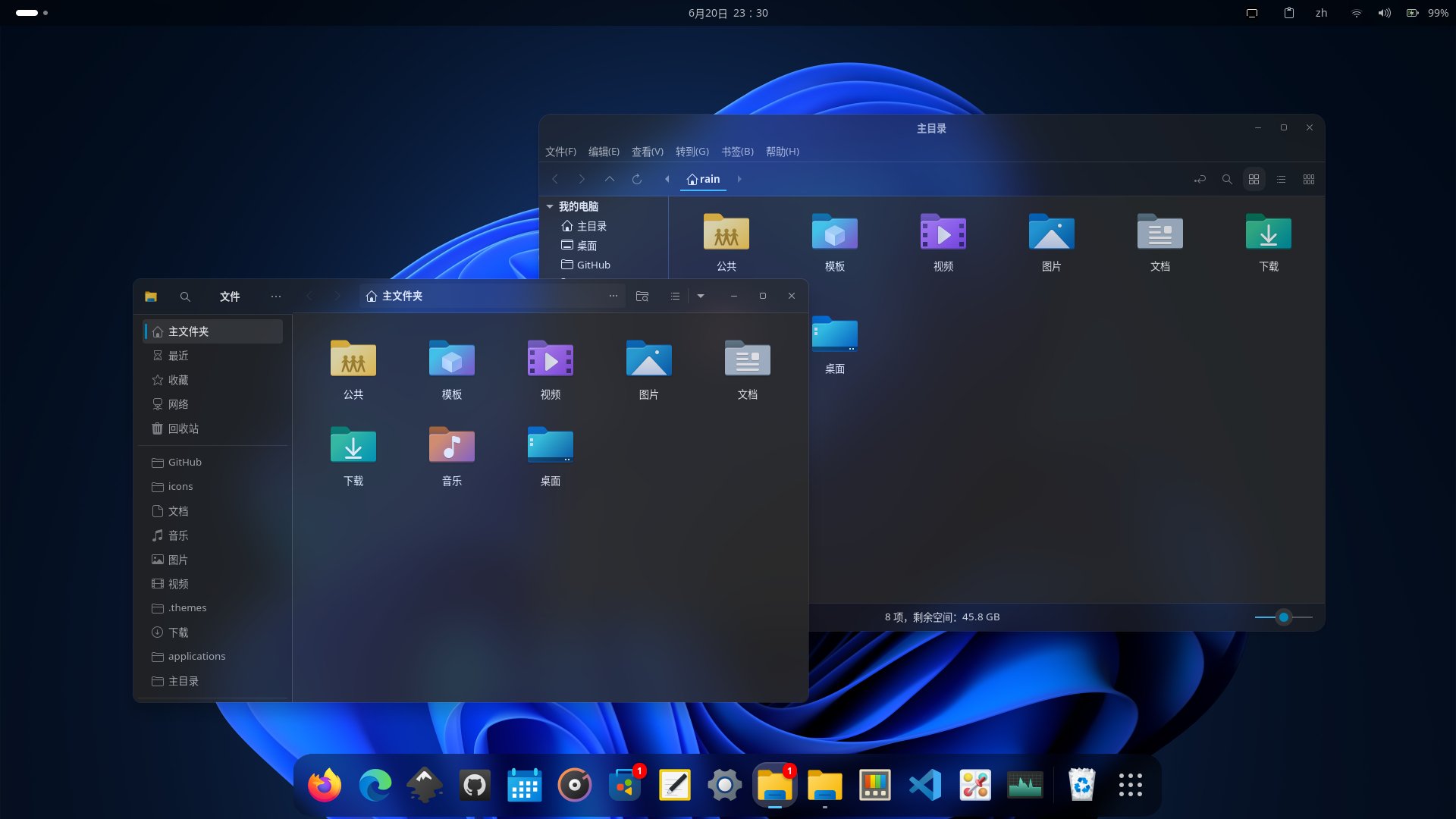
Windows 11
A Linux desktop arranged like Windows 11: a centered taskbar, rounded windows, and a blue wallpaper.
Preview: Win11 GTK theme
Build a Linux desktop arranged like Windows 11, with a centered taskbar, rounded window corners, and a blue bloom wallpaper.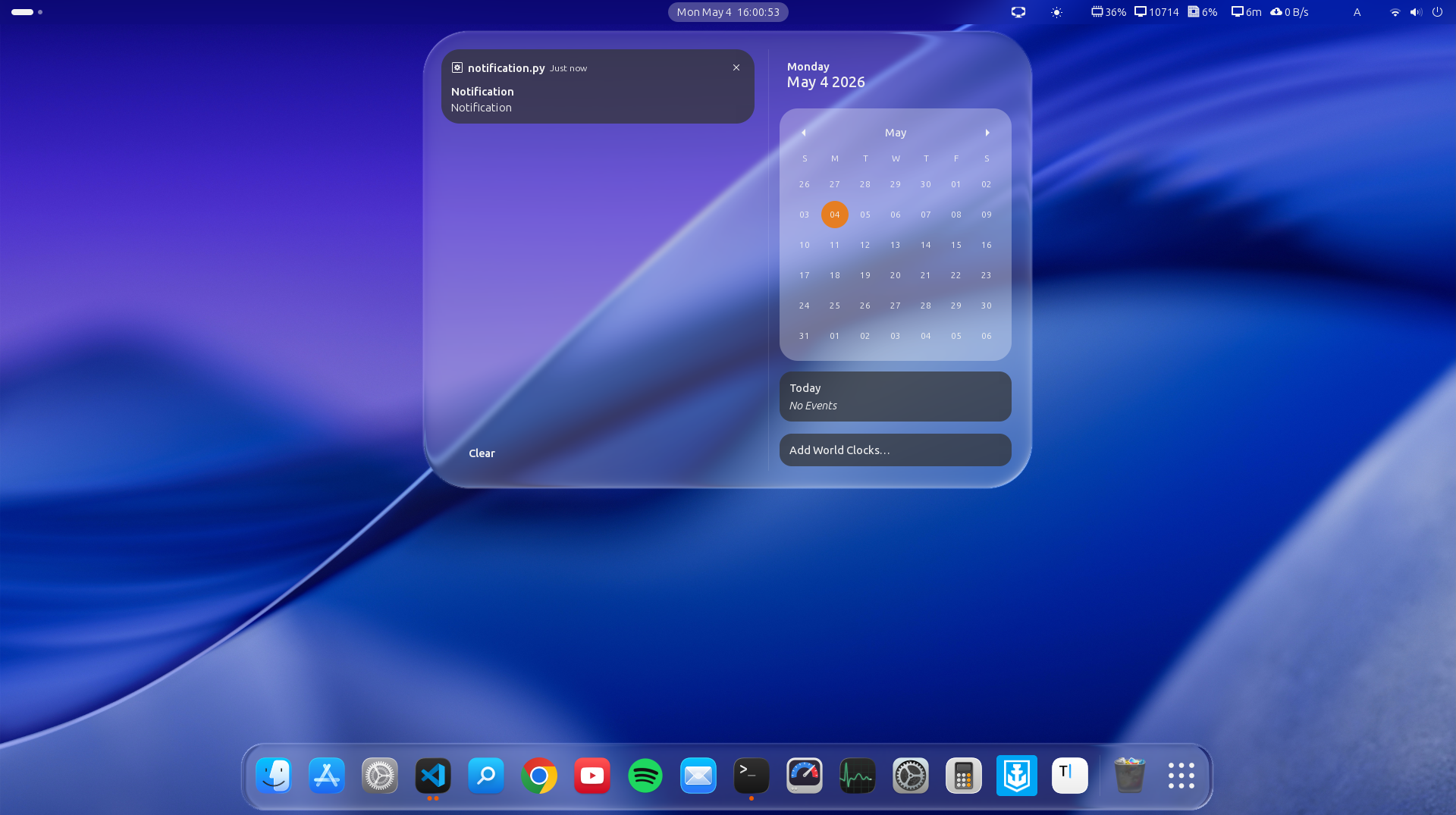
macOS
A Linux desktop arranged like macOS: a glass dock along the bottom and a bar across the top.
Preview: Liquid Glass
Build a Linux desktop arranged like macOS, with a glass dock along the bottom, a bar across the top, and rounded window controls.24 of 24 completed builds
Rebuild from this public recipe. Open it in Build, edit it, then send when ready.
Build a bootable ubuntu-26.04 ISO using this published recipe. Preserve its desktop, applications, appearance and configuration. Use fresh credentials wherever credentials were removed or redacted. Use comparable public assets or source addresses where identifying sources were omitted or redacted. Build the image and verify that its requested features work.

```json
{
  "name": "linux-example",
  "display_name": "Budgie TW",
  "description": "Ubuntu 26.04 Budgie 桌面,台灣繁體中文與 NetworkManager",
  "base_image": "ubuntu-26.04",
  "use_case": "Desktop",
  "hardware": {
    "min_cpu_cores": 2,
    "min_memory_gb": 6,
    "min_storage_gb": 40
  },
  "os": {
    "features": [
      "desktop-budgie",
      "desktop-autologin",
      "networkmanager",
      "ssh",
      "gpu-nvidia",
      "gpu-intel",
      "gpu-amd",
      "cuda",
      "qemu-guest-agent"
    ],
    "packages": [
      "locales",
      "language-pack-zh-hant",
      "language-pack-gnome-zh-hant",
      "fonts-noto-cjk",
      "curl",
      "ca-certificates",
      "qemu-guest-agent",
      "rocminfo",
      "hipcc",
      "linux-headers-generic",
      "nvidia-open",
      "cuda-toolkit",
      "build-essential",
      "initramfs-tools",
      "xdg-user-dirs"
    ],
    "package_overrides": [
      {
        "name": "ubuntu-budgie-desktop",
        "action": "replace",
        "replacement": "budgie-desktop"
      }
    ],
    "services": [
      {
        "name": "ssh"
      },
      {
        "name": "NetworkManager"
      }
    ],
    "users": [
      {
        "username": "ubuntu",
        "full_name": "Live User",
        "groups": [
          "sudo",
          "audio",
          "video",
          "render"
        ]
      }
    ],
    "boot": {
      "kernel_args_default": [
        "locale=zh_TW.UTF-8",
        "locales=zh_TW.UTF-8",
        "hostname=budgie-tw",
        "username=ubuntu"
      ]
    }
  },
  "scenarios": [
    {
      "id": "budgie-desktop",
      "name": "Budgie 繁體中文桌面",
      "custom_tests": [
        {
          "assertions": [
            {
              "type": "visual",
              "params": {
                "expected_visual": "A usable Budgie desktop with a panel; application menu, Raven sidebar, and Budgie desktop settings can each be opened."
              },
              "description": "C1: Budgie desktop controls work"
            },
            {
              "type": "command_succeeds",
              "params": {
                "command": "pgrep -x budgie-panel && pgrep -f 'budgie-desktop|budgie-session'"
              },
              "description": "C2: Budgie session is running"
            }
          ],
          "description": "Budgie 桌面工作階段與控制"
        },
        {
          "assertions": [
            {
              "type": "command_succeeds",
              "params": {
                "command": "locale -a | grep -qi '^zh_TW.utf8$' && grep -Eq '^LANG=\"?zh_TW.UTF-8\"?$' /etc/default/locale"
              },
              "description": "C3: zh_TW.UTF-8 generated and default"
            },
            {
              "type": "visual",
              "params": {
                "expected_visual": "The logged-in Budgie session has LANG=zh_TW.UTF-8 and menus or settings render readable Traditional Chinese characters."
              },
              "description": "C4: Traditional Chinese desktop"
            }
          ],
          "description": "台灣繁體中文語系"
        },
        {
          "assertions": [
            {
              "type": "command_succeeds",
              "params": {
                "command": "systemctl is-enabled NetworkManager && systemctl is-active NetworkManager"
              },
              "description": "C5: NetworkManager enabled and active"
            },
            {
              "type": "visual",
              "params": {
                "expected_visual": "Open the desktop network menu or graphical connection editor; network connections are shown and controls are usable."
              },
              "description": "C6: Graphical network controls"
            },
            {
              "type": "command_succeeds",
              "params": {
                "command": "getent ahosts ubuntu.com && curl --head --fail --location --max-time 30 https://ubuntu.com"
              },
              "description": "C7: DNS resolution and external HTTPS"
            }
          ],
          "description": "NetworkManager 與外部連線"
        },
        {
          "assertions": [
            {
              "type": "command_succeeds",
              "params": {
                "command": "systemctl is-enabled ssh && systemctl is-active ssh"
              },
              "description": "C8: SSH enabled and active"
            },
            {
              "type": "visual",
              "params": {
                "expected_visual": "Show installed NVIDIA, Intel and AMD GPU support, Vulkan libraries, CUDA toolkit and AMD ROCm/HIP tools. Physical GPU acceleration is not claimed on the virtual machine."
              },
              "description": "C9: GPU software provisioned, not physical acceleration"
            }
          ],
          "description": "附帶 SSH 與 GPU 選項"
        }
      ]
    }
  ],
  "build_strategy": "native",
  "package_family": "apt",
  "package_base": "ubuntu"
}
```Rebuild from this public recipe. Open it in Build, edit it, then send when ready.
Build a bootable fedora-44 ISO using this published recipe. Preserve its desktop, applications, appearance and configuration. Use fresh credentials wherever credentials were removed or redacted. Use comparable public assets or source addresses where identifying sources were omitted or redacted. Build the image and verify that its requested features work.

```json
{
  "name": "linux-example",
  "display_name": "Ember",
  "description": "Fedora-based Hyprland distro with custom Omarchy-inspired dotfiles, modern macOS-inspired layout and a cohesive fire-inspired theme.",
  "base_image": "fedora-44",
  "hardware": {
    "min_cpu_cores": 2,
    "min_memory_gb": 4,
    "min_storage_gb": 32
  },
  "os": {
    "features": [
      "desktop-hyprland"
    ],
    "packages": [
      "kitty",
      "waybar",
      "wofi",
      "hyprpaper",
      "xdg-desktop-portal-hyprland",
      "curl",
      "swaybg",
      "nautilus",
      "adwaita-icon-theme",
      "wireplumber",
      "dejavu-sans-fonts",
      "anaconda-live",
      "less",
      "openssl",
      "dconf",
      "gsettings-desktop-schemas",
      "uwsm",
      "xdg-desktop-portal-gtk"
    ],
    "users": [
      {
        "username": "liveuser",
        "full_name": "Ember Live User",
        "groups": [
          "wheel"
        ]
      }
    ],
    "security": {
      "selinux": true
    },
    "desktop_settings": {
      "color_scheme": "prefer-dark",
      "wallpaper_sources": [],
      "wallpaper_prompt": "Original fire-inspired abstract wallpaper: glowing ember orange and deep charcoal, no text"
    },
    "installer": {
      "enabled": true,
      "type": "anaconda",
      "user_setup": "on_device"
    }
  },
  "scenarios": [
    {
      "id": "desktop",
      "name": "Fedora Hyprland fire desktop",
      "custom_tests": [
        {
          "assertions": [
            {
              "type": "command_output",
              "params": {
                "command": "bash -lc '. /etc/os-release; echo \"$ID\"; command -v dnf'",
                "expected_pattern": "fedora"
              },
              "description": "C1 Fedora base"
            }
          ],
          "description": "C1 Fedora base"
        },
        {
          "assertions": [
            {
              "type": "visual",
              "description": "Running Hyprland session: open two tiled terminals and launch the app menu using configured shortcuts.",
              "expected_visual": "Two tiled terminal windows, launcher and top status bar; confirm the actual Hyprland compositor through its runtime IPC."
            }
          ],
          "description": "C2 Hyprland session and tiled keyboard workflow"
        },
        {
          "assertions": [
            {
              "type": "command_output",
              "params": {
                "command": "find /etc/skel/.config/hypr /etc/skel/.config/waybar /etc/skel/.config/kitty -type f",
                "expected_pattern": ".+"
              },
              "description": "C3 Editable custom dotfiles"
            }
          ],
          "description": "C3 Editable custom dotfiles"
        },
        {
          "assertions": [
            {
              "type": "visual",
              "description": "C4 Modern layout",
              "visual_claim": "appearance",
              "expected_visual": "Rounded windows, restrained top status bar, centered bottom dock; macOS-inspired layout adapted to Hyprland."
            }
          ],
          "description": "C4 Modern layout"
        },
        {
          "assertions": [
            {
              "type": "visual",
              "description": "C5 Coordinated controls",
              "visual_claim": "appearance",
              "expected_visual": "Dark launcher and menus, coordinated icons, legible typography and consistent application styling."
            }
          ],
          "description": "C5 Coordinated controls"
        },
        {
          "assertions": [
            {
              "type": "visual",
              "description": "C6 Fire wallpaper",
              "visual_claim": "appearance",
              "expected_visual": "Original fire-inspired wallpaper with glowing ember/flame colors and deep charcoal background."
            }
          ],
          "description": "C6 Fire wallpaper"
        },
        {
          "assertions": [
            {
              "type": "visual",
              "description": "C7 Cohesive fire UI",
              "visual_claim": "appearance",
              "expected_visual": "Orange and warm red accents coordinated across the status bar, terminal and launcher against dark charcoal surfaces."
            }
          ],
          "description": "C7 Cohesive fire UI"
        },
        {
          "assertions": [
            {
              "type": "command_output",
              "params": {
                "command": "bash -lc 'getent hosts fedoraproject.org && curl -I --fail --max-time 30 https://fedoraproject.org && echo CONNECTIVITY_OK'",
                "expected_pattern": "CONNECTIVITY_OK"
              },
              "description": "C8 DNS and external HTTPS"
            }
          ],
          "description": "C8 DNS and external HTTPS"
        }
      ]
    }
  ],
  "visual_references": [
    {
      "claim": "Modern macOS-inspired centered bottom dock like the reference, adapted to Hyprland with charcoal and fire-orange styling; not a literal macOS clone.",
      "source": "https://www.apple.com/v/mac/mac-does-that/p/images/overview[REDACTED:home_path]"
    },
    {
      "claim": "Modern macOS-inspired top status bar like the reference, adapted to Hyprland with charcoal and fire-orange styling; not a literal macOS clone.",
      "source": "https://www.apple.com/v/mac/mac-does-that/p/images/overview[REDACTED:home_path]"
    },
    {
      "claim": "Modern macOS-inspired rounded window chrome like the reference, adapted to Hyprland with charcoal and fire-orange styling; not a literal macOS clone.",
      "source": "https://www.apple.com/v/mac/mac-does-that/p/images/overview[REDACTED:home_path]"
    },
    {
      "claim": "Modern macOS-inspired coordinated icons and launcher like the reference, adapted to Hyprland with charcoal and fire-orange styling; not a literal macOS clone.",
      "source": "https://www.apple.com/v/mac/mac-does-that/p/images/overview[REDACTED:home_path]"
    }
  ],
  "source_iso": "Fedora-Workstation-Live-44-1.7.x86_64.iso",
  "build_strategy": "native",
  "package_family": "dnf",
  "package_base": "fedora"
}
```Rebuild from this public recipe. Open it in Build, edit it, then send when ready.
Build a bootable debian-trixie ISO using this published recipe. Preserve its desktop, applications, appearance and configuration. Use fresh credentials wherever credentials were removed or redacted. Use comparable public assets or source addresses where identifying sources were omitted or redacted. Build the image and verify that its requested features work.

```json
{
  "name": "linux-example",
  "display_name": "Gruvbox Workshop",
  "description": "An earthy Gruvbox desktop with charcoal-brown windows, amber and olive accents, a romantic riverside painting wallpaper, a compact floating dock and a matching terminal.",
  "use_case": "Beautiful live desktop example for the public screenshot gallery",
  "os": {
    "features": [
      "desktop-xfce",
      "desktop-autologin",
      "firefox",
      "networkmanager"
    ],
    "packages": [
      "xfce4-whiskermenu-plugin",
      "xfce4-terminal",
      "papirus-icon-theme",
      "fonts-inter",
      "fonts-jetbrains-mono",
      "fonts-noto-core",
      "fonts-dejavu-core",
      "gtk2-engines-murrine",
      "gnome-themes-extra",
      "btop",
      "curl",
      "ca-certificates",
      "dconf-cli",
      "openssl",
      "sudo",
      "qemu-guest-agent",
      "spice-vdagent",
      "fastfetch"
    ],
    "users": [
      {
        "username": "user",
        "groups": [
          "sudo",
          "video",
          "audio"
        ]
      }
    ],
    "networking": {
      "dns_servers": [
        "[REDACTED:ipv4]",
        "[REDACTED:ipv4]"
      ]
    },
    "desktop_settings": {
      "gtk_theme": "Gruvbox-Dark",
      "icon_theme": "Papirus-Dark",
      "cursor_theme": "Bibata-Modern-Classic",
      "color_scheme": "prefer-dark",
      "wallpaper_sources": [
        "https://raw.githubusercontent.com/omacom/omarchy/386176ab48fe0e18f2194dc96b730b4dda7414a7/themes/gruvbox/backgrounds/1-the-backwater.jpg"
      ],
      "fonts": {
        "interface_font": "Inter 10",
        "document_font": "Inter 10",
        "monospace_font": "JetBrains Mono 11",
        "title_font": "Inter Bold 10"
      },
      "asset_sources": [
        {
          "kind": "gtk_theme",
          "name": "Gruvbox-Dark",
          "url": "https://codeload.github.com/Fausto-Korpsvart/Gruvbox-GTK-Theme/tar.gz/578cd220b5ff6e86b078a6111d26bb20ec8c733f",
          "revision": "578cd220b5ff6e86b078a6111d26bb20ec8c733f",
          "sha256": "f45da23a6c4123148cf8f78983e391a86c2e2ee1b7a80aa66790f148cb9619bd"
        },
        {
          "kind": "cursor_theme",
          "name": "Bibata-Modern-Classic",
          "url": "https://github.com/ful1e5/Bibata_Cursor/releases/download/v2.0.7/Bibata-Modern-Classic.tar.xz",
          "revision": "v2.0.7",
          "sha256": "7d3495864e5bbef02f5e77de760b2905903b63c71495a78ef6306d19a3b556d8"
        }
      ]
    }
  },
  "scenarios": [
    {
      "id": "desktop-demo",
      "name": "Desktop appearance and usability",
      "custom_tests": [
        {
          "assertions": [
            {
              "type": "visual",
              "required": true,
              "description": "An earthy Gruvbox desktop with charcoal-brown windows, amber and olive accents, a romantic riverside painting wallpaper, a compact floating dock and a matching terminal. The application launcher opens and searches installed applications.",
              "visual_claim": "appearance",
              "expected_visual": "An earthy Gruvbox desktop with charcoal-brown windows, amber and olive accents, a romantic riverside painting wallpaper, a compact floating dock and a matching terminal. The application launcher opens and searches installed applications."
            }
          ],
          "description": "An earthy Gruvbox desktop with charcoal-brown windows, amber and olive accents, a romantic riverside painting wallpaper, a compact floating dock and a matching terminal. The application launcher opens and searches installed applications."
        },
        {
          "assertions": [
            {
              "type": "visual",
              "required": true,
              "description": "The file manager, terminal and web browser launch successfully with readable fonts and coordinated desktop styling.",
              "visual_claim": "appearance",
              "expected_visual": "The file manager, terminal and web browser launch successfully with readable fonts and coordinated desktop styling."
            }
          ],
          "description": "The file manager, terminal and web browser launch successfully with readable fonts and coordinated desktop styling."
        }
      ]
    }
  ],
  "community": true,
  "build_strategy": "native",
  "package_family": "apt",
  "package_base": "debian"
}
```Rebuild from this public recipe. Open it in Build, edit it, then send when ready.
Build a bootable debian-trixie ISO using this published recipe. Preserve its desktop, applications, appearance and configuration. Use fresh credentials wherever credentials were removed or redacted. Use comparable public assets or source addresses where identifying sources were omitted or redacted. Build the image and verify that its requested features work.

```json
{
  "name": "linux-example",
  "display_name": "Nord Aurora",
  "description": "A calm Nord desktop with slate-blue windows, pale cyan accents, a moonlit mountain wallpaper, a compact floating dock and a matching terminal.",
  "use_case": "Beautiful live desktop example for the public screenshot gallery",
  "os": {
    "features": [
      "desktop-xfce",
      "desktop-autologin",
      "firefox",
      "networkmanager"
    ],
    "packages": [
      "xfce4-whiskermenu-plugin",
      "xfce4-terminal",
      "papirus-icon-theme",
      "fonts-inter",
      "fonts-jetbrains-mono",
      "fonts-noto-core",
      "fonts-dejavu-core",
      "gtk2-engines-murrine",
      "gnome-themes-extra",
      "btop",
      "curl",
      "ca-certificates",
      "dconf-cli",
      "openssl",
      "sudo",
      "qemu-guest-agent",
      "spice-vdagent",
      "fastfetch"
    ],
    "users": [
      {
        "username": "user",
        "groups": [
          "sudo",
          "video",
          "audio"
        ]
      }
    ],
    "networking": {
      "dns_servers": [
        "[REDACTED:ipv4]",
        "[REDACTED:ipv4]"
      ]
    },
    "desktop_settings": {
      "gtk_theme": "Nordic",
      "icon_theme": "Papirus-Dark",
      "cursor_theme": "Bibata-Modern-Classic",
      "color_scheme": "prefer-dark",
      "wallpaper_sources": [
        "https://raw.githubusercontent.com/omacom/omarchy/386176ab48fe0e18f2194dc96b730b4dda7414a7/themes/nord/backgrounds/0-black-moon.jpg"
      ],
      "fonts": {
        "interface_font": "Inter 10",
        "document_font": "Inter 10",
        "monospace_font": "JetBrains Mono 11",
        "title_font": "Inter Bold 10"
      },
      "asset_sources": [
        {
          "kind": "gtk_theme",
          "name": "Nordic",
          "url": "https://codeload.github.com/EliverLara/Nordic/tar.gz/be5bda37ba01139650e34238336e58e065d2f406",
          "revision": "be5bda37ba01139650e34238336e58e065d2f406",
          "sha256": "0f546993fd2ad65ed17b0534a6ec7da3e76a99139820f6e79f82f1372f9a20d3"
        },
        {
          "kind": "cursor_theme",
          "name": "Bibata-Modern-Classic",
          "url": "https://github.com/ful1e5/Bibata_Cursor/releases/download/v2.0.7/Bibata-Modern-Classic.tar.xz",
          "revision": "v2.0.7",
          "sha256": "7d3495864e5bbef02f5e77de760b2905903b63c71495a78ef6306d19a3b556d8"
        }
      ]
    }
  },
  "scenarios": [
    {
      "id": "desktop-demo",
      "name": "Desktop appearance and usability",
      "custom_tests": [
        {
          "assertions": [
            {
              "type": "visual",
              "required": true,
              "description": "A calm Nord desktop with slate-blue windows, pale cyan accents, a moonlit mountain wallpaper, a compact floating dock and a matching terminal. The application launcher opens and searches installed applications.",
              "visual_claim": "appearance",
              "expected_visual": "A calm Nord desktop with slate-blue windows, pale cyan accents, a moonlit mountain wallpaper, a compact floating dock and a matching terminal. The application launcher opens and searches installed applications."
            }
          ],
          "description": "A calm Nord desktop with slate-blue windows, pale cyan accents, a moonlit mountain wallpaper, a compact floating dock and a matching terminal. The application launcher opens and searches installed applications."
        },
        {
          "assertions": [
            {
              "type": "visual",
              "required": true,
              "description": "The file manager, terminal and web browser launch successfully with readable fonts and coordinated desktop styling.",
              "visual_claim": "appearance",
              "expected_visual": "The file manager, terminal and web browser launch successfully with readable fonts and coordinated desktop styling."
            }
          ],
          "description": "The file manager, terminal and web browser launch successfully with readable fonts and coordinated desktop styling."
        }
      ]
    }
  ],
  "community": true,
  "build_strategy": "native",
  "package_family": "apt",
  "package_base": "debian"
}
```Rebuild from this public recipe. Open it in Build, edit it, then send when ready.
Build a bootable debian-trixie ISO using this published recipe. Preserve its desktop, applications, appearance and configuration. Use fresh credentials wherever credentials were removed or redacted. Use comparable public assets or source addresses where identifying sources were omitted or redacted. Build the image and verify that its requested features work.

```json
{
  "name": "linux-example",
  "display_name": "Rose Pine Dawn",
  "description": "A warm light Rose Pine desktop with cream surfaces, dusty-rose and soft teal accents, pastel abstract wallpaper, a compact floating dock and a matching terminal.",
  "use_case": "Beautiful live desktop example for the public screenshot gallery",
  "os": {
    "features": [
      "desktop-xfce",
      "desktop-autologin",
      "firefox",
      "networkmanager"
    ],
    "packages": [
      "xfce4-whiskermenu-plugin",
      "xfce4-terminal",
      "papirus-icon-theme",
      "fonts-inter",
      "fonts-jetbrains-mono",
      "fonts-noto-core",
      "fonts-dejavu-core",
      "gtk2-engines-murrine",
      "gnome-themes-extra",
      "btop",
      "curl",
      "ca-certificates",
      "dconf-cli",
      "openssl",
      "sudo",
      "qemu-guest-agent",
      "spice-vdagent",
      "fastfetch"
    ],
    "users": [
      {
        "username": "user",
        "groups": [
          "sudo",
          "video",
          "audio"
        ]
      }
    ],
    "networking": {
      "dns_servers": [
        "[REDACTED:ipv4]",
        "[REDACTED:ipv4]"
      ]
    },
    "desktop_settings": {
      "gtk_theme": "Rosepine-Light",
      "icon_theme": "Papirus",
      "cursor_theme": "Bibata-Modern-Classic",
      "color_scheme": "prefer-light",
      "wallpaper_sources": [
        "https://raw.githubusercontent.com/omacom/omarchy/386176ab48fe0e18f2194dc96b730b4dda7414a7/themes/rose-pine/backgrounds/1-funky-shapes.webp"
      ],
      "fonts": {
        "interface_font": "Inter 10",
        "document_font": "Inter 10",
        "monospace_font": "JetBrains Mono 11",
        "title_font": "Inter Bold 10"
      },
      "asset_sources": [
        {
          "kind": "gtk_theme",
          "name": "Rosepine-Light",
          "url": "https://codeload.github.com/Fausto-Korpsvart/Rose-Pine-GTK-Theme/tar.gz/c4fdfa62a9eb6941a36b2cd5026fc64123aaa0dd",
          "revision": "c4fdfa62a9eb6941a36b2cd5026fc64123aaa0dd",
          "sha256": "9410203a7c2d4362c5e8696279e9c9d7b7925b97fd1cb5b1d0890fd6f99ebc58"
        },
        {
          "kind": "cursor_theme",
          "name": "Bibata-Modern-Classic",
          "url": "https://github.com/ful1e5/Bibata_Cursor/releases/download/v2.0.7/Bibata-Modern-Classic.tar.xz",
          "revision": "v2.0.7",
          "sha256": "7d3495864e5bbef02f5e77de760b2905903b63c71495a78ef6306d19a3b556d8"
        }
      ]
    }
  },
  "scenarios": [
    {
      "id": "desktop-demo",
      "name": "Desktop appearance and usability",
      "custom_tests": [
        {
          "assertions": [
            {
              "type": "visual",
              "required": true,
              "description": "A warm light Rose Pine desktop with cream surfaces, dusty-rose and soft teal accents, pastel abstract wallpaper, a compact floating dock and a matching terminal. The application launcher opens and searches installed applications.",
              "visual_claim": "appearance",
              "expected_visual": "A warm light Rose Pine desktop with cream surfaces, dusty-rose and soft teal accents, pastel abstract wallpaper, a compact floating dock and a matching terminal. The application launcher opens and searches installed applications."
            }
          ],
          "description": "A warm light Rose Pine desktop with cream surfaces, dusty-rose and soft teal accents, pastel abstract wallpaper, a compact floating dock and a matching terminal. The application launcher opens and searches installed applications."
        },
        {
          "assertions": [
            {
              "type": "visual",
              "required": true,
              "description": "The file manager, terminal and web browser launch successfully with readable fonts and coordinated desktop styling.",
              "visual_claim": "appearance",
              "expected_visual": "The file manager, terminal and web browser launch successfully with readable fonts and coordinated desktop styling."
            }
          ],
          "description": "The file manager, terminal and web browser launch successfully with readable fonts and coordinated desktop styling."
        }
      ]
    }
  ],
  "community": true,
  "build_strategy": "native",
  "package_family": "apt",
  "package_base": "debian"
}
```Rebuild from this public recipe. Open it in Build, edit it, then send when ready.
Build a bootable debian-trixie ISO using this published recipe. Preserve its desktop, applications, appearance and configuration. Use fresh credentials wherever credentials were removed or redacted. Use comparable public assets or source addresses where identifying sources were omitted or redacted. Build the image and verify that its requested features work.

```json
{
  "name": "linux-example",
  "display_name": "Tokyo Night Studio",
  "description": "A blue-purple Tokyo Night desktop with a clean dark Xfce theme, matching icons, a compact floating dock, coordinated terminal and a night-city wallpaper.",
  "use_case": "Beautiful public desktop example inspired by Reddit r/unixporn Tokyo Night setups",
  "os": {
    "features": [
      "desktop-xfce",
      "desktop-autologin",
      "firefox",
      "networkmanager"
    ],
    "packages": [
      "xfce4-whiskermenu-plugin",
      "xfce4-terminal",
      "papirus-icon-theme",
      "fonts-jetbrains-mono",
      "btop",
      "curl",
      "ca-certificates",
      "dconf-cli",
      "openssl",
      "sudo",
      "fonts-noto-core",
      "qemu-guest-agent",
      "spice-vdagent",
      "fonts-dejavu-core"
    ],
    "users": [
      {
        "username": "user",
        "groups": [
          "sudo",
          "video",
          "audio"
        ]
      }
    ],
    "networking": {
      "dns_servers": [
        "[REDACTED:ipv4]",
        "[REDACTED:ipv4]"
      ]
    },
    "desktop_settings": {
      "gtk_theme": "Tokyonight-Dark",
      "icon_theme": "Papirus-Dark",
      "color_scheme": "prefer-dark",
      "wallpaper_sources": [
        "https://raw.githubusercontent.com/omacom/omarchy/386176ab48fe0e18f2194dc96b730b4dda7414a7/themes/tokyo-night/backgrounds/6-oma-cityscape.jpg"
      ],
      "fonts": {
        "interface_font": "Noto Sans 10",
        "document_font": "Noto Sans 10",
        "monospace_font": "JetBrains Mono 11"
      }
    }
  },
  "scenarios": [
    {
      "id": "desktop-demo",
      "name": "Desktop appearance and usability",
      "custom_tests": [
        {
          "assertions": [
            {
              "type": "visual",
              "required": true,
              "description": "The desktop shows a coherent Tokyo Night blue-purple dark theme, a night-city wallpaper, coordinated icons and a compact floating dock with a functioning application launcher.",
              "visual_claim": "appearance",
              "expected_visual": "The desktop shows a coherent Tokyo Night blue-purple dark theme, a night-city wallpaper, coordinated icons and a compact floating dock with a functioning application launcher."
            }
          ],
          "description": "The desktop shows a coherent Tokyo Night blue-purple dark theme, a night-city wallpaper, coordinated icons and a compact floating dock with a functioning application launcher."
        },
        {
          "assertions": [
            {
              "type": "visual",
              "required": true,
              "description": "The file manager and terminal open successfully with matching Tokyo Night colors and readable fonts, and the web browser launches.",
              "visual_claim": "appearance",
              "expected_visual": "The file manager and terminal open successfully with matching Tokyo Night colors and readable fonts, and the web browser launches."
            }
          ],
          "description": "The file manager and terminal open successfully with matching Tokyo Night colors and readable fonts, and the web browser launches."
        }
      ]
    }
  ],
  "community": true,
  "build_strategy": "native",
  "package_family": "apt",
  "package_base": "debian"
}
```Rebuild from this public recipe. Open it in Build, edit it, then send when ready.
Build a bootable debian-trixie ISO using this published recipe. Preserve its desktop, applications, appearance and configuration. Use fresh credentials wherever credentials were removed or redacted. Use comparable public assets or source addresses where identifying sources were omitted or redacted. Build the image and verify that its requested features work.

```json
{
  "name": "linux-example",
  "display_name": "MinoOS",
  "description": "General",
  "os": {
    "features": [
      "desktop-gnome-minimal"
    ],
    "packages": [
      "curl",
      "mesa-vulkan-drivers",
      "vulkan-tools",
      "swiftlang",
      "swiftlang-dev",
      "libc6-dev",
      "plymouth",
      "plymouth-themes",
      "initramfs-tools"
    ],
    "users": [
      {
        "username": "debian"
      }
    ],
    "desktop_settings": {
      "gtk_theme": "WhiteSur-Light",
      "icon_theme": "WhiteSur",
      "cursor_theme": "WhiteSur-cursors",
      "color_scheme": "prefer-light",
      "wallpaper_url": "local:wallpapers/macos/26-tahoe-light.jpg",
      "fonts": {
        "interface_font": "Inter 11",
        "document_font": "Inter 11",
        "monospace_font": "Monospace 12",
        "title_font": "Inter Bold 11"
      },
      "asset_sources": [
        {
          "kind": "gtk_theme",
          "name": "WhiteSur-Light",
          "url": "https://github.com/vinceliuice/WhiteSur-gtk-theme/archive/refs/tags/2026-09-10.tar.gz",
          "revision": "2026-09-10",
          "sha256": "65516c8f45da45c602471e31b4de0b6e9aed6eb3fc3820df16161d077245a1a2"
        },
        {
          "kind": "icon_theme",
          "name": "WhiteSur",
          "url": "https://github.com/vinceliuice/WhiteSur-icon-theme/archive/refs/tags/2026-09-10.tar.gz",
          "revision": "2026-09-10",
          "sha256": "406c9cd59705583f1754b0eaca96cc48bafda042b88ef143f16d8ae1820ecd95"
        },
        {
          "kind": "cursor_theme",
          "name": "WhiteSur-cursors",
          "url": "https://github.com/vinceliuice/WhiteSur-cursors/archive/e190baf618ed95ee217d2fd45589bd309b37672b.tar.gz",
          "revision": "e190baf618ed95ee217d2fd45589bd309b37672b",
          "sha256": "35c817c2c26bc4d2c06801cfe6c924a068ad771d3846c5203b04d1c893dd5664"
        },
        {
          "kind": "font",
          "name": "Inter",
          "url": "https://github.com/rsms/inter/releases/download/v4.1/Inter-4.1.zip",
          "revision": "4.1",
          "sha256": "9883fdd4a49d4fb66bd8177ba6625ef9a64aa45899767dde3d36aa425756b11e"
        }
      ],
      "favorite_apps": [
        "org.gnome.Nautilus.desktop",
        "org.gnome.Epiphany.desktop",
        "org.gnome.Terminal.desktop",
        "org.gnome.Settings.desktop"
      ],
      "shell_extensions": [
        "dash-to-dock@micxgx.gmail.com",
        "liquid-glass@thinkingcoding1231.gmail.com"
      ],
      "custom_gsettings": {
        "org.gnome.desktop.wm.preferences": {
          "button-layout": "'close,minimize,maximize:'"
        },
        "org.gnome.shell.extensions.dash-to-dock": {
          "autohide": "true",
          "dock-fixed": "false",
          "intellihide": "true",
          "dock-position": "'BOTTOM'",
          "extend-height": "false",
          "intellihide-mode": "'FOCUS_APPLICATION_WINDOWS'",
          "show-apps-at-top": "false",
          "transparency-mode": "'FIXED'",
          "apply-custom-theme": "false",
          "background-opacity": "0.0",
          "dash-max-icon-size": "56",
          "running-indicator-style": "'DOTS'",
          "disable-overview-on-startup": "true"
        },
        "org.gnome.shell.extensions.liquid-glass": {
          "blur-method": "1",
          "top-bar-style": "'pill'",
          "enable-osd-glass": "true",
          "enable-dock-glass": "true",
          "enable-menu-glass": "true",
          "dock-margin-bottom": "8",
          "glass-blur-downscale": "4",
          "enable-application-glass": "false",
          "enable-notification-glass": "true",
          "enable-quick-settings-glass": "true"
        }
      }
    },
    "branding": {
      "display_name": "MinoOS",
      "plymouth": true
    },
    "boot": {
      "kernel_args_default": [
        "quiet",
        "splash"
      ],
      "grub": {
        "enabled": true,
        "timeout": 3
      }
    }
  },
  "scenarios": [
    {
      "id": "owner-requests",
      "name": "MinoOS requirements",
      "topology": {
        "vms": [
          {
            "vm_id": "MinoOS",
            "memory_mb": 2048,
            "vcpus": 2,
            "networks": [
              "l2-switch"
            ],
            "interfaces": [
              {
                "name": "eth0",
                "network": "l2-switch"
              }
            ],
            "planned": true,
            "x": 0.0,
            "y": 0.0
          }
        ],
        "networks": [
          {
            "network_id": "l2-switch",
            "type": "isolated",
            "x": 40.0,
            "y": 600.0
          },
          {
            "network_id": "internet",
            "type": "internet",
            "x": 640.0,
            "y": 320.0,
            "external": true
          }
        ],
        "canvas": {
          "positions": {
            "vm-MinoOS": {
              "x": 0.0,
              "y": 0.0
            },
            "network-internet": {
              "x": 640.0,
              "y": 320.0
            },
            "network-l2-switch": {
              "x": 40.0,
              "y": 600.0
            }
          },
          "viewport": {
            "x": 50.80635070800781,
            "y": 164.18162841796874,
            "zoom": 0.4
          },
          "view_mode": "2d"
        }
      },
      "custom_tests": [
        {
          "assertions": [
            {
              "type": "visual",
              "expected_visual": "A working minimal GNOME desktop without unrelated bundled applications"
            }
          ],
          "description": "Minimal working desktop"
        },
        {
          "assertions": [
            {
              "type": "command_output",
              "params": {
                "command": "grep '^PRETTY_NAME=' /etc/os-release",
                "expected_pattern": "MinoOS"
              }
            }
          ],
          "description": "MinoOS identity"
        },
        {
          "assertions": [
            {
              "type": "visual",
              "expected_visual": "Bottom dock, top bar, macOS-inspired window controls and icons"
            }
          ],
          "description": "macOS-inspired layout"
        },
        {
          "assertions": [
            {
              "type": "command_output",
              "params": {
                "command": "swift --version",
                "expected_pattern": "Swift version"
              }
            }
          ],
          "description": "Swift toolchain"
        },
        {
          "assertions": [
            {
              "type": "visual",
              "expected_visual": "Translucent refractive glass styling on the dock"
            }
          ],
          "description": "Liquid Glass dock"
        },
        {
          "assertions": [
            {
              "type": "visual",
              "expected_visual": "Translucent refractive glass styling on the top bar"
            }
          ],
          "description": "Liquid Glass top bar"
        },
        {
          "assertions": [
            {
              "type": "visual",
              "expected_visual": "Translucent refractive glass styling on the shell menu"
            }
          ],
          "description": "Liquid Glass shell menu"
        },
        {
          "assertions": [
            {
              "type": "visual",
              "expected_visual": "Translucent refractive glass styling on the Quick Settings"
            }
          ],
          "description": "Liquid Glass Quick Settings"
        },
        {
          "assertions": [
            {
              "type": "visual",
              "expected_visual": "Translucent refractive glass styling on the notification surface"
            }
          ],
          "description": "Liquid Glass notification surface"
        },
        {
          "assertions": [
            {
              "type": "command_output",
              "params": {
                "command": "getent hosts deb.debian.org && curl -I --fail https://deb.debian.org",
                "expected_pattern": "HTTP"
              }
            }
          ],
          "description": "DNS and external HTTPS"
        }
      ]
    }
  ],
  "visual_references": [
    {
      "claim": "the Dock: a floating, centered capsule of clear glass along the bottom edge; the wallpaper behind it shows through, bent at its rounded rim, with a thin bright edge, like the reference",
      "source": "https://raw.githubusercontent.com/ryohsuke1231/liquid-glass/fc191a95371f429e7df61156aa4d8323638d1180/assets/dock.png"
    },
    {
      "claim": "the menu bar: a translucent glass bar across the top edge with the clock and status icons, the wallpaper visible through it, like the reference",
      "source": "https://raw.githubusercontent.com/ryohsuke1231/liquid-glass/fc191a95371f429e7df61156aa4d8323638d1180/assets/topbar-one-pill.png"
    },
    {
      "claim": "an open menu (the clock's calendar menu): a rounded sheet of glass that bends the desktop behind it, its text readable, like the reference",
      "source": "https://raw.githubusercontent.com/ryohsuke1231/liquid-glass/fc191a95371f429e7df61156aa4d8323638d1180/assets/calendar.png"
    },
    {
      "claim": "Control Center (GNOME Quick Settings): a rounded glass panel over the desktop, like the reference",
      "source": "https://raw.githubusercontent.com/ryohsuke1231/liquid-glass/fc191a95371f429e7df61156aa4d8323638d1180/assets/qs-adwaita-whole.png"
    },
    {
      "claim": "a notification banner: a rounded glass card near the top of the screen, like the reference",
      "source": "https://raw.githubusercontent.com/ryohsuke1231/liquid-glass/fc191a95371f429e7df61156aa4d8323638d1180/assets/notification.png"
    },
    {
      "claim": "window controls: three round red/yellow/green buttons at the top-left of every window title bar, like the reference",
      "source": "https://raw.githubusercontent.com/vinceliuice/WhiteSur-gtk-theme/b1ffb35cd0ef1417d3164cb1df0bd9b683ce6527/pictures/macbook.png"
    }
  ],
  "build_strategy": "native",
  "package_family": "apt",
  "package_base": "debian"
}
```Rebuild from this public recipe. Open it in Build, edit it, then send when ready.
Build a bootable fedora-44 ISO using this published recipe. Preserve its desktop, applications, appearance and configuration. Use fresh credentials wherever credentials were removed or redacted. Use comparable public assets or source addresses where identifying sources were omitted or redacted. Build the image and verify that its requested features work.

```json
{
  "name": "linux-example",
  "display_name": "Harbor OS",
  "description": "Harbor OS is a Fedora 44 XFCE desktop with a macOS-style top panel, Plank dock, dark appearance, Harbor branding, and native graphical disk installation.",
  "base_image": "fedora-44",
  "use_case": "Branded XFCE desktop workstation",
  "hardware": {
    "min_cpu_cores": 2,
    "min_memory_gb": 4,
    "min_storage_gb": 40
  },
  "os": {
    "features": [
      "desktop-xfce"
    ],
    "packages": [
      "plank",
      "fastfetch",
      "qemu-guest-agent",
      "plymouth-plugin-script",
      "dconf"
    ],
    "users": [
      {
        "username": "liveuser",
        "groups": [
          "wheel"
        ]
      }
    ],
    "desktop_settings": {
      "gtk_theme": "WhiteSur-Dark",
      "icon_theme": "WhiteSur",
      "cursor_theme": "WhiteSur-cursors",
      "color_scheme": "prefer-dark",
      "wallpaper_url": "https://images.unsplash.com/photo-1562534913-d10c07786db8?fm=jpg&q=85&w=3840",
      "wallpaper_sources": [
        "https://images.unsplash.com/photo-1562534913-d10c07786db8?fm=jpg&q=85&w=3840"
      ],
      "wallpaper_prompt": "Harbor wallpaper"
    },
    "branding": {
      "display_name": "Harbor OS",
      "os_id": "harbor-os",
      "logo_path": "/usr/share/harbor-os/brand/logo.png",
      "fastfetch": true,
      "plymouth": true
    },
    "boot": {
      "kernel_args_default": [
        "quiet",
        "splash",
        "selinux=0",
        "rhgb",
        "plymouth.ignore-serial-consoles"
      ],
      "grub": {
        "enabled": true,
        "background_image_path": "/usr/share/backgrounds/custom-wallpaper.png"
      }
    },
    "installer": {
      "enabled": true,
      "type": "anaconda"
    },
    "startup_scripts": [
      {
        "name": "harbor-xfce-layout",
        "description": "Apply the Harbor XFCE top panel, WhiteSur dark themes, requested harbor wallpaper, and centered Plank dock at each live or installed login.",
        "command": "install -d -m 0755 /usr/local/bin /etc/xdg/autostart && cat > /usr/local/bin/harbor-xfce-layout <<'EOF'\n#!/usr/bin/env bash\nset -u\nset_value() {\n  local channel=\"$1\" property=\"$2\" type=\"$3\" value=\"$4\"\n  xfconf-query -c \"$channel\" -p \"$property\" -s \"$value\" 2>/dev/null || xfconf-query -c \"$channel\" -p \"$property\" -n -t \"$type\" -s \"$value\"\n}\nset_value xfce4-panel /panels/panel-1/position string 'p=6;x=0;y=0'\nset_value xfce4-panel /panels/panel-1/length int 100\nset_value xfce4-panel /panels/panel-1/size int 32\nset_value xsettings /Net/ThemeName string WhiteSur-Dark\nset_value xsettings /Net/IconThemeName string WhiteSur\nset_value xsettings /Gtk/CursorThemeName string WhiteSur-cursors\nset_value xsettings /Net/PreferDarkTheme bool true\nif command -v gsettings >/dev/null 2>&1; then\n  gsettings set org.gnome.desktop.interface color-scheme prefer-dark\nfi\nset_value xfwm4 /general/theme string WhiteSur-Dark\nset_value xfce4-desktop /desktop-icons/single-click bool true\nset_value xfce4-desktop /desktop-icons/icon-size uint 96\nset_value xfce4-desktop /desktop-icons/file-icons/show-home bool false\nset_value xfce4-desktop /desktop-icons/file-icons/show-filesystem bool false\nset_value xfce4-desktop /desktop-icons/file-icons/show-trash bool false\nwallpaper=/usr/share/backgrounds/custom-wallpaper.png\nfound=false\nwhile IFS= read -r property; do\n  case \"$property\" in\n    */last-image)\n      xfconf-query -c xfce4-desktop -p \"$property\" -s \"$wallpaper\" || true\n      style=\"${property%/last-image}/image-style\"\n      xfconf-query -c xfce4-desktop -p \"$style\" -s 5 2>/dev/null || xfconf-query -c xfce4-desktop -p \"$style\" -n -t int -s 5 || true\n      found=true\n      ;;\n  esac\ndone < <(xfconf-query -c xfce4-desktop -l 2>/dev/null || true)\nif [ \"$found\" = false ]; then\n  set_value xfce4-desktop /backdrop/screen0/monitorVirtual-1/workspace0/last-image string \"$wallpaper\"\n  set_value xfce4-desktop /backdrop/screen0/monitorVirtual-1/workspace0/image-style int 5\nfi\npgrep -x plank >/dev/null 2>&1 || plank >/dev/null 2>&1 &\nEOF\nchmod 0755 /usr/local/bin/harbor-xfce-layout\ncat > /etc/xdg/autostart/harbor-xfce-layout.desktop <<'EOF'\n[Desktop Entry]\nType=Application\nName=Harbor XFCE Layout\nExec=/usr/local/bin/harbor-xfce-layout\nOnlyShowIn=XFCE;\nX-GNOME-Autostart-enabled=true\nNoDisplay=true\nEOF",
        "after": "graphical.target"
      }
    ]
  },
  "scenarios": [
    {
      "id": "default",
      "name": "Harbor OS validation",
      "custom_tests": [
        {
          "git_url": null,
          "category": null,
          "assertions": [
            {
              "type": "command_output",
              "on_vm": null,
              "phase": "live",
              "params": {
                "command": ". /etc/os-release && printf '%s' \"$VERSION_ID\"",
                "expected_pattern": "44"
              },
              "expected": "Fedora 44",
              "description": "Fedora 44 is installed",
              "assertion_id": null,
              "visual_claim": null,
              "capability_id": null,
              "expected_visual": "Terminal displays Fedora version 44 and a successful command result.",
              "skip_if_no_display": false,
              "verification_requirement_id": null
            },
            {
              "type": "file_exists",
              "on_vm": null,
              "phase": "live",
              "params": {
                "path": "/etc/openfactory/branding.json"
              },
              "expected": "exists",
              "description": "Harbor branding manifest exists",
              "assertion_id": null,
              "visual_claim": null,
              "capability_id": null,
              "expected_visual": "Terminal confirms that the Harbor OS branding manifest exists.",
              "skip_if_no_display": false,
              "verification_requirement_id": null
            }
          ],
          "description": "Verify Harbor OS branding and Fedora release",
          "environment": null,
          "script_path": null,
          "category_label": null
        },
        {
          "git_url": null,
          "category": null,
          "assertions": [
            {
              "type": "package_installed",
              "on_vm": null,
              "phase": "live",
              "params": {
                "package": "plank"
              },
              "expected": "installed",
              "description": "Plank is installed",
              "assertion_id": null,
              "visual_claim": null,
              "capability_id": null,
              "expected_visual": "Terminal confirms the Plank package is installed.",
              "skip_if_no_display": false,
              "verification_requirement_id": null
            },
            {
              "type": "file_exists",
              "on_vm": null,
              "phase": "live",
              "params": {
                "path": "/etc/xdg/autostart/harbor-xfce-layout.desktop"
              },
              "expected": "exists",
              "description": "Harbor XFCE layout autostart entry exists",
              "assertion_id": null,
              "visual_claim": null,
              "capability_id": null,
              "expected_visual": "Terminal confirms the Harbor XFCE layout autostart entry exists.",
              "skip_if_no_display": false,
              "verification_requirement_id": null
            },
            {
              "type": "file_exists",
              "on_vm": null,
              "phase": "live",
              "params": {
                "path": "/usr/local/bin/harbor-xfce-layout"
              },
              "expected": "exists",
              "description": "Harbor XFCE layout helper exists",
              "assertion_id": null,
              "visual_claim": null,
              "capability_id": null,
              "expected_visual": "Terminal confirms the Harbor XFCE session-layout helper exists.",
              "skip_if_no_display": false,
              "verification_requirement_id": null
            },
            {
              "type": "gui_desktop_matches",
              "on_vm": null,
              "phase": "live",
              "params": {
                "visual_reference": "https://www.apple.com/macos/"
              },
              "expected": "desktop appearance matches",
              "description": "XFCE desktop shows a top panel, bottom Plank dock, dark theme, and Harbor wallpaper",
              "assertion_id": null,
              "visual_claim": "appearance",
              "capability_id": null,
              "expected_visual": "The bare XFCE desktop has a full-width dark top panel, a centered Plank dock at the bottom, dark application styling, and a Harbor-themed wallpaper like the macOS layout reference.",
              "skip_if_no_display": false,
              "verification_requirement_id": null
            }
          ],
          "description": "Verify the Harbor XFCE macOS-style layout",
          "environment": null,
          "script_path": null,
          "category_label": null
        },
        {
          "git_url": null,
          "category": null,
          "assertions": [
            {
              "type": "boot_screen_matches",
              "on_vm": null,
              "phase": "live",
              "params": {
                "stage": "splash",
                "ocr_contains": [
                  "Harbor OS"
                ]
              },
              "expected": "Harbor OS splash visible",
              "description": "Harbor OS Plymouth splash is visible",
              "assertion_id": null,
              "visual_claim": "appearance",
              "capability_id": null,
              "expected_visual": "The early boot splash visibly presents Harbor OS branding on a dark background.",
              "skip_if_no_display": false,
              "verification_requirement_id": null
            },
            {
              "type": "file_exists",
              "on_vm": null,
              "phase": "live",
              "params": {
                "path": "/usr/share/applications/openfactory-installer.desktop"
              },
              "expected": "exists",
              "description": "Native installer application launcher exists",
              "assertion_id": null,
              "visual_claim": null,
              "capability_id": null,
              "expected_visual": "Terminal confirms the canonical Install to Hard Drive application launcher exists.",
              "skip_if_no_display": false,
              "verification_requirement_id": null
            },
            {
              "type": "file_exists",
              "on_vm": null,
              "phase": "live",
              "params": {
                "path": "/etc/skel/Desktop/liveinst.desktop"
              },
              "expected": "exists",
              "description": "Executable XFCE desktop installer launcher exists",
              "assertion_id": null,
              "visual_claim": null,
              "capability_id": null,
              "expected_visual": "Terminal confirms the executable XFCE desktop launcher for Install to Hard Drive exists.",
              "skip_if_no_display": false,
              "verification_requirement_id": null
            },
            {
              "type": "command_output",
              "on_vm": null,
              "phase": "live",
              "params": {
                "command": "grep -Fx 'Exec=/usr/bin/openfactory-installer' /usr/share/applications/openfactory-installer.desktop && grep -Fx 'Exec=/usr/bin/openfactory-installer' /etc/skel/Desktop/liveinst.desktop && grep -Fq '/desktop-icons/single-click bool true' /usr/local/bin/harbor-xfce-layout && grep -Fq '/desktop-icons/icon-size uint 96' /usr/local/bin/harbor-xfce-layout && printf 'installer-launcher-ready'",
                "expected_pattern": "installer-launcher-ready"
              },
              "expected": "installer-launcher-ready",
              "description": "Installer launcher and immediate XFCE activation are configured",
              "assertion_id": null,
              "visual_claim": null,
              "capability_id": null,
              "expected_visual": "Terminal confirms the native installer launcher target, immediate activation, and prominent 96-pixel XFCE desktop entry are configured.",
              "skip_if_no_display": false,
              "verification_requirement_id": null
            },
            {
              "type": "gui_application_opens",
              "on_vm": null,
              "phase": "live",
              "params": {
                "application": "liveinst",
                "take_screenshot": true,
                "ocr_labels_optional": true
              },
              "expected": "installer window visible",
              "description": "Native Fedora graphical installer opens",
              "assertion_id": null,
              "visual_claim": null,
              "capability_id": null,
              "expected_visual": "A graphical Fedora installation window opens from the desktop launcher.",
              "skip_if_no_display": false,
              "verification_requirement_id": null
            }
          ],
          "description": "Verify branded boot splash and graphical installer",
          "environment": null,
          "script_path": null,
          "category_label": null
        }
      ]
    }
  ],
  "source_iso": "Fedora-Xfce-Live-44-1.7.x86_64.iso",
  "distro_id": "fedora-xfce",
  "build_strategy": "native",
  "package_family": "dnf",
  "package_base": "fedora",
  "package_codename": "44"
}
```Rebuild from this public recipe. Open it in Build, edit it, then send when ready.
Build a bootable fedora-44 ISO using this published recipe. Preserve its desktop, applications, appearance and configuration. Use fresh credentials wherever credentials were removed or redacted. Use comparable public assets or source addresses where identifying sources were omitted or redacted. Build the image and verify that its requested features work.

```json
{
  "name": "linux-example",
  "display_name": "Malo Gaming Linux",
  "description": "Malo-branded lightweight gaming desktop with low-latency audio and GameMode.",
  "base_image": "fedora-44",
  "hardware": {
    "min_cpu_cores": 2,
    "min_memory_gb": 4,
    "min_storage_gb": 32
  },
  "os": {
    "features": [
      "desktop-xfce",
      "steam",
      "lutris",
      "wine",
      "gamemode",
      "networkmanager",
      "qemu-guest-agent",
      "openfactory-installer",
      "firefox"
    ],
    "packages": [
      "mesa-vulkan-drivers",
      "mesa-vulkan-drivers.i686",
      "mesa-dri-drivers.i686",
      "pipewire",
      "pipewire-pulseaudio",
      "wireplumber",
      "curl",
      "ca-certificates",
      "plymouth",
      "plymouth-plugin-script",
      "openssl",
      "discord",
      "xrandr",
      "greybird-dark-theme"
    ],
    "excluded_packages": [
      "chromium",
      "google-chrome-stable"
    ],
    "users": [
      {
        "username": "gamer",
        "groups": [
          "wheel",
          "audio",
          "video",
          "render"
        ]
      }
    ],
    "desktop_settings": {
      "gtk_theme": "Greybird-dark",
      "color_scheme": "prefer-dark"
    },
    "branding": {
      "display_name": "Malo Gaming Linux",
      "os_id": "malo-gaming-linux",
      "version": "1.0",
      "plymouth": true,
      "replace_distributor_logos": false
    },
    "boot": {
      "kernel_args_default": [
        "quiet",
        "splash"
      ],
      "grub": {
        "enabled": true,
        "timeout": 3,
        "timeout_style": "menu",
        "distributor": "Malo Gaming Linux",
        "background_color": "#201429"
      }
    },
    "installer": {
      "enabled": true,
      "type": "openfactory-installer",
      "user_setup": "on_device"
    }
  },
  "scenarios": [
    {
      "id": "gaming-readiness",
      "name": "Malo gaming readiness",
      "custom_tests": [
        {
          "assertions": [
            {
              "type": "command_output",
              "params": {
                "command": "rpm -q steam lutris wine gamemode mesa-vulkan-drivers.x86_64 mesa-vulkan-drivers.i686 && echo GAMING_READY",
                "expected_pattern": "GAMING_READY"
              }
            }
          ],
          "description": "Gaming tools, Steam and Vulkan libraries are installed"
        },
        {
          "assertions": [
            {
              "type": "command_output",
              "params": {
                "command": "test \"$(sysctl -n vm.swappiness)\" = 10 && grep -q \"default.clock.quantum = 128\" /etc/pipewire/pipewire.conf.d/99-malo-latency.conf && echo LATENCY_READY",
                "expected_pattern": "LATENCY_READY"
              }
            }
          ],
          "description": "Low-latency settings are configured"
        },
        {
          "assertions": [
            {
              "type": "visual",
              "expected_visual": "Malo Gaming Linux named dark XFCE desktop with purple/pink text artwork and Malo boot styling without explicit imagery"
            }
          ],
          "description": "Malo identity and dark purple/pink desktop"
        },
        {
          "assertions": [
            {
              "type": "command_output",
              "params": {
                "command": ". /etc/os-release; test \"$ID\" = fedora && test \"$VERSION_ID\" = 44 && echo FEDORA44",
                "expected_pattern": "FEDORA44"
              }
            }
          ],
          "description": "Fedora 44 base"
        },
        {
          "assertions": [
            {
              "type": "visual",
              "expected_visual": "SKLauncher desktop application is open with its own visible window, installed locally rather than a download page"
            }
          ],
          "description": "SKLauncher is pre-installed and opens"
        },
        {
          "assertions": [
            {
              "type": "visual",
              "expected_visual": "Discord desktop application is open with its sign-in screen"
            }
          ],
          "description": "Discord is pre-installed and opens"
        },
        {
          "assertions": [
            {
              "type": "visual",
              "expected_visual": "Firefox opens as the browser; Chrome and Chromium browser are not installed"
            }
          ],
          "description": "Firefox is the default browser with no Chrome/Chromium browser"
        },
        {
          "assertions": [
            {
              "type": "command_output",
              "params": {
                "command": "getent hosts fedoraproject.org >/dev/null && curl -fsI --max-time 20 https://fedoraproject.org >/dev/null && echo ONLINE",
                "expected_pattern": "ONLINE"
              }
            }
          ],
          "description": "Internet DNS and HTTPS work"
        }
      ]
    }
  ],
  "build_strategy": "source_iso_remaster",
  "package_family": "dnf",
  "package_base": "fedora",
  "package_codename": "44"
}
```Rebuild from this public recipe. Open it in Build, edit it, then send when ready.
Build a bootable debian-trixie ISO using this published recipe. Preserve its desktop, applications, appearance and configuration. Use fresh credentials wherever credentials were removed or redacted. Use comparable public assets or source addresses where identifying sources were omitted or redacted. Build the image and verify that its requested features work.

```json
{
  "name": "linux-example",
  "display_name": "OpenFactory Codex Plugin Lab",
  "description": "Debian 13 XFCE live desktop for testing the OpenFactory Codex plugin with Node.js 22, system-wide OpenAI Codex CLI, Firefox, XFCE Terminal, and a preinstalled OpenFactory marketplace/plugin for the developer user.",
  "use_case": "Interactive testing of the OpenFactory Codex plugin sign-in and OAuth browser flow",
  "hardware": {
    "min_cpu_cores": 2,
    "min_memory_gb": 4
  },
  "os": {
    "features": [
      "desktop-xfce",
      "desktop-autologin",
      "nodejs",
      "codex-cli",
      "firefox",
      "networkmanager"
    ],
    "packages": [
      "qemu-guest-agent"
    ],
    "users": [
      {
        "username": "developer",
        "groups": []
      }
    ],
    "time_zone": "Etc/UTC"
  },
  "scenarios": [
    {
      "id": "owner-requests",
      "name": "Owner requests",
      "custom_tests": [
        {
          "assertions": [
            {
              "type": "visual",
              "expected_visual": "A usable XFCE desktop is visible with an XFCE panel, and the live session is logged in as the developer user rather than showing a login screen."
            }
          ],
          "description": "Debian 13 XFCE live desktop starts as developer"
        },
        {
          "assertions": [
            {
              "type": "command_output",
              "params": {
                "command": "node --version",
                "expected_pattern": "^v22\\."
              }
            }
          ],
          "description": "Node.js 22 is installed"
        },
        {
          "assertions": [
            {
              "type": "command_succeeds",
              "params": {
                "command": "sh -lc 'command -v codex && codex --version'"
              }
            }
          ],
          "description": "The system-wide OpenAI Codex CLI is runnable"
        },
        {
          "assertions": [
            {
              "type": "command_succeeds",
              "params": {
                "command": "sh -lc 'test -d [REDACTED:home_path]/.codex/plugins/marketplaces/openfactory && test -e [REDACTED:home_path]/.codex/plugins/openfactory && grep -Rqs \"openfactory@openfactory\" [REDACTED:home_path]/.codex' "
              }
            }
          ],
          "description": "OpenFactory marketplace and plugin are installed for developer"
        },
        {
          "assertions": [
            {
              "type": "visual",
              "expected_visual": "The XFCE desktop shows both a normal Firefox browser window and an XFCE Terminal window that is ready to accept input."
            }
          ],
          "description": "Firefox and XFCE Terminal launch in the XFCE session"
        },
        {
          "assertions": [
            {
              "type": "command_succeeds",
              "params": {
                "command": "bash -c 'for attempt in {1..15}; do if timeout 3 getent ahosts example.com && timeout 3 bash -c \"exec 3<>/dev/tcp/example.com/443\"; then exit 0; fi; sleep 2; done; cat /etc/resolv.conf; ip route; exit 1'",
                "timeout_seconds": 120
              }
            }
          ],
          "description": "DNS resolves and outbound HTTPS connects"
        },
        {
          "assertions": [
            {
              "type": "command_succeeds",
              "params": {
                "command": "bash -c 'command -v systemctl >/dev/null || exit 1; units=$(systemctl --failed --no-legend --plain --no-pager) || exit 1; if [ -n \"$units\" ]; then printf \"%s\\n\" \"$units\"; exit 1; fi; printf \"NO_FAILED_UNITS\\n\"'"
              }
            }
          ],
          "description": "No systemd services failed after boot"
        },
        {
          "assertions": [
            {
              "type": "visual",
              "expected_visual": "The XFCE desktop has no installer launcher, install-to-disk prompt, or installer window; it is a live-only session."
            }
          ],
          "description": "The image is live-only with no installer workflow"
        }
      ]
    }
  ],
  "build_strategy": "native",
  "package_family": "apt",
  "package_base": "debian"
}
```Rebuild from this public recipe. Open it in Build, edit it, then send when ready.
Build a bootable debian-trixie ISO using this published recipe. Preserve its desktop, applications, appearance and configuration. Use fresh credentials wherever credentials were removed or redacted. Use comparable public assets or source addresses where identifying sources were omitted or redacted. Build the image and verify that its requested features work.

```json
{
  "name": "linux-example",
  "display_name": "FreOS",
  "description": "A free, lightweight, beginner-friendly Debian Linux distribution for older computers. Czech is the default language with English available as an additional language; unbranded XFCE desktop.",
  "use_case": "Lightweight beginner-friendly desktop for older computers",
  "os": {
    "features": [
      "networkmanager",
      "desktop-xfce",
      "firefox",
      "libreoffice",
      "vlc",
      "gimp",
      "editors",
      "ssh"
    ],
    "packages": [
      "network-manager",
      "thunar",
      "xfce4-settings",
      "xfce4-terminal",
      "mousepad",
      "synaptic",
      "locales",
      "task-czech",
      "task-czech-desktop",
      "task-english",
      "openssh-server",
      "openssh-client"
    ]
  },
  "scenarios": [
    {
      "id": "default",
      "name": "FreOS desktop acceptance",
      "custom_tests": [
        {
          "git_url": null,
          "category": null,
          "assertions": [
            {
              "type": "command_succeeds",
              "on_vm": null,
              "phase": "live",
              "params": {
                "command": "locale | grep -E 'LANG=cs_CZ.UTF-8|LANG=cs_CZ'"
              },
              "expected": "Czech locale configured",
              "description": "LANG reports Czech",
              "assertion_id": null,
              "visual_claim": null,
              "capability_id": null,
              "expected_visual": "The terminal command completes successfully, confirming Czech is the LANG setting.",
              "skip_if_no_display": false,
              "verification_requirement_id": null
            }
          ],
          "description": "Verify Czech is the configured default locale",
          "environment": null,
          "script_path": null,
          "category_label": null
        },
        {
          "git_url": null,
          "category": null,
          "assertions": [
            {
              "type": "command_succeeds",
              "on_vm": null,
              "phase": "live",
              "params": {
                "command": "locale -a | grep -E '^en_US(\\.utf8|\\.UTF-8)$'"
              },
              "expected": "English locale available",
              "description": "English locale is listed",
              "assertion_id": null,
              "visual_claim": null,
              "capability_id": null,
              "expected_visual": "The terminal command completes successfully, confirming an English locale is available.",
              "skip_if_no_display": false,
              "verification_requirement_id": null
            }
          ],
          "description": "Verify English locale is available",
          "environment": null,
          "script_path": null,
          "category_label": null
        },
        {
          "git_url": null,
          "category": null,
          "assertions": [
            {
              "type": "command_succeeds",
              "on_vm": null,
              "phase": "live",
              "params": {
                "command": "printf '%s' \"$XDG_CURRENT_DESKTOP\" | grep -i xfce"
              },
              "expected": "XFCE session active",
              "description": "Desktop reports XFCE",
              "assertion_id": null,
              "visual_claim": null,
              "capability_id": null,
              "expected_visual": "The desktop session reports XFCE.",
              "skip_if_no_display": false,
              "verification_requirement_id": null
            }
          ],
          "description": "Verify the XFCE desktop session is active",
          "environment": null,
          "script_path": null,
          "category_label": null
        },
        {
          "git_url": null,
          "category": null,
          "assertions": [
            {
              "type": "command_succeeds",
              "on_vm": null,
              "phase": "live",
              "params": {
                "command": "command -v thunar && command -v xfce4-settings && command -v xfce4-terminal && command -v mousepad"
              },
              "expected": "Desktop utilities available",
              "description": "Core desktop tools resolve",
              "assertion_id": null,
              "visual_claim": null,
              "capability_id": null,
              "expected_visual": "The terminal command completes successfully for the file manager, settings, terminal, and text editor.",
              "skip_if_no_display": false,
              "verification_requirement_id": null
            }
          ],
          "description": "Verify the requested desktop tools are installed",
          "environment": null,
          "script_path": null,
          "category_label": null
        }
      ]
    }
  ],
  "build_strategy": "native",
  "package_family": "apt",
  "package_base": "debian"
}
```Rebuild from this public recipe. Open it in Build, edit it, then send when ready.
Build a bootable debian-trixie ISO using this published recipe. Preserve its desktop, applications, appearance and configuration. Use fresh credentials wherever credentials were removed or redacted. Use comparable public assets or source addresses where identifying sources were omitted or redacted. Build the image and verify that its requested features work.

```json
{
  "name": "linux-example",
  "display_name": "Blue River",
  "description": "Debian 13 XFCE desktop with Firefox, a graphical installer, a blue wallpaper, and automatic login for river.",
  "os": {
    "features": [
      "desktop-xfce",
      "desktop-autologin",
      "firefox"
    ],
    "packages": [
      "qemu-guest-agent",
      "xfce4-terminal"
    ],
    "services": [
      {
        "name": "qemu-guest-agent"
      }
    ],
    "users": [
      {
        "username": "river",
        "groups": [
          "sudo",
          "audio",
          "video",
          "netdev"
        ]
      }
    ],
    "desktop_settings": {
      "wallpaper_prompt": "A clean blue desktop wallpaper with a deep navy-to-azure gradient and subtle flowing blue bands."
    },
    "installer": {
      "enabled": true
    }
  },
  "scenarios": [
    {
      "id": "owner-requests",
      "name": "Owner requests",
      "custom_tests": [
        {
          "assertions": [
            {
              "type": "command_output",
              "params": {
                "command": "grep '^VERSION_ID=' /etc/os-release",
                "expected_pattern": "13"
              }
            }
          ],
          "description": "Debian 13 base"
        },
        {
          "assertions": [
            {
              "type": "visual",
              "expected_visual": "The live desktop visibly shows a working XFCE desktop session with its native panel and desktop."
            }
          ],
          "description": "XFCE desktop session"
        },
        {
          "assertions": [
            {
              "type": "command_output",
              "params": {
                "command": "firefox --version",
                "expected_pattern": "Firefox"
              }
            }
          ],
          "description": "Firefox is installed"
        },
        {
          "assertions": [
            {
              "type": "visual",
              "expected_visual": "A graphical system installer launcher is visibly available on the live XFCE desktop."
            }
          ],
          "description": "Graphical installer is available"
        },
        {
          "assertions": [
            {
              "type": "visual",
              "expected_visual": "The unobstructed XFCE desktop has a clearly blue wallpaper."
            }
          ],
          "description": "Blue wallpaper is applied"
        },
        {
          "assertions": [
            {
              "type": "visual",
              "expected_visual": "The system has automatically logged in as user river and reached the XFCE desktop without stopping at a login prompt."
            }
          ],
          "description": "river automatic login"
        }
      ]
    }
  ],
  "build_strategy": "native",
  "package_family": "apt",
  "package_base": "debian"
}
```Rebuild from this public recipe. Open it in Build, edit it, then send when ready.
Build a bootable ubuntu-24.04 ISO using this published recipe. Preserve its desktop, applications, appearance and configuration. Use fresh credentials wherever credentials were removed or redacted. Use comparable public assets or source addresses where identifying sources were omitted or redacted. Build the image and verify that its requested features work.

```json
{
  "name": "linux-example",
  "display_name": "Ubuntu 24.04 CIS Level 1 Hardened-rerun-f8ea76d9",
  "description": "General",
  "base_image": "ubuntu-24.04",
  "os": {
    "features": [
      "desktop",
      "ssh",
      "networking-base",
      "cis-benchmarks"
    ],
    "services": [
      {
        "name": "firewall",
        "config": {
          "allow-ssh": true,
          "allow-ping": true,
          "log-dropped": false,
          "default-policy": "Drop",
          "allow-tcp-ports": [],
          "allow-udp-ports": []
        }
      }
    ],
    "users": [
      {
        "username": "ubuntu"
      }
    ],
    "networking": {
      "firewall": true
    }
  },
  "scenarios": [
    {
      "id": "cis-level-1",
      "name": "CIS Level 1 compliance and system health",
      "custom_tests": [
        {
          "git_url": null,
          "category": null,
          "assertions": [
            {
              "type": "command_succeeds",
              "on_vm": null,
              "phase": "live",
              "params": {
                "command": "chage -l ubuntu | grep -Eq 'Maximum number of days between password change[[:space:]]*: 365' && chage -l ubuntu | grep -Eq 'Number of days of warning before password expires[[:space:]]*: 7'"
              },
              "expected": "CIS password-aging policy is applied",
              "description": "Existing human account has a maximum password age of 365 days and seven-day warning",
              "assertion_id": null,
              "visual_claim": null,
              "capability_id": null,
              "expected_visual": "Terminal confirms the account's CIS password-aging controls.",
              "skip_if_no_display": false,
              "verification_requirement_id": null
            },
            {
              "type": "command_succeeds",
              "on_vm": null,
              "phase": "live",
              "params": {
                "command": "passwd -S root | grep -Eq '^root L ' && test \"$(stat -c %a /etc/shadow)\" = 600"
              },
              "expected": "root locked and /etc/shadow mode 0600",
              "description": "Root account is locked and shadow file permissions are restricted",
              "assertion_id": null,
              "visual_claim": null,
              "capability_id": null,
              "expected_visual": "Terminal confirms the locked root account and restricted shadow-file permissions.",
              "skip_if_no_display": false,
              "verification_requirement_id": null
            }
          ],
          "description": "Verify the CIS password-aging and root account controls applied after boot",
          "environment": null,
          "script_path": null,
          "category_label": null
        },
        {
          "git_url": null,
          "category": null,
          "assertions": [
            {
              "type": "command_succeeds",
              "on_vm": null,
              "phase": "live",
              "params": {
                "command": "test -z \"$(systemctl --failed --no-legend --plain)\""
              },
              "expected": "no failed systemd units",
              "description": "No failed systemd units remain after boot",
              "assertion_id": null,
              "visual_claim": null,
              "capability_id": null,
              "expected_visual": "Terminal shows no failed systemd units.",
              "skip_if_no_display": false,
              "verification_requirement_id": null
            },
            {
              "type": "command_succeeds",
              "on_vm": null,
              "phase": "live",
              "params": {
                "command": "journalctl -b -p err --no-pager -o cat | grep -Ev \"(Initramfs unpacking failed: invalid magic at start of compressed archive|spice-vdagentd.*Error getting active session: No data available|Gdm: on_display_(added|removed): assertion|gkr-pam: couldn.t unlock the login keyring.|Failed to start app-gnome|Failed to start vte-spawn)\" | grep -q . && exit 1 || exit 0"
              },
              "expected": "no error-priority boot journal records",
              "description": "No error-priority journal records are present after boot",
              "assertion_id": null,
              "visual_claim": null,
              "capability_id": null,
              "expected_visual": "Terminal shows no error-priority boot journal records.",
              "skip_if_no_display": false,
              "verification_requirement_id": null
            }
          ],
          "description": "Verify the hardened system reaches a healthy boot state",
          "environment": null,
          "script_path": null,
          "category_label": null
        }
      ],
      "cis_benchmark": "Ubuntu 24.04 CIS Benchmark",
      "cis_level": "1"
    }
  ],
  "notifications_disabled": true,
  "build_strategy": "native",
  "package_family": "apt",
  "package_base": "ubuntu"
}
```Rebuild from this public recipe. Open it in Build, edit it, then send when ready.
Build a bootable fedora-44 ISO using this published recipe. Preserve its desktop, applications, appearance and configuration. Use fresh credentials wherever credentials were removed or redacted. Use comparable public assets or source addresses where identifying sources were omitted or redacted. Build the image and verify that its requested features work.

```json
{
  "name": "linux-example",
  "display_name": "glacier-os",
  "description": "Fedora 44 KDE Plasma desktop ISO with hostname glacier, Firefox, htop, and the native Anaconda installer.",
  "base_image": "fedora-44",
  "task": "Provide an installable Fedora 44 KDE Plasma desktop and verify the installed system boots.",
  "executor": "Fedora native Anaconda installer",
  "use_case": "General-purpose KDE Plasma desktop workstation",
  "hardware": {
    "min_cpu_cores": 2,
    "min_memory_gb": 4,
    "min_storage_gb": 32
  },
  "os": {
    "features": [
      "desktop-kde",
      "firefox",
      "htop"
    ],
    "packages": [
      "firefox",
      "htop",
      "qemu-guest-agent"
    ],
    "services": [
      {
        "name": "firewall",
        "config": {
          "allow-ssh": true,
          "allow-ping": true,
          "log-dropped": false,
          "default-policy": "Drop",
          "allow-tcp-ports": [],
          "allow-udp-ports": []
        }
      }
    ],
    "users": [
      {
        "username": "glacier",
        "full_name": "Glacier User",
        "groups": [
          "wheel"
        ]
      }
    ],
    "networking": {
      "firewall": true
    },
    "desktop_settings": {
      "power": {
        "idle_delay": 0
      }
    },
    "branding": {
      "display_name": "glacier-os",
      "os_id": "glacier-os",
      "version": "1.0"
    },
    "boot": {
      "kernel_args_default": [
        "selinux=0"
      ]
    },
    "installer": {
      "enabled": true,
      "type": "anaconda"
    },
    "chroot_hooks": [
      {
        "name": "set-glacier-hostname",
        "path": "config/hooks/live/0910-set-glacier-hostname.chroot",
        "content": "#!/bin/bash\nset -e\nprintf '%s\\n' glacier > /etc/hostname\nif grep -qE '^127\\.0\\.1\\.1[[:space:]]' /etc/hosts; then\n  sed -i -E 's/^127\\.0\\.1\\.1[[:space:]].*/[REDACTED:ipv4] glacier/' /etc/hosts\nelse\n  printf '%s\\n' '[REDACTED:ipv4] glacier' >> /etc/hosts\nfi\n"
      },
      {
        "name": "disable-live-screen-lock",
        "path": "config/hooks/live/0920-disable-live-screen-lock.chroot",
        "content": "#!/bin/bash\nset -e\ninstall -d -m 0755 /etc/xdg /etc/skel/.config /etc/xdg/autostart\ncat > /etc/xdg/kscreenlockerrc <<'EOF'\n[Daemon]\nAutolock=false\nLockOnResume=false\nTimeout=0\nEOF\ncp /etc/xdg/kscreenlockerrc /etc/skel/.config/kscreenlockerrc\ncat > /etc/xdg/autostart/glacier-no-idle-lock.desktop <<'EOF'\n[Desktop Entry]\nType=Application\nName=Keep live installer session awake\nExec=systemd-inhibit --what=idle --who=glacier-os --why=installer-verification --mode=block sleep infinity\nOnlyShowIn=KDE;\nX-KDE-autostart-after=panel\nNoDisplay=true\nEOF\n",
        "description": "Keep the live desktop unlocked so unattended installation can proceed."
      },
      {
        "name": "prepare-installed-glacier-desktop",
        "path": "config/hooks/live/0930-prepare-installed-glacier-desktop.chroot",
        "content": "#!/bin/bash\nset -e\nprintf '%s\\n' 'glacier-os Fedora 44 KDE revision 3' > /etc/glacier-os-release\nif [ -f /etc/selinux/config ]; then\n  sed -i 's/^SELINUX=.*/SELINUX=disabled/' /etc/selinux/config\nfi\nrm -f /etc/xdg/autostart/sealertauto.desktop /etc/xdg/autostart/setroubleshoot.desktop\nif ! id glacier >/dev/null 2>&1; then\n  useradd -m -s /bin/bash -G wheel -c 'Glacier User' glacier\nfi\npasswd -d glacier >/dev/null 2>&1 || true\ninstall -d -m 0700 -o glacier -g glacier [REDACTED:home_path]/.config\ncat > [REDACTED:home_path]/.config/kscreenlockerrc <<'LOCKEOF'\n[Daemon]\nAutolock=false\nLockOnResume=false\nTimeout=0\nLOCKEOF\nchown glacier:glacier [REDACTED:home_path]/.config/kscreenlockerrc\ninstall -d -m 0755 /usr/lib/systemd/system-generators\ncat > /usr/lib/systemd/system-generators/glacier-installed-login <<'EOF'\n#!/bin/bash\nset -eu\nif grep -qwE 'rd.live.image|root=live:' /proc/cmdline; then\n  exit 0\nfi\nconf=/etc/plasmalogin.conf\n[ -f \"$conf\" ] || exit 0\nif grep -q '^User=' \"$conf\"; then\n  sed -i 's/^User=.*/User=glacier/' \"$conf\"\nelse\n  printf '\\n[Autologin]\\nUser=glacier\\n' >> \"$conf\"\nfi\nif grep -q '^Session=' \"$conf\"; then\n  sed -i 's/^Session=.*/Session=plasma.desktop/' \"$conf\"\nelse\n  printf 'Session=plasma.desktop\\n' >> \"$conf\"\nfi\nEOF\nchmod 0755 /usr/lib/systemd/system-generators/glacier-installed-login\n\n# Anaconda finalizes its account and GRUB state after kickstart %post. An\n# ordinary boot service, rather than generator side effects, restores the\n# declared state before the installed graphical login starts.\ninstall -d -m 0755 /usr/libexec /etc/systemd/system/multi-user.target.wants\ncat > /usr/libexec/glacier-installed-fixup <<'EOF'\n#!/bin/bash\nset -euo pipefail\nif grep -qwE 'rd.live.image|root=live:' /proc/cmdline; then\n  exit 0\nfi\npasswd -d glacier >/dev/null 2>&1 || true\ntouch /etc/default/grub\nif grep -q '^GRUB_DISTRIBUTOR=' /etc/default/grub; then\n  sed -i 's/^GRUB_DISTRIBUTOR=.*/GRUB_DISTRIBUTOR=\"glacier-os\"/' /etc/default/grub\nelse\n  printf '%s\\n' 'GRUB_DISTRIBUTOR=\"glacier-os\"' >> /etc/default/grub\nfi\n/usr/lib/openfactory/verify-branding\nEOF\nchmod 0755 /usr/libexec/glacier-installed-fixup\ncat > /etc/systemd/system/glacier-installed-fixup.service <<'EOF'\n[Unit]\nDescription=Restore glacier-os installed account and branding state\nAfter=local-fs.target\nBefore=display-manager.service\nConditionKernelCommandLine=!rd.live.image\nConditionKernelCommandLine=!root=live:\n\n[Service]\nType=oneshot\nExecStart=/usr/libexec/glacier-installed-fixup\nRemainAfterExit=yes\n\n[Install]\nWantedBy=multi-user.target\nEOF\nln -sfn ../glacier-installed-fixup.service /etc/systemd/system/multi-user.target.wants/glacier-installed-fixup.service\n\n# Ensure the installed disk exposes the guest agent required for verified boot.\ninstall -d -m 0755 /etc/systemd/system/multi-user.target.wants\nln -sfn /usr/lib/systemd/system/qemu-guest-agent.service /etc/systemd/system/multi-user.target.wants/qemu-guest-agent.service\n",
        "description": "Provision the glacier account before the installed graphical session and prevent non-actionable SELinux desktop alerts."
      },
      {
        "name": "glacier-anaconda-user",
        "path": "config/hooks/live/2310-glacier-anaconda-user.chroot",
        "content": "#!/bin/bash\nset -e\ncat > /etc/glacier-anaconda.ks <<'KS'\nuser --name=glacier --gecos=\"glacier-os\" --groups=wheel --password=[REDACTED:kv_secret] --plaintext\n%post\nprintf '%s\\n' glacier > /etc/hostname\npasswd -d glacier >/dev/null 2>&1 || true\ntouch /etc/default/grub\nif grep -q '^GRUB_DISTRIBUTOR=' /etc/default/grub; then\n  sed -i 's/^GRUB_DISTRIBUTOR=.*/GRUB_DISTRIBUTOR=\"glacier-os\"/' /etc/default/grub\nelse\n  printf '%s\\n' 'GRUB_DISTRIBUTOR=\"glacier-os\"' >> /etc/default/grub\nfi\ninstall -d -m 0700 -o glacier -g glacier [REDACTED:home_path]/.config [REDACTED:home_path]/.config/gtk-3.0\ncat > [REDACTED:home_path]/.config/kdeglobals <<'EOF'\n[General]\nColorScheme=BreezeLight\n[Icons]\nTheme=breeze\n[KDE]\nLookAndFeelPackage=org.kde.breeze.desktop\nEOF\ncat > [REDACTED:home_path]/.config/kcminputrc <<'EOF'\n[Mouse]\ncursorTheme=breeze_cursors\ncursorSize=24\nEOF\ncat > [REDACTED:home_path]/.config/gtk-3.0/settings.ini <<'EOF'\n[Settings]\ngtk-theme-name=Breeze\ngtk-icon-theme-name=breeze\ngtk-cursor-theme-name=breeze_cursors\nEOF\ncat > [REDACTED:home_path]/.config/kscreenlockerrc <<'EOF'\n[Daemon]\nAutolock=false\nLockOnResume=false\nTimeout=0\nEOF\nchown -R glacier:glacier [REDACTED:home_path]/.config\nsystemctl enable glacier-installed-fixup.service || {\n  install -d -m 0755 /etc/systemd/system/multi-user.target.wants\n  ln -sfn ../glacier-installed-fixup.service /etc/systemd/system/multi-user.target.wants/glacier-installed-fixup.service\n}\n/usr/lib/openfactory/verify-branding\n%end\nKS\ncat > /usr/bin/openfactory-installer <<'EOF'\n#!/bin/sh\nexec /usr/bin/liveinst --kickstart /etc/glacier-anaconda.ks \"$@\"\nEOF\nchmod 0755 /usr/bin/openfactory-installer\n",
        "description": "Create the declared glacier administrator through native Anaconda before first boot so KDE starts with stable settings."
      },
      {
        "name": "enable-glacier-installed-fixup",
        "path": "config/hooks/live/2406-enable-glacier-installed-fixup.chroot",
        "content": "#!/bin/bash\nset -euo pipefail\n\n# Run after native installer and branding hooks so no later preset pass can\n# remove the installed-boot correction unit's enablement.\ntest -x /usr/libexec/glacier-installed-fixup\ntest -s /etc/systemd/system/glacier-installed-fixup.service\ninstall -d -m 0755 /etc/systemd/system/multi-user.target.wants\nln -sfn ../glacier-installed-fixup.service /etc/systemd/system/multi-user.target.wants/glacier-installed-fixup.service\ntest -L /etc/systemd/system/multi-user.target.wants/glacier-installed-fixup.service\n",
        "description": "Enable the post-Anaconda installed-boot correction service after all installer and branding configuration."
      }
    ]
  },
  "scenarios": [
    {
      "id": "end-to-end",
      "name": "Live ISO and installed-system verification",
      "custom_tests": [
        {
          "git_url": null,
          "category": null,
          "assertions": [
            {
              "type": "command_output",
              "on_vm": null,
              "phase": "live",
              "params": {
                "command": "cat /proc/sys/kernel/hostname",
                "expected_pattern": "^glacier$"
              },
              "expected": "glacier",
              "description": "Live system hostname is glacier",
              "assertion_id": null,
              "visual_claim": null,
              "capability_id": null,
              "expected_visual": "Terminal shows the live system hostname glacier and exit code 0",
              "skip_if_no_display": false,
              "verification_requirement_id": null
            },
            {
              "type": "package_installed",
              "on_vm": null,
              "phase": "live",
              "params": {
                "package": "firefox"
              },
              "expected": "installed",
              "description": "Firefox is installed in the live system",
              "assertion_id": null,
              "visual_claim": null,
              "capability_id": null,
              "expected_visual": "Terminal shows the Firefox RPM is installed and exit code 0",
              "skip_if_no_display": false,
              "verification_requirement_id": null
            },
            {
              "type": "package_installed",
              "on_vm": null,
              "phase": "live",
              "params": {
                "package": "htop"
              },
              "expected": "installed",
              "description": "htop is installed in the live system",
              "assertion_id": null,
              "visual_claim": null,
              "capability_id": null,
              "expected_visual": "Terminal shows the htop RPM is installed and exit code 0",
              "skip_if_no_display": false,
              "verification_requirement_id": null
            },
            {
              "type": "command_succeeds",
              "on_vm": null,
              "phase": "live",
              "params": {
                "command": "systemctl is-enabled glacier-installed-fixup.service"
              },
              "expected": "exit 0",
              "description": "Live first-boot preset preserves glacier-installed-fixup enablement",
              "assertion_id": null,
              "visual_claim": null,
              "capability_id": null,
              "expected_visual": "Terminal shows glacier-installed-fixup.service is enabled during the live boot and exit code 0",
              "skip_if_no_display": false,
              "verification_requirement_id": null
            }
          ],
          "description": "Verify the live ISO uses the requested hostname and packages.",
          "environment": null,
          "script_path": null,
          "category_label": null
        },
        {
          "git_url": null,
          "category": null,
          "assertions": [
            {
              "type": "command_output",
              "on_vm": null,
              "phase": "installed_system",
              "params": {
                "command": "cat /proc/sys/kernel/hostname",
                "expected_pattern": "^glacier$"
              },
              "expected": "glacier",
              "description": "Installed system boots with hostname glacier",
              "assertion_id": null,
              "visual_claim": null,
              "capability_id": null,
              "expected_visual": "Terminal on the installed disk shows hostname glacier and exit code 0",
              "skip_if_no_display": false,
              "verification_requirement_id": null
            },
            {
              "type": "command_succeeds",
              "on_vm": null,
              "phase": "installed_system",
              "params": {
                "command": "sh -lc 'command -v plasmashell >/dev/null && test -x \"$(command -v plasmashell)\"'"
              },
              "expected": "exit 0",
              "description": "KDE Plasma is installed on the installed system",
              "assertion_id": null,
              "visual_claim": null,
              "capability_id": null,
              "expected_visual": "Terminal on the installed disk confirms plasmashell is executable and exit code 0",
              "skip_if_no_display": false,
              "verification_requirement_id": null
            },
            {
              "type": "package_installed",
              "on_vm": null,
              "phase": "installed_system",
              "params": {
                "package": "firefox"
              },
              "expected": "installed",
              "description": "Firefox survives installation to disk",
              "assertion_id": null,
              "visual_claim": null,
              "capability_id": null,
              "expected_visual": "Terminal on the installed disk shows the Firefox RPM is installed and exit code 0",
              "skip_if_no_display": false,
              "verification_requirement_id": null
            },
            {
              "type": "package_installed",
              "on_vm": null,
              "phase": "installed_system",
              "params": {
                "package": "htop"
              },
              "expected": "installed",
              "description": "htop survives installation to disk",
              "assertion_id": null,
              "visual_claim": null,
              "capability_id": null,
              "expected_visual": "Terminal on the installed disk shows the htop RPM is installed and exit code 0",
              "skip_if_no_display": false,
              "verification_requirement_id": null
            },
            {
              "type": "gui_desktop_matches",
              "on_vm": null,
              "phase": "installed_system",
              "params": {},
              "expected": "KDE Plasma desktop visible",
              "description": "Installed system reaches a usable KDE Plasma desktop",
              "assertion_id": null,
              "visual_claim": "appearance",
              "capability_id": null,
              "expected_visual": "The installed system shows a fully painted KDE Plasma desktop with its panel and desktop shell visible",
              "skip_if_no_display": false,
              "verification_requirement_id": null
            }
          ],
          "description": "Verify Anaconda produced a bootable installed KDE system preserving all requested settings and applications.",
          "environment": null,
          "script_path": null,
          "category_label": null
        }
      ]
    }
  ],
  "notifications_disabled": true,
  "source_iso": "Fedora-KDE-Desktop-Live-44-1.7.x86_64.iso",
  "artifact_filename": "glacier-os.iso",
  "build_strategy": "native",
  "package_family": "dnf",
  "package_base": "fedora"
}
```Rebuild from this public recipe. Open it in Build, edit it, then send when ready.
Build a bootable debian-trixie ISO using this published recipe. Preserve its desktop, applications, appearance and configuration. Use fresh credentials wherever credentials were removed or redacted. Use comparable public assets or source addresses where identifying sources were omitted or redacted. Build the image and verify that its requested features work.
```json
{
"name": "linux-example",
"display_name": "Kalian Linux",
"description": "Clean, modular Debian Trixie core desktop system with networking, package management, firewall, administration, security, virtualization, container, and development tools.",
"use_case": "modular Debian core system",
"hardware": {
"min_memory_gb": 4,
"min_storage_gb": 32
},
"os": {
"features": [
"base",
"ssh",
"networking-base",
"docker",
"fail2ban",
"apparmor",
"tmux",
"btop",
"virt-manager",
"firewall",
"network-tools",
"htop",
"git",
"vim",
"os-branding",
"desktop"
],
"packages": [
"ufw",
"gnome-core",
"gnome-shell",
"gnome-session",
"gnome-session-xsession",
"gdm3",
"gnome-terminal",
"xserver-xorg",
"dbus-x11",
"fail2ban",
"apparmor",
"apparmor-utils",
"openssh-server",
"openssh-client",
"libvirt-daemon-system",
"libvirt-daemon-driver-qemu",
"libvirt-clients",
"virtinst",
"virt-manager",
"qemu-system-x86",
"qemu-utils",
"docker.io",
"docker-cli"
],
"services": [
{
"name": "firewall",
"config": {
"allow-ssh": true,
"allow-ping": true,
"log-dropped": false,
"default-policy": "Drop",
"allow-tcp-ports": [],
"allow-udp-ports": []
}
},
{
"name": "fail2ban",
"config": {
"protect_ssh": true
}
}
],
"users": [
{
"username": "Kalian",
"full_name": "Kalian",
"groups": [
"sudo",
"docker",
"libvirt"
]
}
],
"security": {
"fail2ban": true
},
"networking": {
"firewall": true
},
"branding": {
"display_name": "Kalian Linux"
},
"installer": {
"enabled": true,
"user_setup": "on_device"
}
},
"scenarios": [
{
"id": "default",
"name": "Comprehensive Kalian core system verification",
"custom_tests": [
{
"git_url": null,
"category": "system",
"assertions": [
{
"type": "user_exists",
"phase": "live",
"params": {
"username": "Kalian"
},
"description": "Kalian live administrator account exists",
"expected_visual": "Platform confirms the Kalian live administrator account exists"
},
{
"type": "user_in_group",
"phase": "live",
"params": {
"group": "sudo",
"username": "Kalian"
},
"description": "Kalian has sudo administrative access",
"expected_visual": "Platform confirms Kalian belongs to sudo"
},
{
"type": "user_in_group",
"phase": "live",
"params": {
"group": "docker",
"username": "Kalian"
},
"description": "Kalian can use Docker without changing the image",
"expected_visual": "Platform confirms Kalian belongs to docker"
},
{
"type": "user_in_group",
"phase": "live",
"params": {
"group": "libvirt",
"username": "Kalian"
},
"description": "Kalian can manage system virtual machines",
"expected_visual": "Platform confirms Kalian belongs to libvirt"
},
{
"type": "command_succeeds",
"phase": "live",
"params": {
"command": "runuser -u Kalian -- sh -lc 'test -w \"$HOME\" && touch \"$HOME/.of-write-test\" && rm \"$HOME/.of-write-test\"'"
},
"description": "Kalian home directory is writable by Kalian",
"expected_visual": "Platform command check passes: Kalian home directory is writable by Kalian"
},
{
"type": "command_succeeds",
"phase": "live",
"params": {
"command": "apt-get --version >/dev/null && dpkg --version >/dev/null"
},
"description": "APT and dpkg package management are available",
"expected_visual": "Platform command check passes: APT and dpkg package management are available"
},
{
"type": "command_succeeds",
"phase": "live",
"params": {
"command": "ip -o link show up | grep -v ': lo:' | grep -q . && ip route show default | grep -q '^default'"
},
"description": "A non-loopback network interface is up and a default route exists",
"expected_visual": "Platform command check passes: A non-loopback network interface is up and a default route exists"
},
{
"type": "command_succeeds",
"phase": "live",
"params": {
"command": "ufw status verbose | grep -q 'Status: active' && ufw status verbose | grep -q 'Default: deny (incoming)' && ufw status | grep -Eq '22/tcp.*ALLOW'"
},
"description": "UFW is active with deny-by-default inbound policy and an SSH allow rule",
"expected_visual": "Platform command check passes: UFW is active with deny-by-default inbound policy and an SSH allow rule"
},
{
"type": "service_running",
"phase": "live",
"params": {
"service": "fail2ban"
},
"description": "Fail2ban is active",
"expected_visual": "Platform service check passes: Fail2ban is active"
},
{
"type": "package_installed",
"phase": "live",
"params": {
"package": "apparmor"
},
"description": "AppArmor package is installed",
"expected_visual": "Platform package check passes: AppArmor package is installed"
},
{
"type": "service_enabled",
"phase": "live",
"params": {
"service": "apparmor"
},
"description": "AppArmor starts at boot",
"expected_visual": "Platform service check passes: AppArmor starts at boot"
},
{
"type": "command_succeeds",
"phase": "live",
"params": {
"command": "aa-enabled"
},
"description": "AppArmor is enabled in the running kernel",
"expected_visual": "Platform command check passes: AppArmor is enabled in the running kernel"
},
{
"type": "command_succeeds",
"phase": "live",
"params": {
"command": "tmux -V"
},
"description": "tmux is usable",
"expected_visual": "Platform command check passes: tmux is usable"
},
{
"type": "command_succeeds",
"phase": "live",
"params": {
"command": "btop --version"
},
"description": "btop is usable",
"expected_visual": "Platform command check passes: btop is usable"
},
{
"type": "command_succeeds",
"phase": "live",
"params": {
"command": "htop --version"
},
"description": "htop is usable",
"expected_visual": "Platform command check passes: htop is usable"
},
{
"type": "command_succeeds",
"phase": "live",
"params": {
"command": "git --version && git lfs version"
},
"description": "Git and Git LFS are usable",
"expected_visual": "Platform command check passes: Git and Git LFS are usable"
},
{
"type": "command_succeeds",
"phase": "live",
"params": {
"command": "vim --version | grep -q '^VIM - Vi IMproved'"
},
"description": "Vim is usable",
"expected_visual": "Platform command check passes: Vim is usable"
},
{
"type": "command_succeeds",
"phase": "live",
"params": {
"command": "command -v curl wget nc nmap tcpdump traceroute dig >/dev/null"
},
"description": "The requested network administration tools are available",
"expected_visual": "Platform command check passes: The requested network administration tools are available"
},
{
"type": "service_enabled",
"phase": "live",
"params": {
"service": "libvirtd"
},
"description": "libvirtd starts at boot",
"expected_visual": "Platform service check passes: libvirtd starts at boot"
},
{
"type": "service_running",
"phase": "live",
"params": {
"service": "libvirtd"
},
"description": "libvirtd is active",
"expected_visual": "Platform service check passes: libvirtd is active"
},
{
"type": "command_succeeds",
"phase": "live",
"params": {
"command": "virsh --version && virt-install --version && qemu-system-x86_64 --version && qemu-img --version"
},
"description": "libvirt, virt-install, QEMU and qemu-img tools are usable",
"expected_visual": "Platform command check passes: libvirt, virt-install, QEMU and qemu-img tools are usable"
},
{
"type": "command_succeeds",
"phase": "live",
"params": {
"command": "runuser -u Kalian -- virsh -c qemu:///system list --all >/dev/null"
},
"description": "Kalian can reach the system libvirt connection",
"expected_visual": "Platform command check passes: Kalian can reach the system libvirt connection"
},
{
"type": "command_succeeds",
"phase": "live",
"params": {
"command": "runuser -u Kalian -- docker ps >/dev/null"
},
"description": "Kalian can query Docker",
"expected_visual": "Platform command check passes: Kalian can query Docker"
},
{
"type": "service_running",
"phase": "live",
"params": {
"service": "display-manager"
},
"description": "The graphical display manager is active",
"expected_visual": "Platform service check passes: The graphical display manager is active"
},
{
"type": "command_succeeds",
"phase": "live",
"params": {
"command": "if command -v getenforce >/dev/null 2>&1; then test \"$(getenforce)\" = Disabled; else true; fi"
},
"description": "SELinux is not enabled",
"expected_visual": "Platform command check passes: SELinux is not enabled"
},
{
"type": "gui_application_opens",
"phase": "live",
"params": {
"application": "gnome-terminal"
},
"description": "GNOME Terminal opens on the live desktop",
"expected_visual": "A painted GNOME Terminal window is open on the Kalian Linux live desktop with no error dialog"
},
{
"type": "gui_application_opens",
"phase": "live",
"params": {
"application": "virt-manager"
},
"description": "Virtual Machine Manager opens on the live desktop",
"expected_visual": "The painted Virtual Machine Manager main window is open and shows its normal connection view without an error dialog"
},
{
"type": "command_succeeds",
"phase": "installed_system",
"params": {
"command": "apt-get --version >/dev/null && dpkg --version >/dev/null"
},
"description": "APT and dpkg package management remain available after install",
"expected_visual": "Platform command check passes: APT and dpkg package management remain available after install"
},
{
"type": "command_succeeds",
"phase": "installed_system",
"params": {
"command": "ip -o link show up | grep -v ': lo:' | grep -q . && ip route show default | grep -q '^default'"
},
"description": "Installed system networking has an up interface and default route",
"expected_visual": "Platform command check passes: Installed system networking has an up interface and default route"
},
{
"type": "command_succeeds",
"phase": "installed_system",
"params": {
"command": "ufw status verbose | grep -q 'Status: active' && ufw status verbose | grep -q 'Default: deny (incoming)' && ufw status | grep -Eq '22/tcp.*ALLOW'"
},
"description": "Installed UFW remains active with deny-by-default inbound policy and SSH allowed",
"expected_visual": "Platform command check passes: Installed UFW remains active with deny-by-default inbound policy and SSH allowed"
},
{
"type": "command_succeeds",
"phase": "installed_system",
"params": {
"command": "aa-enabled"
},
"description": "Installed AppArmor is enabled in the running kernel",
"expected_visual": "Platform command check passes: Installed AppArmor is enabled in the running kernel"
},
{
"type": "command_succeeds",
"phase": "installed_system",
"params": {
"command": "tmux -V && btop --version && htop --version && git --version && git lfs version && vim --version >/dev/null"
},
"description": "Installed CLI administration and development tools remain usable",
"expected_visual": "Platform command check passes: Installed CLI administration and development tools remain usable"
},
{
"type": "command_succeeds",
"phase": "installed_system",
"params": {
"command": "command -v curl wget nc nmap tcpdump traceroute dig >/dev/null"
},
"description": "Installed network tools remain available",
"expected_visual": "Platform command check passes: Installed network tools remain available"
},
{
"type": "command_succeeds",
"phase": "installed_system",
"params": {
"command": "virsh --version && virt-install --version && qemu-system-x86_64 --version && qemu-img --version"
},
"description": "Installed virtualization CLI remains usable",
"expected_visual": "Platform command check passes: Installed virtualization CLI remains usable"
},
{
"type": "command_succeeds",
"phase": "installed_system",
"params": {
"command": "if command -v getenforce >/dev/null 2>&1; then test \"$(getenforce)\" = Disabled; else true; fi"
},
"description": "SELinux remains disabled after install",
"expected_visual": "Platform command check passes: SELinux remains disabled after install"
},
{
"type": "service_running",
"phase": "installed_system",
"params": {
"service": "fail2ban"
},
"description": "Installed fail2ban is active",
"expected_visual": "Platform service check passes: Installed fail2ban is active"
},
{
"type": "service_enabled",
"phase": "installed_system",
"params": {
"service": "apparmor"
},
"description": "Installed AppArmor starts at boot",
"expected_visual": "Platform service check passes: Installed AppArmor starts at boot"
},
{
"type": "service_enabled",
"phase": "installed_system",
"params": {
"service": "libvirtd"
},
"description": "Installed libvirtd starts at boot",
"expected_visual": "Platform service check passes: Installed libvirtd starts at boot"
},
{
"type": "service_running",
"phase": "installed_system",
"params": {
"service": "libvirtd"
},
"description": "Installed libvirtd is active",
"expected_visual": "Platform service check passes: Installed libvirtd is active"
},
{
"type": "service_running",
"phase": "installed_system",
"params": {
"service": "display-manager"
},
"description": "Installed graphical display manager is active",
"expected_visual": "Platform service check passes: Installed graphical display manager is active"
},
{
"type": "gui_application_opens",
"phase": "installed_system",
"params": {
"application": "gnome-terminal"
},
"description": "GNOME Terminal opens after installation",
"expected_visual": "A painted GNOME Terminal window is open on the installed Kalian Linux desktop with no error dialog"
},
{
"type": "gui_application_opens",
"phase": "installed_system",
"params": {
"application": "virt-manager"
},
"description": "Virtual Machine Manager opens after installation",
"expected_visual": "The painted Virtual Machine Manager main window is open on the installed system and shows its normal connection view without an error dialog"
}
],
"description": "Verify Kalian administration, security, networking, container, virtualization, and development capabilities",
"environment": null,
"script_path": null,
"category_label": "Core system"
}
]
}
],
"notifications_disabled": true,
"build_strategy": "native",
"package_family": "apt",
"package_base": "debian"
}
```Rebuild from this public recipe. Open it in Build, edit it, then send when ready.
Build a bootable artix-openrc ISO using this published recipe. Preserve its desktop, applications, appearance and configuration. Use fresh credentials wherever credentials were removed or redacted. Use comparable public assets or source addresses where identifying sources were omitted or redacted. Build the image and verify that its requested features work.
```json
{
"name": "linux-example",
"display_name": "FrostBox OS",
"description": "Lightweight Artix OpenRC container workstation with IceWM + Plank, Alacritty + tmux, and an Arch core laboratory for GPU/CUDA, Python, RetroArch and Unix text games.",
"base_image": "artix-openrc",
"use_case": "lightweight container workstation",
"hardware": {
"min_cpu_cores": 2,
"min_memory_gb": 4,
"min_storage_gb": 32
},
"os": {
"features": [
"networking-base"
],
"packages": [
"acpid",
"alacritty",
"bash",
"curl",
"dbus",
"dbus-openrc",
"git",
"grep",
"icewm",
"mesa",
"networkmanager",
"networkmanager-openrc",
"openrc",
"plank",
"podman",
"python",
"python-pip",
"qemu-guest-agent",
"retroarch",
"tmux",
"ufw",
"util-linux",
"xorg-server",
"xorg-xinit",
"limine",
"kbd",
"linux-firmware",
"wpa_supplicant",
"flatpak",
"qemu-guest-agent-openrc",
"acpid-openrc",
"ufw-openrc",
"sudo",
"xorg-xauth",
"xorg-xsetroot",
"xf86-input-libinput",
"ttf-dejavu",
"adwaita-icon-theme",
"mesa-utils",
"vulkan-tools",
"picom",
"fuse-overlayfs",
"slirp4netns",
"grub"
],
"excluded_packages": [
"connman-openrc",
"connman"
],
"services": [
{
"name": "frostbox-overlay"
},
{
"name": "frostbox-cockpit"
},
{
"name": "frostbox-firewall"
},
{
"name": "frostbox-desktop"
},
{
"name": "qemu-guest-agent"
},
{
"name": "acpid"
},
{
"name": "firewall",
"config": {
"allow-ssh": true,
"allow-ping": true,
"log-dropped": false,
"default-policy": "Drop",
"allow-tcp-ports": [],
"allow-udp-ports": []
}
},
{
"name": "NetworkManager"
}
],
"users": [
{
"username": "artix",
"groups": [
"wheel",
"video",
"render",
"audio",
"input"
]
}
],
"networking": {
"firewall": true
},
"desktop_settings": {
"color_scheme": "prefer-dark",
"favorite_apps": [
"alacritty.desktop",
"arch-terminal.desktop"
]
},
"branding": {
"display_name": "FrostBox OS",
"os_id": "frostbox",
"version": "1.0"
},
"runtime": {
"init_system": "openrc",
"service_manager": "openrc",
"package_manager": "pacman"
},
"boot": {
"live_bootloader": "limine",
"grub": {
"enabled": true
}
},
"apps": [
{
"name": "FrostBox Desktop",
"description": "IceWM and Plank desktop with FrostBox configuration"
}
]
},
"scenarios": [
{
"id": "default",
"name": "FrostBox acceptance",
"topology": {
"vms": [
{
"vm_id": "frostbox-os",
"memory_mb": 4096,
"vcpus": 2,
"networks": [
"l2-switch"
],
"interfaces": [
{
"name": "eth0",
"network": "l2-switch"
}
],
"planned": false,
"x": 40.0,
"y": 240.0
}
],
"networks": [
{
"network_id": "l2-switch",
"type": "isolated",
"x": 760.0,
"y": 360.0
},
{
"network_id": "internet",
"type": "internet",
"x": 760.0,
"y": 0.0,
"external": true
}
],
"canvas": {
"positions": {
"vm-primary": {
"x": 0,
"y": 360
},
"vm-frostbox-os": {
"x": 40,
"y": 240
},
"network-internet": {
"x": 760,
"y": 0
},
"network-l2-switch": {
"x": 760,
"y": 360
}
},
"viewport": {
"x": -6.187469482421875,
"y": 21.041656494140625,
"zoom": 0.6
},
"view_mode": "2d"
}
},
"custom_tests": [
{
"assertions": [
{
"type": "command_output",
"phase": "live",
"params": {
"command": "sh -lc '. /etc/os-release; printf \"%s|%s|%s|%s\\n\" \"$NAME\" \"$ID\" \"$IMAGE_ID\" \"$IMAGE_VERSION\"'",
"expected_pattern": "^FrostBox OS\\|artix\\|frostbox\\|1\\.0$"
},
"expected": "FrostBox OS|artix|frostbox|1.0",
"description": "FrostBox name is applied without replacing the Artix base identity",
"expected_visual": "The command output reads FrostBox OS|artix|frostbox|1.0.",
"skip_if_no_display": false
},
{
"type": "command_output",
"phase": "live",
"params": {
"command": "sh -lc 'test -x /sbin/openrc && ! command -v systemctl >/dev/null 2>&1; cat /proc/1/comm'",
"expected_pattern": "^(init|openrc-init)$"
},
"description": "OpenRC is PID 1 and systemd is absent",
"expected_visual": "The live system reports the OpenRC init process and confirms systemctl is absent.",
"skip_if_no_display": false
},
{
"type": "command_succeeds",
"phase": "live",
"params": {
"command": "sh -lc 'id -nG artix | tr \" \" \"\\n\" | grep -qx wheel && id -nG artix | tr \" \" \"\\n\" | grep -qx video && id -nG artix | tr \" \" \"\\n\" | grep -qx render && id -nG artix | tr \" \" \"\\n\" | grep -qx audio && id -nG artix | tr \" \" \"\\n\" | grep -qx input'"
},
"description": "The Artix administrator has workstation access groups",
"expected_visual": "The group checks confirm artix belongs to wheel, video, render, audio and input.",
"skip_if_no_display": false
},
{
"type": "command_succeeds",
"phase": "live",
"params": {
"command": "sh -lc '! test -e /usr/share/applications/install-frostbox.desktop && ! test -e /usr/share/applications/calamares.desktop'"
},
"description": "The image remains live-only with no installer launcher",
"expected_visual": "The absence check exits successfully; no install-to-disk launcher is shipped.",
"skip_if_no_display": false
},
{
"type": "package_installed",
"phase": "live",
"params": {
"package": "limine"
},
"expected": "installed",
"description": "Limine live bootloader support is installed",
"expected_visual": "The package query reports Limine installed.",
"skip_if_no_display": false
}
],
"description": "Verify FrostBox identity, Artix OpenRC runtime, live-only scope, and account"
},
{
"assertions": [
{
"type": "file_contains",
"phase": "live",
"params": {
"path": "/etc/skel/.icewm/preferences",
"pattern": "TaskBarAtTop=1"
},
"description": "IceWM is configured with a top taskbar",
"expected_visual": "The IceWM preferences contain TaskBarAtTop=1.",
"skip_if_no_display": false
},
{
"type": "file_contains",
"phase": "live",
"params": {
"path": "/etc/skel/.config/plank/dock1/settings",
"pattern": "Position='bottom'"
},
"description": "Plank is configured as a centered bottom dock",
"expected_visual": "The Plank settings identify the bottom edge.",
"skip_if_no_display": false
},
{
"type": "service_enabled",
"phase": "live",
"params": {
"service": "frostbox-desktop"
},
"expected": "enabled",
"description": "FrostBox desktop service is enabled",
"expected_visual": "The OpenRC service query shows frostbox-desktop enabled.",
"skip_if_no_display": false
},
{
"type": "service_running",
"phase": "live",
"params": {
"service": "frostbox-desktop"
},
"expected": "running",
"description": "FrostBox desktop service is running",
"expected_visual": "The OpenRC service query shows frostbox-desktop running.",
"skip_if_no_display": false
},
{
"type": "gui_desktop_matches",
"phase": "live",
"params": {},
"description": "FrostBox IceWM and Plank desktop is visibly complete",
"visual_claim": "appearance",
"expected_visual": "The live FrostBox desktop is visibly running: a dark navy IceWM taskbar spans the TOP edge with the applications menu, workspaces and clock, while a separate centered Plank dock of large application icons sits along the BOTTOM edge; this must be the rendered desktop, not configuration text.",
"skip_if_no_display": true
},
{
"type": "gui_window_visible",
"phase": "live",
"params": {
"take_screenshot": true,
"timeout_seconds": 60,
"paint_settle_seconds": 4,
"window_title_contains": "FrostBox Cockpit"
},
"description": "The Alacritty and tmux FrostBox Cockpit is open",
"expected_visual": "A painted Alacritty window titled FrostBox Cockpit shows the FROSTBOX OS 1.0 banner, ARTIX / OPENRC WORKSTATION, and the container, GPU/CUDA, Python, RetroArch and Unix text-game laboratory list; the tmux status bar is visible at the bottom.",
"skip_if_no_display": true
}
],
"description": "Verify the native FrostBox IceWM desktop, dock, and cockpit"
},
{
"assertions": [
{
"type": "command_output",
"phase": "live",
"params": {
"command": "alacritty --version",
"expected_pattern": "^alacritty "
},
"description": "Alacritty is the terminal emulator",
"expected_visual": "Alacritty prints its version.",
"skip_if_no_display": false
},
{
"type": "command_output",
"phase": "live",
"params": {
"command": "tmux -V",
"expected_pattern": "^tmux "
},
"description": "tmux is available",
"expected_visual": "tmux prints its version.",
"skip_if_no_display": false
},
{
"type": "command_succeeds",
"phase": "live",
"params": {
"command": "podman info --format '{{.Host.OCIRuntime.Name}}'",
"timeout_seconds": 60
},
"description": "Podman can initialize its container engine",
"expected_visual": "Podman returns the active OCI runtime with exit code 0.",
"skip_if_no_display": false
},
{
"type": "command_output",
"phase": "live",
"params": {
"command": "distrobox --version",
"expected_pattern": "^distrobox: 1\\.8\\.2\\.5$"
},
"description": "Distrobox upstream source delivery is executable and pinned",
"expected_visual": "Distrobox reports the pinned [REDACTED:ipv4] release.",
"skip_if_no_display": false
},
{
"type": "command_succeeds",
"phase": "live",
"params": {
"command": "distrobox list",
"timeout_seconds": 30
},
"description": "Distrobox can inspect its local container inventory",
"expected_visual": "Distrobox lists its inventory with exit code 0.",
"skip_if_no_display": false
},
{
"type": "command_output",
"phase": "live",
"params": {
"command": "flatpak --version",
"expected_pattern": "^Flatpak "
},
"description": "Flatpak support is available",
"expected_visual": "Flatpak prints its version.",
"skip_if_no_display": false
},
{
"type": "command_output",
"phase": "live",
"params": {
"command": "sh -lc 'printf \"bash=%s git=%s curl=%s grep=%s\\n\" \"$(bash --version | head -1)\" \"$(git --version)\" \"$(curl --version | head -1)\" \"$(grep --version | head -1)\"'",
"expected_pattern": "bash=.*git=git version .*curl=curl .*grep=grep"
},
"description": "Core shell laboratory tools are available",
"expected_visual": "The output names working Bash, Git, curl and grep tools.",
"skip_if_no_display": false
},
{
"type": "command_output",
"phase": "live",
"params": {
"command": "mount --version | head -1",
"expected_pattern": "^mount from util-linux "
},
"description": "The mount utility is provided by util-linux",
"expected_visual": "The mount utility prints its util-linux version.",
"skip_if_no_display": false
}
],
"description": "Verify terminal, container, and core Arch laboratory tools"
},
{
"assertions": [
{
"type": "command_output",
"phase": "live",
"params": {
"command": "sh -lc 'python -c \"import platform; print(\\\"python-ok:\\\"+platform.python_version())\" && python -m pip --version'",
"expected_pattern": "python-ok:[0-9]+\\.[0-9]+.*pip "
},
"description": "Python and pip execute a laboratory self-test",
"expected_visual": "Python prints python-ok with its version and pip prints its installed version.",
"skip_if_no_display": false
},
{
"type": "command_output",
"phase": "live",
"params": {
"command": "glxinfo -h 2>&1 | head -1",
"expected_pattern": "Usage: glxinfo|glxinfo"
},
"description": "Mesa rendering tools are installed",
"expected_visual": "glxinfo responds with its usage text.",
"skip_if_no_display": false
},
{
"type": "command_succeeds",
"phase": "live",
"params": {
"command": "sh -lc 'find /usr/lib /usr/lib64 -type f -name \"*_drv_video.so\" 2>/dev/null | grep -q .'"
},
"description": "Mesa supplies the VA-API video driver capability",
"expected_visual": "The built image contains at least one Mesa VA-API video driver.",
"skip_if_no_display": false
},
{
"type": "command_output",
"phase": "live",
"params": {
"command": "frostbox-gpu-lab --check",
"expected_pattern": "(?s)FrostBox GPU/CUDA Lab.*CUDA container recipe: podman run --rm --device nvidia.com/gpu=all"
},
"description": "The FrostBox GPU/CUDA helper provides a hardware-aware container workflow",
"expected_visual": "The helper reports the detected GPU interfaces and prints the NVIDIA CUDA Podman recipe without claiming absent hardware.",
"skip_if_no_display": false
}
],
"description": "Verify the Python and GPU/CUDA laboratory"
},
{
"assertions": [
{
"type": "package_installed",
"phase": "live",
"params": {
"package": "retroarch"
},
"expected": "installed",
"description": "RetroArch is installed",
"expected_visual": "The package query reports RetroArch installed.",
"skip_if_no_display": false
},
{
"type": "gui_application_opens",
"phase": "live",
"params": {
"application": "retroarch",
"take_screenshot": true,
"timeout_seconds": 60,
"paint_settle_seconds": 8
},
"description": "RetroArch opens its real graphical menu",
"expected_visual": "The real RetroArch graphical main menu is painted in its own window; a package listing, process name, terminal version string or blank window is not sufficient.",
"skip_if_no_display": true
},
{
"type": "command_output",
"phase": "live",
"params": {
"command": "frost-guess --demo",
"expected_pattern": "Frost Guess demo: secret=[REDACTED:kv_secret] solved-in=3"
},
"description": "The Frost Guess game executes its deterministic demo",
"expected_visual": "The Frost Guess demo reports a solved game.",
"skip_if_no_display": false
},
{
"type": "command_output",
"phase": "live",
"params": {
"command": "frost-words --demo",
"expected_pattern": "Frost Words demo: ICE -> ICE solved"
},
"description": "The Frost Words game executes its deterministic demo",
"expected_visual": "The Frost Words demo reports a solved word game.",
"skip_if_no_display": false
}
],
"description": "Verify RetroArch and Unix text games"
},
{
"assertions": [
{
"type": "service_enabled",
"phase": "live",
"params": {
"service": "qemu-guest-agent"
},
"expected": "enabled",
"description": "QEMU guest agent is enabled",
"expected_visual": "OpenRC reports qemu-guest-agent enabled.",
"skip_if_no_display": false
},
{
"type": "service_running",
"phase": "live",
"params": {
"service": "qemu-guest-agent"
},
"expected": "running",
"description": "QEMU guest agent is running",
"expected_visual": "OpenRC reports qemu-guest-agent running.",
"skip_if_no_display": false
},
{
"type": "service_enabled",
"phase": "live",
"params": {
"service": "acpid"
},
"expected": "enabled",
"description": "ACPI daemon is enabled",
"expected_visual": "OpenRC reports acpid enabled.",
"skip_if_no_display": false
},
{
"type": "service_running",
"phase": "live",
"params": {
"service": "acpid"
},
"expected": "running",
"description": "ACPI daemon is running",
"expected_visual": "OpenRC reports acpid running.",
"skip_if_no_display": false
},
{
"type": "service_running",
"phase": "live",
"params": {
"service": "NetworkManager"
},
"expected": "running",
"description": "NetworkManager is running",
"expected_visual": "OpenRC reports NetworkManager running.",
"skip_if_no_display": false
},
{
"type": "command_succeeds",
"phase": "live",
"params": {
"command": "sh -lc '! pacman -Q connman >/dev/null 2>&1 && ! rc-update show | grep -q connman'"
},
"description": "ConnMan is absent so NetworkManager exclusively owns networking",
"expected_visual": "The absence check confirms no inherited ConnMan package or OpenRC entry can conflict with NetworkManager.",
"skip_if_no_display": false
},
{
"type": "service_running",
"phase": "live",
"params": {
"service": "frostbox-overlay"
},
"expected": "running",
"description": "FrostBox overlay monitor is running",
"expected_visual": "OpenRC reports frostbox-overlay running.",
"skip_if_no_display": false
},
{
"type": "service_running",
"phase": "live",
"params": {
"service": "frostbox-cockpit"
},
"expected": "running",
"description": "FrostBox cockpit monitor is running",
"expected_visual": "OpenRC reports frostbox-cockpit running.",
"skip_if_no_display": false
},
{
"type": "service_running",
"phase": "live",
"params": {
"service": "frostbox-firewall"
},
"expected": "running",
"description": "FrostBox firewall monitor is running",
"expected_visual": "OpenRC reports frostbox-firewall running.",
"skip_if_no_display": false
},
{
"type": "command_succeeds",
"phase": "live",
"params": {
"command": "sh -lc 'ufw status verbose | grep -q \"Status: active\" && ufw status verbose | grep -Eq \"Default: deny \\\\(incoming\\\\), allow \\\\(outgoing\\\\)\"'"
},
"description": "Firewall is active with deny-by-default incoming policy",
"expected_visual": "UFW reports active with deny incoming and allow outgoing defaults.",
"skip_if_no_display": false
},
{
"type": "command_output",
"phase": "live",
"params": {
"command": "sh -lc 'grep -RhsE \"8\\\\.8\\\\.8\\\\.8|8\\\\.8\\\\.4\\\\.4\" /etc/NetworkManager /etc/resolv.conf | sort -u | tr \"\\\\n\" \" \"'",
"expected_pattern": "8\\.8\\.(8\\.8|4\\.4)"
},
"description": "Configured public DNS servers are present",
"expected_visual": "Network configuration contains the requested Google DNS server addresses.",
"skip_if_no_display": false
},
{
"type": "file_contains",
"phase": "live",
"params": {
"path": "/usr/local/bin/frostbox-proof-of-life",
"pattern": "FROSTBOX OS 1\\.0"
},
"description": "The startup proof-of-life script carries the FrostBox identity",
"expected_visual": "The proof-of-life script contains the FrostBox OS 1.0 banner.",
"skip_if_no_display": false
},
{
"type": "file_contains",
"phase": "live",
"params": {
"path": "/usr/local/bin/frostbox-proof-of-life.sh",
"pattern": "FROSTBOX OS 1\\.0"
},
"description": "The compatibility proof-of-life script path carries the FrostBox identity",
"expected_visual": "The compatibility script exists at the platform-checked path and contains the FrostBox OS 1.0 banner.",
"skip_if_no_display": false
}
],
"description": "Verify OpenRC services, networking, firewall, and proof-of-life state"
},
{
"assertions": [
{
"type": "command_output",
"phase": "live",
"params": {
"command": "uname -m",
"expected_pattern": "^x86_64$"
},
"description": "The image boots as x86_64",
"expected_visual": "uname reports x86_64.",
"skip_if_no_display": false
},
{
"type": "command_succeeds",
"phase": "live",
"params": {
"command": "sh -lc '[ \"$(nproc)\" -ge 2 ] && [ \"$(awk \"/MemTotal/{print \\$2}\" /proc/meminfo)\" -ge 3900000 ]'"
},
"description": "The VM meets the two-core and four-gigabyte memory floors",
"expected_visual": "The runtime resource checks confirm at least two CPUs and approximately 4 GiB of RAM.",
"skip_if_no_display": false
},
{
"type": "command_succeeds",
"phase": "live",
"params": {
"command": "sh -lc 'lsblk -bdn -o SIZE,TYPE | awk \"\\$2==\\\"disk\\\" && \\$1>=34359738368 {ok=1} END{exit !ok}\"'"
},
"description": "The VM exposes at least the 32 GiB storage floor",
"expected_visual": "The block-device inventory includes a disk of at least 32 GiB.",
"skip_if_no_display": false
},
{
"type": "command_output",
"phase": "live",
"params": {
"command": "sh -lc 'find /sys/class/net -mindepth 1 -maxdepth 1 ! -name lo | wc -l'",
"expected_pattern": "^[[:space:]]*1[[:space:]]*$"
},
"description": "The workstation has exactly one non-loopback NIC",
"expected_visual": "The interface count reports one non-loopback NIC.",
"skip_if_no_display": false
},
{
"type": "command_output",
"phase": "live",
"params": {
"command": "sh -lc 'for i in $(seq 1 20); do grep -h \"^mode=\" /run/frostbox/overlay.status 2>/dev/null && exit 0; sleep 1; done; exit 1'",
"timeout_seconds": 30,
"expected_pattern": "^mode=ephemeral-live-overlay$"
},
"description": "The live root reports ephemeral overlay mode",
"expected_visual": "The live overlay monitor reports mode=ephemeral-live-overlay.",
"skip_if_no_display": false
}
],
"description": "Verify the requested x86_64 hardware floors and topology"
}
]
}
],
"notifications_disabled": true,
"source_iso": "artix-base-openrc-x86_64.iso",
"distro_id": "artix-linux",
"build_strategy": "source_iso_remaster",
"package_family": "pacman",
"package_base": "arch",
"package_codename": "rolling"
}
```Rebuild from this public recipe. Open it in Build, edit it, then send when ready.
Build a bootable debian-trixie ISO using this published recipe. Preserve its desktop, applications, appearance and configuration. Use fresh credentials wherever credentials were removed or redacted. Use comparable public assets or source addresses where identifying sources were omitted or redacted. Build the image and verify that its requested features work.

```json
{
  "name": "linux-example",
  "display_name": "Raspberry Pi OS Fusion",
  "description": "AMD/Intel 64-bit desktop OS preserving the classic Raspberry Pi desktop experience, with broad hardware, Wi-Fi, and Bluetooth support.",
  "use_case": "General-purpose x86_64 desktop workstation",
  "hardware": {
    "min_cpu_cores": 2,
    "min_memory_gb": 4,
    "min_storage_gb": 32
  },
  "os": {
    "features": [
      "desktop-lxde",
      "networkmanager",
      "ssh"
    ],
    "packages": [
      "firmware-linux",
      "firmware-iwlwifi",
      "firmware-realtek",
      "bluez",
      "blueman",
      "rfkill",
      "network-manager",
      "openssh-server",
      "task-lxde-desktop",
      "wmctrl",
      "lightdm",
      "openssh-client",
      "fastfetch",
      "x11-utils"
    ],
    "users": [
      {
        "username": "debian",
        "groups": [
          "sudo",
          "autologin"
        ]
      }
    ],
    "branding": {
      "display_name": "Raspberry Pi OS Fusion",
      "os_id": "raspberry-pi-os-fusion",
      "version": "Fusion",
      "fastfetch": true
    }
  },
  "scenarios": [
    {
      "id": "default",
      "name": "Fusion desktop and hardware support",
      "custom_tests": [
        {
          "git_url": null,
          "category": null,
          "assertions": [
            {
              "type": "gui_desktop_matches",
              "on_vm": null,
              "phase": "live",
              "params": {},
              "expected": "Raspberry Pi-style LXDE desktop visible",
              "description": "The bare desktop presents the Raspberry Pi-style LXDE experience",
              "assertion_id": null,
              "visual_claim": "appearance",
              "capability_id": null,
              "expected_visual": "A logged-in bare desktop is visible with the classic lightweight Raspberry Pi-style panel, launcher, and window styling; no greeter or empty black screen is shown.",
              "skip_if_no_display": false,
              "verification_requirement_id": null
            },
            {
              "type": "package_installed",
              "on_vm": null,
              "phase": "live",
              "params": {
                "package": "task-lxde-desktop"
              },
              "expected": "installed",
              "description": "The classic LXDE desktop task is installed",
              "assertion_id": null,
              "visual_claim": null,
              "capability_id": null,
              "expected_visual": "Terminal shows task-lxde-desktop installed in the guest package database, exit code 0",
              "skip_if_no_display": false,
              "verification_requirement_id": null
            },
            {
              "type": "file_exists",
              "on_vm": null,
              "phase": "live",
              "params": {
                "path": "/usr/share/xsessions/LXDE.desktop"
              },
              "expected": "present",
              "description": "The LXDE graphical session is installed",
              "assertion_id": null,
              "visual_claim": null,
              "capability_id": null,
              "expected_visual": "Terminal confirms /usr/share/xsessions/LXDE.desktop exists, exit code 0",
              "skip_if_no_display": false,
              "verification_requirement_id": null
            },
            {
              "type": "service_running",
              "on_vm": null,
              "phase": "live",
              "params": {
                "service": "lightdm"
              },
              "expected": "running",
              "description": "LightDM is running the graphical login session",
              "assertion_id": null,
              "visual_claim": null,
              "capability_id": null,
              "expected_visual": "Terminal shows lightdm.service active (running), exit code 0",
              "skip_if_no_display": false,
              "verification_requirement_id": null
            }
          ],
          "description": "Verify the LXDE desktop is running and visually available",
          "environment": null,
          "script_path": null,
          "category_label": null
        },
        {
          "git_url": null,
          "category": null,
          "assertions": [
            {
              "type": "package_installed",
              "on_vm": null,
              "phase": "live",
              "params": {
                "package": "firmware-linux"
              },
              "expected": "installed",
              "description": "Linux firmware bundle is installed",
              "assertion_id": null,
              "visual_claim": null,
              "capability_id": null,
              "expected_visual": "Terminal shows firmware-linux installed in the guest package database, exit code 0",
              "skip_if_no_display": false,
              "verification_requirement_id": null
            },
            {
              "type": "package_installed",
              "on_vm": null,
              "phase": "live",
              "params": {
                "package": "firmware-iwlwifi"
              },
              "expected": "installed",
              "description": "Intel Wi-Fi firmware is installed",
              "assertion_id": null,
              "visual_claim": null,
              "capability_id": null,
              "expected_visual": "Terminal shows firmware-iwlwifi installed in the guest package database, exit code 0",
              "skip_if_no_display": false,
              "verification_requirement_id": null
            },
            {
              "type": "package_installed",
              "on_vm": null,
              "phase": "live",
              "params": {
                "package": "firmware-realtek"
              },
              "expected": "installed",
              "description": "Realtek firmware is installed",
              "assertion_id": null,
              "visual_claim": null,
              "capability_id": null,
              "expected_visual": "Terminal shows firmware-realtek installed in the guest package database, exit code 0",
              "skip_if_no_display": false,
              "verification_requirement_id": null
            },
            {
              "type": "package_installed",
              "on_vm": null,
              "phase": "live",
              "params": {
                "package": "bluez"
              },
              "expected": "installed",
              "description": "Bluetooth stack is installed",
              "assertion_id": null,
              "visual_claim": null,
              "capability_id": null,
              "expected_visual": "Terminal shows bluez installed in the guest package database, exit code 0",
              "skip_if_no_display": false,
              "verification_requirement_id": null
            },
            {
              "type": "package_installed",
              "on_vm": null,
              "phase": "live",
              "params": {
                "package": "blueman"
              },
              "expected": "installed",
              "description": "Bluetooth desktop manager is installed",
              "assertion_id": null,
              "visual_claim": null,
              "capability_id": null,
              "expected_visual": "Terminal shows blueman installed in the guest package database, exit code 0",
              "skip_if_no_display": false,
              "verification_requirement_id": null
            },
            {
              "type": "package_installed",
              "on_vm": null,
              "phase": "live",
              "params": {
                "package": "rfkill"
              },
              "expected": "installed",
              "description": "Radio device control utility is installed",
              "assertion_id": null,
              "visual_claim": null,
              "capability_id": null,
              "expected_visual": "Terminal shows rfkill installed in the guest package database, exit code 0",
              "skip_if_no_display": false,
              "verification_requirement_id": null
            },
            {
              "type": "gui_application_opens",
              "on_vm": null,
              "phase": "live",
              "params": {
                "application": "blueman-manager",
                "take_screenshot": true,
                "timeout_seconds": 30
              },
              "expected": "Blueman window opens",
              "description": "Blueman desktop manager launches successfully",
              "assertion_id": null,
              "visual_claim": "application",
              "capability_id": null,
              "expected_visual": "Desktop shows the real Blueman Bluetooth Manager window open and visible",
              "skip_if_no_display": false,
              "verification_requirement_id": null
            }
          ],
          "description": "Verify broad wireless and Bluetooth hardware support is present",
          "environment": null,
          "script_path": null,
          "category_label": null
        },
        {
          "git_url": null,
          "category": null,
          "assertions": [
            {
              "type": "service_enabled",
              "on_vm": null,
              "phase": "live",
              "params": {
                "service": "NetworkManager"
              },
              "expected": "enabled",
              "description": "NetworkManager is enabled",
              "assertion_id": null,
              "visual_claim": null,
              "capability_id": null,
              "expected_visual": "Terminal shows NetworkManager.service enabled, exit code 0",
              "skip_if_no_display": false,
              "verification_requirement_id": null
            },
            {
              "type": "command_succeeds",
              "on_vm": null,
              "phase": "live",
              "params": {
                "command": "command -v bluetoothctl"
              },
              "expected": "exit 0",
              "description": "The Bluetooth controller utility is available",
              "assertion_id": null,
              "visual_claim": null,
              "capability_id": null,
              "expected_visual": "Terminal shows bluetoothctl on PATH and exit code 0",
              "skip_if_no_display": false,
              "verification_requirement_id": null
            }
          ],
          "description": "Verify NetworkManager is available for Wi-Fi and Ethernet management",
          "environment": null,
          "script_path": null,
          "category_label": null
        }
      ]
    }
  ],
  "notifications_disabled": true,
  "build_strategy": "native",
  "package_family": "apt",
  "package_base": "debian"
}
```Rebuild from this public recipe. Open it in Build, edit it, then send when ready.
Build a bootable debian-bookworm ISO using this published recipe. Preserve its desktop, applications, appearance and configuration. Use fresh credentials wherever credentials were removed or redacted. Use comparable public assets or source addresses where identifying sources were omitted or redacted. Build the image and verify that its requested features work.

```json
{
  "name": "linux-example",
  "display_name": "Nightingale Desktop",
  "description": "Debian 12 XFCE desktop with Firefox, LibreOffice, and a graphical Calamares installer.",
  "base_image": "debian-bookworm",
  "use_case": "Installable productivity desktop",
  "hardware": {
    "min_cpu_cores": 2,
    "min_memory_gb": 4,
    "min_storage_gb": 32
  },
  "os": {
    "features": [
      "desktop-xfce",
      "firefox",
      "libreoffice"
    ],
    "users": [
      {
        "username": "debian"
      }
    ],
    "installer": {
      "enabled": true
    }
  },
  "scenarios": [
    {
      "id": "default",
      "name": "Default Tests",
      "custom_tests": [
        {
          "git_url": null,
          "category": null,
          "assertions": [
            {
              "type": "gui_application_opens",
              "on_vm": null,
              "phase": "live",
              "params": {
                "application": "calamares",
                "take_screenshot": true,
                "ocr_labels_optional": true
              },
              "expected": "installer window visible",
              "description": "Calamares installer window opens",
              "assertion_id": null,
              "visual_claim": null,
              "capability_id": null,
              "expected_visual": "The Calamares graphical installer window is visible and ready to guide disk installation.",
              "skip_if_no_display": false,
              "verification_requirement_id": null
            }
          ],
          "description": "Verify the graphical Calamares installer opens",
          "environment": null,
          "script_path": null,
          "category_label": null
        }
      ]
    }
  ],
  "build_strategy": "native",
  "package_family": "apt",
  "package_base": "debian"
}
```Rebuild from this public recipe. Open it in Build, edit it, then send when ready.
Build a bootable debian-bookworm ISO using this published recipe. Preserve its desktop, applications, appearance and configuration. Use fresh credentials wherever credentials were removed or redacted. Use comparable public assets or source addresses where identifying sources were omitted or redacted. Build the image and verify that its requested features work.

```json
{
  "name": "linux-example",
  "display_name": "Nightingale NAS",
  "description": "Debian 12 headless home NAS with Samba, NFS, Cockpit web administration, ZFS tooling, and disk installation support.",
  "base_image": "debian-bookworm",
  "use_case": "Home NAS file server",
  "hardware": {
    "min_cpu_cores": 2,
    "min_memory_gb": 4,
    "min_storage_gb": 64
  },
  "os": {
    "features": [
      "headless",
      "ssh"
    ],
    "packages": [
      "samba",
      "nfs-kernel-server",
      "cockpit",
      "zfsutils-linux"
    ],
    "services": [
      {
        "name": "ssh",
        "config": {
          "port": 22
        }
      }
    ],
    "users": [
      {
        "username": "debian"
      }
    ],
    "installer": {
      "enabled": true,
      "desktop_launcher": false
    },
    "startup_scripts": [
      {
        "name": "configure-nas-shares",
        "description": "Configure the NAS share for Samba and NFS, then enable Samba, NFS, and Cockpit.",
        "command": "install -d -m 0755 /srv/nas /etc/exports.d /var/lib/nightingale-nas && install -d -o debian -g debian -m 0775 /srv/nas/share && if [ \"$(findmnt -n -o FSTYPE /)\" = overlay ] && ! mountpoint -q /srv/nas/share; then truncate -s 256M /run/nightingale-nas-live-share.ext4 && mkfs.ext4 -q -F /run/nightingale-nas-live-share.ext4 && mount -o loop /run/nightingale-nas-live-share.ext4 /srv/nas/share; fi && chown debian:debian /srv/nas/share && chmod 0775 /srv/nas/share && printf '%s\\n' '[global]' 'workgroup = WORKGROUP' 'server role = standalone server' 'map to guest = Never' '' '[nas]' 'path = /srv/nas/share' 'browseable = yes' 'read only = no' 'valid users = debian' 'create mask = 0664' 'directory mask = 0775' > /etc/samba/smb.conf && printf '%s\\n' '/srv/nas/share *(rw,sync,no_subtree_check)' > /etc/exports.d/openfactory-nas.exports && printf '%s\\n%s\\n' 'debian' 'debian' | smbpasswd -a -s debian && testparm -s && exportfs -ra && systemctl enable --now smbd nfs-server cockpit.socket"
      }
    ]
  },
  "scenarios": [
    {
      "id": "default",
      "name": "NAS Service Tests",
      "custom_tests": [
        {
          "git_url": null,
          "category": null,
          "assertions": [
            {
              "type": "command_succeeds",
              "on_vm": null,
              "phase": "live",
              "params": {
                "command": "testparm -s"
              },
              "expected": "exit 0",
              "description": "Samba configuration validates",
              "assertion_id": null,
              "visual_claim": null,
              "capability_id": null,
              "expected_visual": "Terminal shows Samba configuration validation completing successfully.",
              "skip_if_no_display": false,
              "verification_requirement_id": null
            },
            {
              "type": "port_listening",
              "on_vm": null,
              "phase": "live",
              "params": {
                "port": 445,
                "protocol": "tcp"
              },
              "expected": "listening",
              "description": "Samba listens for SMB clients",
              "assertion_id": null,
              "visual_claim": null,
              "capability_id": null,
              "expected_visual": "Terminal shows TCP port 445 in LISTEN state.",
              "skip_if_no_display": false,
              "verification_requirement_id": null
            }
          ],
          "description": "Verify Samba share configuration and service",
          "environment": null,
          "script_path": null,
          "category_label": null
        },
        {
          "git_url": null,
          "category": null,
          "assertions": [
            {
              "type": "service_running",
              "on_vm": null,
              "phase": "live",
              "params": {
                "service": "nfs-server"
              },
              "expected": "active",
              "description": "NFS server is active",
              "assertion_id": null,
              "visual_claim": null,
              "capability_id": null,
              "expected_visual": "Terminal shows nfs-server.service active and running.",
              "skip_if_no_display": false,
              "verification_requirement_id": null
            },
            {
              "type": "command_output",
              "on_vm": null,
              "phase": "live",
              "params": {
                "command": "exportfs -v",
                "expected_pattern": "/srv/nas/share"
              },
              "expected": "share exported",
              "description": "NAS share is exported over NFS",
              "assertion_id": null,
              "visual_claim": null,
              "capability_id": null,
              "expected_visual": "Terminal lists /srv/nas/share as an active NFS export.",
              "skip_if_no_display": false,
              "verification_requirement_id": null
            }
          ],
          "description": "Verify NFS export and service",
          "environment": null,
          "script_path": null,
          "category_label": null
        },
        {
          "git_url": null,
          "category": null,
          "assertions": [
            {
              "type": "port_listening",
              "on_vm": null,
              "phase": "live",
              "params": {
                "port": 9090,
                "protocol": "tcp"
              },
              "expected": "listening",
              "description": "Cockpit listens on its requested port",
              "assertion_id": null,
              "visual_claim": null,
              "capability_id": null,
              "expected_visual": "Terminal shows TCP port 9090 in LISTEN state.",
              "skip_if_no_display": false,
              "verification_requirement_id": null
            }
          ],
          "description": "Verify Cockpit web administration",
          "environment": null,
          "script_path": null,
          "category_label": null
        },
        {
          "git_url": null,
          "category": null,
          "assertions": [
            {
              "type": "command_succeeds",
              "on_vm": null,
              "phase": "live",
              "params": {
                "command": "zfs --version"
              },
              "expected": "exit 0",
              "description": "ZFS command-line tools are available",
              "assertion_id": null,
              "visual_claim": null,
              "capability_id": null,
              "expected_visual": "Terminal displays the installed ZFS version.",
              "skip_if_no_display": false,
              "verification_requirement_id": null
            }
          ],
          "description": "Verify ZFS tooling",
          "environment": null,
          "script_path": null,
          "category_label": null
        },
        {
          "git_url": null,
          "category": null,
          "assertions": [
            {
              "type": "command_succeeds",
              "on_vm": null,
              "phase": "live",
              "params": {
                "command": "command -v calamares"
              },
              "expected": "exit 0",
              "description": "Calamares installer is installed",
              "assertion_id": null,
              "visual_claim": null,
              "capability_id": null,
              "expected_visual": "Terminal displays the Calamares executable path.",
              "skip_if_no_display": false,
              "verification_requirement_id": null
            }
          ],
          "description": "Verify disk installer availability",
          "environment": null,
          "script_path": null,
          "category_label": null
        }
      ]
    }
  ],
  "build_strategy": "native",
  "package_family": "apt",
  "package_base": "debian"
}
```Rebuild from this public recipe. Open it in Build, edit it, then send when ready.
Build a bootable debian-trixie ISO using this published recipe. Preserve its desktop, applications, appearance and configuration. Use fresh credentials wherever credentials were removed or redacted. Use comparable public assets or source addresses where identifying sources were omitted or redacted. Build the image and verify that its requested features work.

```json
{
  "name": "linux-example",
  "display_name": "Rowan OS",
  "description": "Verification harness v2 pilot: a small XFCE desktop ISO called Rowan OS with a deep-green wallpaper, an orange accent colour, Rowan OS branding, one user rowan/rowan who logs in automatically, and a persistent desktop identity panel that surfaces the live branding and theme values.",
  "use_case": "Development",
  "os": {
    "features": [
      "desktop-xfce",
      "desktop-autologin"
    ],
    "packages": [
      "xfce4-terminal",
      "conky-all"
    ],
    "services": [
      {
        "name": "firewall",
        "config": {
          "allow-ssh": true,
          "allow-ping": true,
          "log-dropped": false,
          "default-policy": "Drop",
          "allow-tcp-ports": [],
          "allow-udp-ports": []
        }
      }
    ],
    "users": [
      {
        "username": "rowan"
      }
    ],
    "networking": {
      "firewall": true
    },
    "desktop_settings": {
      "gtk_theme": "Rowan-Dark",
      "color_scheme": "prefer-dark",
      "accent_color": "#ff7a00",
      "wallpaper_sources": [
        "generated:ae6ad3cf9f5cdaed"
      ],
      "wallpaper_prompt": "deep green minimalist abstract layers"
    },
    "branding": {
      "display_name": "Rowan OS",
      "os_id": "rowan-os"
    },
    "installer": {
      "enabled": true
    },
    "chroot_hooks": [
      {
        "name": "rowan-desktop-identity",
        "path": "config/hooks/live/2410-rowan-desktop-identity.hook.chroot",
        "content": "#!/bin/bash\n# Keep Rowan OS identity and the applied desktop profile visibly available on\n# the final XFCE desktop. The Conky panel reads live files and XFConf values;\n# it is product UI, not a verification-session overlay.\n\nset -eu\n\n# This hook belongs to the enabled desktop-xfce profile.  Default true so the\n# product identity cannot disappear merely because live-build omitted the\n# optional feature environment export.\nENABLE_DESKTOP_XFCE=\"${ENABLE_DESKTOP_XFCE:-true}\"\n\ncommand -v conky >/dev/null 2>&1\n\nmkdir -p /etc/xdg/rowan-os /etc/xdg/autostart \\\n    /etc/xdg/xfce4/xfconf/xfce-perchannel-xml\n\n# Brand XFCE's own shell surface, not only the informational Conky panel.\n# Patch the system default when this XFCE release has the expected shape, but\n# do not make image assembly depend on vendor XML formatting.  The session\n# helper below writes the same values through XFConf after the real panel has\n# created its channel, which is authoritative in both live and installed use.\npanel_default=/etc/xdg/xfce4/panel/default.xml\nif [ -s \"$panel_default\" ] && \\\n   grep -q '<property name=\"plugin-1\" type=\"string\" value=\"applicationsmenu\"/>' \"$panel_default\"; then\n    panel_tmp=$(mktemp)\n    awk '\n      /<property name=\"plugin-1\" type=\"string\" value=\"applicationsmenu\"\\/>/ {\n        indent = $0\n        sub(/<property.*/, \"\", indent)\n        print indent \"<property name=\\\"plugin-1\\\" type=\\\"string\\\" value=\\\"applicationsmenu\\\">\"\n        print indent \"  <property name=\\\"show-button-title\\\" type=\\\"bool\\\" value=\\\"true\\\"/>\"\n        print indent \"  <property name=\\\"button-title\\\" type=\\\"string\\\" value=\\\"Rowan OS\\\"/>\"\n        print indent \"  <property name=\\\"button-icon\\\" type=\\\"string\\\" value=\\\"computer\\\"/>\"\n        print indent \"</property>\"\n        next\n      }\n      { print }\n    ' \"$panel_default\" > \"$panel_tmp\"\n    cat \"$panel_tmp\" > \"$panel_default\"\n    rm -f \"$panel_tmp\"\nfi\n\ncat > /usr/local/bin/apply-rowan-xfce-panel <<'EOF'\n#!/bin/sh\ni=0\nwhile [ \"$i\" -lt 20 ]; do\n    if pgrep -u \"$(id -u)\" -x xfce4-panel >/dev/null 2>&1; then\n        break\n    fi\n    i=$((i + 1))\n    sleep 1\ndone\nxfconf-query -c xfce4-panel -p /plugins/plugin-1/show-button-title \\\n    -n -t bool -s true >/dev/null 2>&1 || true\nxfconf-query -c xfce4-panel -p /plugins/plugin-1/button-title \\\n    -n -t string -s 'Rowan OS' >/dev/null 2>&1 || true\nxfconf-query -c xfce4-panel -p /plugins/plugin-1/button-icon \\\n    -n -t string -s computer >/dev/null 2>&1 || true\nxfce4-panel --restart >/dev/null 2>&1 || true\nEOF\nchmod 0755 /usr/local/bin/apply-rowan-xfce-panel\n\ncat > /etc/xdg/autostart/rowan-xfce-panel.desktop <<'EOF'\n[Desktop Entry]\nType=Application\nName=Apply Rowan OS Panel Identity\nExec=/usr/local/bin/apply-rowan-xfce-panel\nTerminal=false\nOnlyShowIn=XFCE;\nX-GNOME-Autostart-enabled=true\nEOF\n\ncat > /etc/xdg/xfce4/xfconf/xfce-perchannel-xml/rowan-os.xml <<'EOF'\n<?xml version=\"1.0\" encoding=\"UTF-8\"?>\n<channel name=\"rowan-os\" version=\"1.0\">\n  <property name=\"Appearance\" type=\"empty\">\n    <property name=\"ColorScheme\" type=\"string\" value=\"prefer-dark\"/>\n    <property name=\"AccentColor\" type=\"string\" value=\"#ff7a00\"/>\n  </property>\n</channel>\nEOF\n\n# Rowan-Dark is a real installed theme, not only a value written to XFConf.\n# Greybird-dark ships GTK2, GTK3, and XFWM assets on Debian Trixie; expose\n# those assets under the Rowan product name requested by the desktop profile.\ntest -r /usr/share/themes/Greybird-dark/gtk-3.0/gtk.css\nln -sfn Greybird-dark /usr/share/themes/Rowan-Dark\ntest -r /usr/share/themes/Rowan-Dark/gtk-3.0/gtk.css\n\n# Apply dark preference at the toolkit and window-manager layers so native\n# applications use dark chrome instead of falling back when they start before\n# the per-user XFConf channel is fully available.\nmkdir -p /etc/gtk-2.0 /etc/gtk-3.0 /etc/gtk-4.0\ncat > /etc/gtk-3.0/settings.ini <<'EOF'\n[Settings]\ngtk-theme-name=Rowan-Dark\ngtk-application-prefer-dark-theme=true\ngtk-icon-theme-name=Adwaita\nEOF\ncp /etc/gtk-3.0/settings.ini /etc/gtk-4.0/settings.ini\n\ncat > /etc/gtk-2.0/gtkrc <<'EOF'\ngtk-theme-name=\"Rowan-Dark\"\ngtk-icon-theme-name=\"Adwaita\"\nEOF\n\ncat > /etc/xdg/xfce4/xfconf/xfce-perchannel-xml/xfwm4.xml <<'EOF'\n<?xml version=\"1.0\" encoding=\"UTF-8\"?>\n<channel name=\"xfwm4\" version=\"1.0\">\n  <property name=\"general\" type=\"empty\">\n    <property name=\"theme\" type=\"string\" value=\"Rowan-Dark\"/>\n  </property>\n</channel>\nEOF\n\n# Calamares officially loads stylesheet.qss from the selected branding\n# component. Style the actual Qt widgets dark while retaining Rowan's green\n# sidebar and orange selection, so prefer-dark is visible in the installer.\nmkdir -p /etc/calamares/branding/rowan-os\ncat > /etc/calamares/branding/rowan-os/stylesheet.qss <<'EOF'\n#mainApp {\n    background-color: #10231b;\n    color: #f4f7f5;\n}\n#mainApp QWidget {\n    background-color: #10231b;\n    color: #f4f7f5;\n}\n#mainApp QLabel,\n#mainApp QCheckBox,\n#mainApp QRadioButton,\n#mainApp QGroupBox {\n    background-color: transparent;\n    color: #f4f7f5;\n}\n#sidebarApp,\n#sidebarApp QWidget {\n    background-color: #0c2d22;\n    color: #f4f7f5;\n}\nQPushButton {\n    background-color: #23483a;\n    color: #f4f7f5;\n    border: 1px solid #49705f;\n    border-radius: 3px;\n    padding: 5px 16px;\n}\nQPushButton:hover,\nQPushButton:focus {\n    border-color: #ff7a00;\n}\nQPushButton:pressed {\n    background-color: #ff7a00;\n    color: #0c2d22;\n}\nQPushButton:disabled {\n    background-color: #192c24;\n    color: #71877d;\n    border-color: #2d463b;\n}\nQLineEdit,\nQComboBox,\nQSpinBox,\nQAbstractItemView,\nQTreeView,\nQTableView,\nQListView,\nQPlainTextEdit,\nQTextEdit {\n    background-color: #1a3329;\n    color: #f4f7f5;\n    selection-background-color: #ff7a00;\n    selection-color: #0c2d22;\n    border: 1px solid #49705f;\n}\nQComboBox QAbstractItemView {\n    background-color: #1a3329;\n    color: #f4f7f5;\n}\nQProgressBar {\n    background-color: #1a3329;\n    color: #f4f7f5;\n    border: 1px solid #49705f;\n}\nQProgressBar::chunk {\n    background-color: #ff7a00;\n}\nQToolTip {\n    background-color: #0c2d22;\n    color: #f4f7f5;\n    border: 1px solid #ff7a00;\n}\nEOF\n\ngrep -q '^#mainApp' /etc/calamares/branding/rowan-os/stylesheet.qss\n\ncat > /usr/local/bin/rowan-desktop-value <<'EOF'\n#!/bin/sh\nset -eu\n\njson_string() {\n    key=$1\n    file=$2\n    sed -n 's/^[[:space:]]*\"'\"$key\"'\"[[:space:]]*:[[:space:]]*\"\\([^\"]*\\)\".*/\\1/p' \"$file\" | head -n 1\n}\n\ncase \"${1:-}\" in\n    system)\n        . /etc/os-release\n        printf '%s\\n' \"${PRETTY_NAME:-unknown}\"\n        ;;\n    namespace)\n        . /etc/os-release\n        printf '%s\\n' \"${IMAGE_ID:-unknown}\"\n        ;;\n    release)\n        json_string recipe_name /etc/openfactory/build-info.json\n        ;;\n    base)\n        . /etc/os-release\n        codename=${VERSION_CODENAME:-unknown}\n        first=$(printf '%.1s' \"$codename\" | tr '[:lower:]' '[:upper:]')\n        rest=$(printf '%s' \"$codename\" | cut -c 2-)\n        printf 'Debian %s · %s%s\\n' \"${VERSION_ID:-unknown}\" \"$first\" \"$rest\"\n        ;;\n    session)\n        printf '%s · XFCE\\n' \"$(id -un)\"\n        ;;\n    theme)\n        xfconf-query -c xsettings -p /Net/ThemeName 2>/dev/null || printf 'not applied\\n'\n        ;;\n    scheme)\n        xfconf-query -c rowan-os -p /Appearance/ColorScheme 2>/dev/null || printf 'not applied\\n'\n        ;;\n    accent)\n        xfconf-query -c rowan-os -p /Appearance/AccentColor 2>/dev/null || printf 'not applied\\n'\n        ;;\n    manifest)\n        if [ -s /etc/openfactory/branding.json ]; then\n            printf 'present\\n'\n        else\n            printf 'missing\\n'\n        fi\n        ;;\n    branding)\n        if /usr/lib/openfactory/verify-branding >/dev/null 2>&1; then\n            printf 'verified\\n'\n        else\n            printf 'FAILED\\n'\n        fi\n        ;;\n    *)\n        exit 2\n        ;;\nesac\nEOF\nchmod 0755 /usr/local/bin/rowan-desktop-value\n\ncat > /etc/xdg/rowan-os/conky.conf <<'EOF'\nconky.config = {\n    alignment = 'top_right',\n    background = true,\n    border_width = 0,\n    default_color = 'f4f7f5',\n    default_outline_color = '000000',\n    default_shade_color = '000000',\n    double_buffer = true,\n    draw_borders = false,\n    draw_graph_borders = false,\n    draw_outline = false,\n    draw_shades = false,\n    font = 'DejaVu Sans:size=11',\n    gap_x = 30,\n    gap_y = 58,\n    minimum_height = 338,\n    minimum_width = 365,\n    maximum_width = 365,\n    no_buffers = true,\n    out_to_console = false,\n    out_to_ncurses = false,\n    out_to_stderr = false,\n    out_to_x = true,\n    own_window = true,\n    own_window_argb_value = 218,\n    own_window_argb_visual = true,\n    own_window_class = 'RowanDesktopIdentity',\n    own_window_colour = '0c2d22',\n    own_window_hints = 'undecorated,above,sticky,skip_taskbar,skip_pager',\n    own_window_transparent = false,\n    own_window_type = 'dock',\n    update_interval = 5.0,\n    uppercase = false,\n    use_spacer = 'none',\n    use_xft = true,\n};\n\nconky.text = [[\n${font DejaVu Sans:size=27:bold}${color ff7a00}ROWAN${color f4f7f5} OS${font}\n${font DejaVu Sans:size=10:bold}${color 9fc1b2}${execi 30 /usr/local/bin/rowan-desktop-value release}${color}${font}\n${color ff7a00}${hr 2}${color}\n${voffset 8}${font DejaVu Sans:size=9:bold}${color 9fc1b2}SYSTEM${alignr}${color f4f7f5}${execi 30 /usr/local/bin/rowan-desktop-value system}${font}\n${font DejaVu Sans:size=9:bold}${color 9fc1b2}NAMESPACE${alignr}${color f4f7f5}${execi 30 /usr/local/bin/rowan-desktop-value namespace}${font}\n${font DejaVu Sans:size=9:bold}${color 9fc1b2}BASE${alignr}${color f4f7f5}${execi 30 /usr/local/bin/rowan-desktop-value base}${font}\n${font DejaVu Sans:size=9:bold}${color 9fc1b2}SESSION${alignr}${color f4f7f5}${execi 10 /usr/local/bin/rowan-desktop-value session}${font}\n${voffset 5}${color 315f4d}${hr 1}${color}\n${voffset 5}${font DejaVu Sans:size=9:bold}${color 9fc1b2}THEME${alignr}${color f4f7f5}${execi 10 /usr/local/bin/rowan-desktop-value theme}${font}\n${font DejaVu Sans:size=9:bold}${color 9fc1b2}COLOUR SCHEME${alignr}${color f4f7f5}${execi 10 /usr/local/bin/rowan-desktop-value scheme}${font}\n${font DejaVu Sans:size=9:bold}${color 9fc1b2}ACCENT${alignr}${color ff7a00}●  ${execi 10 /usr/local/bin/rowan-desktop-value accent}${font}\n${voffset 5}${color 315f4d}${hr 1}${color}\n${voffset 5}${font DejaVu Sans:size=9:bold}${color 9fc1b2}BRANDING MANIFEST${alignr}${color f4f7f5}${execi 30 /usr/local/bin/rowan-desktop-value manifest}${font}\n${font DejaVu Sans:size=9:bold}${color 9fc1b2}BRANDING SURFACES${alignr}${color ff7a00}${execi 30 /usr/local/bin/rowan-desktop-value branding}${font}\n]];\nEOF\n\ncat > /usr/local/bin/rowan-desktop-identity <<'EOF'\n#!/bin/sh\n# Wait for xfdesktop and xfconfd so every value is read from the active session.\ni=0\nwhile [ \"$i\" -lt 20 ]; do\n    if pgrep -u \"$(id -u)\" -x xfdesktop >/dev/null 2>&1 \\\n       && xfconf-query -c xsettings -p /Net/ThemeName >/dev/null 2>&1; then\n        break\n    fi\n    i=$((i + 1))\n    sleep 1\ndone\nexec /usr/bin/conky -c /etc/xdg/rowan-os/conky.conf\nEOF\nchmod 0755 /usr/local/bin/rowan-desktop-identity\n\ncat > /etc/xdg/autostart/rowan-desktop-identity.desktop <<'EOF'\n[Desktop Entry]\nType=Application\nName=Rowan OS Desktop Identity\nComment=Show the active Rowan OS branding and appearance profile\nExec=/usr/local/bin/rowan-desktop-identity\nTerminal=false\nOnlyShowIn=XFCE;\nX-GNOME-Autostart-enabled=true\nX-XFCE-Autostart-Override=true\nEOF\n\n# Validate the static branding surfaces while assembling the image. Runtime\n# theme values remain checked by the panel after XFCE starts.\n/usr/lib/openfactory/verify-branding >/dev/null\n",
        "description": "Show a persistent Rowan OS desktop identity panel backed by the active branding files and XFCE appearance settings."
      }
    ]
  },
  "scenarios": [
    {
      "id": "default",
      "name": "Default Tests"
    }
  ],
  "build_strategy": "native",
  "package_family": "apt",
  "package_base": "debian"
}
```Rebuild from this public recipe. Open it in Build, edit it, then send when ready.
Build a bootable debian-trixie ISO using this published recipe. Preserve its desktop, applications, appearance and configuration. Use fresh credentials wherever credentials were removed or redacted. Use comparable public assets or source addresses where identifying sources were omitted or redacted. Build the image and verify that its requested features work.

```json
{
  "name": "linux-example",
  "display_name": "Rowan OS",
  "description": "Verification harness v2 pilot: a small XFCE desktop ISO called Rowan OS with a deep-green wallpaper, an orange accent colour, Rowan OS branding, one user rowan/rowan who logs in automatically, and a persistent desktop identity panel that surfaces the live branding and theme values.",
  "use_case": "Development",
  "os": {
    "features": [
      "desktop-xfce",
      "desktop-autologin"
    ],
    "packages": [
      "xfce4-terminal",
      "conky-all"
    ],
    "services": [
      {
        "name": "firewall",
        "config": {
          "allow-ssh": true,
          "allow-ping": true,
          "log-dropped": false,
          "default-policy": "Drop",
          "allow-tcp-ports": [],
          "allow-udp-ports": []
        }
      }
    ],
    "users": [
      {
        "username": "rowan"
      }
    ],
    "networking": {
      "firewall": true
    },
    "desktop_settings": {
      "gtk_theme": "Rowan-Dark",
      "color_scheme": "prefer-dark",
      "accent_color": "#ff7a00",
      "wallpaper_sources": [],
      "wallpaper_prompt": "deep green minimalist abstract layers"
    },
    "branding": {
      "display_name": "Rowan OS",
      "os_id": "rowan-os"
    },
    "installer": {
      "enabled": true
    },
    "chroot_hooks": [
      {
        "name": "rowan-desktop-identity",
        "path": "config/hooks/live/2410-rowan-desktop-identity.hook.chroot",
        "content": "#!/bin/bash\n# Keep Rowan OS identity and the applied desktop profile visibly available on\n# the final XFCE desktop. The Conky panel reads live files and XFConf values;\n# it is product UI, not a verification-session overlay.\n\nset -eu\n\n# This hook belongs to the enabled desktop-xfce profile.  Default true so the\n# product identity cannot disappear merely because live-build omitted the\n# optional feature environment export.\nENABLE_DESKTOP_XFCE=\"${ENABLE_DESKTOP_XFCE:-true}\"\n\ncommand -v conky >/dev/null 2>&1\n\nmkdir -p /etc/xdg/rowan-os /etc/xdg/autostart \\\n    /etc/xdg/xfce4/xfconf/xfce-perchannel-xml\n\n# Brand XFCE's own shell surface, not only the informational Conky panel.\n# The applicationsmenu plugin otherwise renders the generic “Applications”\n# label.  New users copy this system default on first login, so the branded\n# button persists in both the live session and the installed system.\npanel_default=/etc/xdg/xfce4/panel/default.xml\nif [ -s \"$panel_default\" ] && \\\n   grep -q '<property name=\"plugin-1\" type=\"string\" value=\"applicationsmenu\"/>' \"$panel_default\"; then\n    panel_tmp=$(mktemp)\n    awk '\n      /<property name=\"plugin-1\" type=\"string\" value=\"applicationsmenu\"\\/>/ {\n        indent = $0\n        sub(/<property.*/, \"\", indent)\n        print indent \"<property name=\\\"plugin-1\\\" type=\\\"string\\\" value=\\\"applicationsmenu\\\">\"\n        print indent \"  <property name=\\\"show-button-title\\\" type=\\\"bool\\\" value=\\\"true\\\"/>\"\n        print indent \"  <property name=\\\"button-title\\\" type=\\\"string\\\" value=\\\"Rowan OS\\\"/>\"\n        print indent \"  <property name=\\\"button-icon\\\" type=\\\"string\\\" value=\\\"computer\\\"/>\"\n        print indent \"</property>\"\n        next\n      }\n      { print }\n    ' \"$panel_default\" > \"$panel_tmp\"\n    cat \"$panel_tmp\" > \"$panel_default\"\n    rm -f \"$panel_tmp\"\nfi\n\ngrep -q '<property name=\"button-title\" type=\"string\" value=\"Rowan OS\"/>' \\\n    \"$panel_default\"\n\ncat > /etc/xdg/xfce4/xfconf/xfce-perchannel-xml/rowan-os.xml <<'EOF'\n<?xml version=\"1.0\" encoding=\"UTF-8\"?>\n<channel name=\"rowan-os\" version=\"1.0\">\n  <property name=\"Appearance\" type=\"empty\">\n    <property name=\"ColorScheme\" type=\"string\" value=\"prefer-dark\"/>\n    <property name=\"AccentColor\" type=\"string\" value=\"#ff7a00\"/>\n  </property>\n</channel>\nEOF\n\n# Rowan-Dark is a real installed theme, not only a value written to XFConf.\n# Greybird-dark ships GTK2, GTK3, and XFWM assets on Debian Trixie; expose\n# those assets under the Rowan product name requested by the desktop profile.\ntest -r /usr/share/themes/Greybird-dark/gtk-3.0/gtk.css\nln -sfn Greybird-dark /usr/share/themes/Rowan-Dark\ntest -r /usr/share/themes/Rowan-Dark/gtk-3.0/gtk.css\n\n# Apply dark preference at the toolkit and window-manager layers so native\n# applications use dark chrome instead of falling back when they start before\n# the per-user XFConf channel is fully available.\nmkdir -p /etc/gtk-2.0 /etc/gtk-3.0 /etc/gtk-4.0\ncat > /etc/gtk-3.0/settings.ini <<'EOF'\n[Settings]\ngtk-theme-name=Rowan-Dark\ngtk-application-prefer-dark-theme=true\ngtk-icon-theme-name=Adwaita\nEOF\ncp /etc/gtk-3.0/settings.ini /etc/gtk-4.0/settings.ini\n\ncat > /etc/gtk-2.0/gtkrc <<'EOF'\ngtk-theme-name=\"Rowan-Dark\"\ngtk-icon-theme-name=\"Adwaita\"\nEOF\n\ncat > /etc/xdg/xfce4/xfconf/xfce-perchannel-xml/xfwm4.xml <<'EOF'\n<?xml version=\"1.0\" encoding=\"UTF-8\"?>\n<channel name=\"xfwm4\" version=\"1.0\">\n  <property name=\"general\" type=\"empty\">\n    <property name=\"theme\" type=\"string\" value=\"Rowan-Dark\"/>\n  </property>\n</channel>\nEOF\n\n# Calamares officially loads stylesheet.qss from the selected branding\n# component. Style the actual Qt widgets dark while retaining Rowan's green\n# sidebar and orange selection, so prefer-dark is visible in the installer.\nmkdir -p /etc/calamares/branding/rowan-os\ncat > /etc/calamares/branding/rowan-os/stylesheet.qss <<'EOF'\n#mainApp {\n    background-color: #10231b;\n    color: #f4f7f5;\n}\n#mainApp QWidget {\n    background-color: #10231b;\n    color: #f4f7f5;\n}\n#mainApp QLabel,\n#mainApp QCheckBox,\n#mainApp QRadioButton,\n#mainApp QGroupBox {\n    background-color: transparent;\n    color: #f4f7f5;\n}\n#sidebarApp,\n#sidebarApp QWidget {\n    background-color: #0c2d22;\n    color: #f4f7f5;\n}\nQPushButton {\n    background-color: #23483a;\n    color: #f4f7f5;\n    border: 1px solid #49705f;\n    border-radius: 3px;\n    padding: 5px 16px;\n}\nQPushButton:hover,\nQPushButton:focus {\n    border-color: #ff7a00;\n}\nQPushButton:pressed {\n    background-color: #ff7a00;\n    color: #0c2d22;\n}\nQPushButton:disabled {\n    background-color: #192c24;\n    color: #71877d;\n    border-color: #2d463b;\n}\nQLineEdit,\nQComboBox,\nQSpinBox,\nQAbstractItemView,\nQTreeView,\nQTableView,\nQListView,\nQPlainTextEdit,\nQTextEdit {\n    background-color: #1a3329;\n    color: #f4f7f5;\n    selection-background-color: #ff7a00;\n    selection-color: #0c2d22;\n    border: 1px solid #49705f;\n}\nQComboBox QAbstractItemView {\n    background-color: #1a3329;\n    color: #f4f7f5;\n}\nQProgressBar {\n    background-color: #1a3329;\n    color: #f4f7f5;\n    border: 1px solid #49705f;\n}\nQProgressBar::chunk {\n    background-color: #ff7a00;\n}\nQToolTip {\n    background-color: #0c2d22;\n    color: #f4f7f5;\n    border: 1px solid #ff7a00;\n}\nEOF\n\ngrep -q '^#mainApp' /etc/calamares/branding/rowan-os/stylesheet.qss\n\ncat > /usr/local/bin/rowan-desktop-value <<'EOF'\n#!/bin/sh\nset -eu\n\njson_string() {\n    key=$1\n    file=$2\n    sed -n 's/^[[:space:]]*\"'\"$key\"'\"[[:space:]]*:[[:space:]]*\"\\([^\"]*\\)\".*/\\1/p' \"$file\" | head -n 1\n}\n\ncase \"${1:-}\" in\n    system)\n        . /etc/os-release\n        printf '%s\\n' \"${PRETTY_NAME:-unknown}\"\n        ;;\n    namespace)\n        . /etc/os-release\n        printf '%s\\n' \"${IMAGE_ID:-unknown}\"\n        ;;\n    release)\n        json_string recipe_name /etc/openfactory/build-info.json\n        ;;\n    base)\n        . /etc/os-release\n        codename=${VERSION_CODENAME:-unknown}\n        first=$(printf '%.1s' \"$codename\" | tr '[:lower:]' '[:upper:]')\n        rest=$(printf '%s' \"$codename\" | cut -c 2-)\n        printf 'Debian %s · %s%s\\n' \"${VERSION_ID:-unknown}\" \"$first\" \"$rest\"\n        ;;\n    session)\n        printf '%s · XFCE\\n' \"$(id -un)\"\n        ;;\n    theme)\n        xfconf-query -c xsettings -p /Net/ThemeName 2>/dev/null || printf 'not applied\\n'\n        ;;\n    scheme)\n        xfconf-query -c rowan-os -p /Appearance/ColorScheme 2>/dev/null || printf 'not applied\\n'\n        ;;\n    accent)\n        xfconf-query -c rowan-os -p /Appearance/AccentColor 2>/dev/null || printf 'not applied\\n'\n        ;;\n    manifest)\n        if [ -s /etc/openfactory/branding.json ]; then\n            printf 'present\\n'\n        else\n            printf 'missing\\n'\n        fi\n        ;;\n    branding)\n        if /usr/lib/openfactory/verify-branding >/dev/null 2>&1; then\n            printf 'verified\\n'\n        else\n            printf 'FAILED\\n'\n        fi\n        ;;\n    *)\n        exit 2\n        ;;\nesac\nEOF\nchmod 0755 /usr/local/bin/rowan-desktop-value\n\ncat > /etc/xdg/rowan-os/conky.conf <<'EOF'\nconky.config = {\n    alignment = 'top_right',\n    background = true,\n    border_width = 0,\n    default_color = 'f4f7f5',\n    default_outline_color = '000000',\n    default_shade_color = '000000',\n    double_buffer = true,\n    draw_borders = false,\n    draw_graph_borders = false,\n    draw_outline = false,\n    draw_shades = false,\n    font = 'DejaVu Sans:size=11',\n    gap_x = 30,\n    gap_y = 58,\n    minimum_height = 338,\n    minimum_width = 365,\n    maximum_width = 365,\n    no_buffers = true,\n    out_to_console = false,\n    out_to_ncurses = false,\n    out_to_stderr = false,\n    out_to_x = true,\n    own_window = true,\n    own_window_argb_value = 218,\n    own_window_argb_visual = true,\n    own_window_class = 'RowanDesktopIdentity',\n    own_window_colour = '0c2d22',\n    own_window_hints = 'undecorated,above,sticky,skip_taskbar,skip_pager',\n    own_window_transparent = false,\n    own_window_type = 'dock',\n    update_interval = 5.0,\n    uppercase = false,\n    use_spacer = 'none',\n    use_xft = true,\n};\n\nconky.text = [[\n${font DejaVu Sans:size=27:bold}${color ff7a00}ROWAN${color f4f7f5} OS${font}\n${font DejaVu Sans:size=10:bold}${color 9fc1b2}${execi 30 /usr/local/bin/rowan-desktop-value release}${color}${font}\n${color ff7a00}${hr 2}${color}\n${voffset 8}${font DejaVu Sans:size=9:bold}${color 9fc1b2}SYSTEM${alignr}${color f4f7f5}${execi 30 /usr/local/bin/rowan-desktop-value system}${font}\n${font DejaVu Sans:size=9:bold}${color 9fc1b2}NAMESPACE${alignr}${color f4f7f5}${execi 30 /usr/local/bin/rowan-desktop-value namespace}${font}\n${font DejaVu Sans:size=9:bold}${color 9fc1b2}BASE${alignr}${color f4f7f5}${execi 30 /usr/local/bin/rowan-desktop-value base}${font}\n${font DejaVu Sans:size=9:bold}${color 9fc1b2}SESSION${alignr}${color f4f7f5}${execi 10 /usr/local/bin/rowan-desktop-value session}${font}\n${voffset 5}${color 315f4d}${hr 1}${color}\n${voffset 5}${font DejaVu Sans:size=9:bold}${color 9fc1b2}THEME${alignr}${color f4f7f5}${execi 10 /usr/local/bin/rowan-desktop-value theme}${font}\n${font DejaVu Sans:size=9:bold}${color 9fc1b2}COLOUR SCHEME${alignr}${color f4f7f5}${execi 10 /usr/local/bin/rowan-desktop-value scheme}${font}\n${font DejaVu Sans:size=9:bold}${color 9fc1b2}ACCENT${alignr}${color ff7a00}●  ${execi 10 /usr/local/bin/rowan-desktop-value accent}${font}\n${voffset 5}${color 315f4d}${hr 1}${color}\n${voffset 5}${font DejaVu Sans:size=9:bold}${color 9fc1b2}BRANDING MANIFEST${alignr}${color f4f7f5}${execi 30 /usr/local/bin/rowan-desktop-value manifest}${font}\n${font DejaVu Sans:size=9:bold}${color 9fc1b2}BRANDING SURFACES${alignr}${color ff7a00}${execi 30 /usr/local/bin/rowan-desktop-value branding}${font}\n]];\nEOF\n\ncat > /usr/local/bin/rowan-desktop-identity <<'EOF'\n#!/bin/sh\n# Wait for xfdesktop and xfconfd so every value is read from the active session.\ni=0\nwhile [ \"$i\" -lt 20 ]; do\n    if pgrep -u \"$(id -u)\" -x xfdesktop >/dev/null 2>&1 \\\n       && xfconf-query -c xsettings -p /Net/ThemeName >/dev/null 2>&1; then\n        break\n    fi\n    i=$((i + 1))\n    sleep 1\ndone\nexec /usr/bin/conky -c /etc/xdg/rowan-os/conky.conf\nEOF\nchmod 0755 /usr/local/bin/rowan-desktop-identity\n\ncat > /etc/xdg/autostart/rowan-desktop-identity.desktop <<'EOF'\n[Desktop Entry]\nType=Application\nName=Rowan OS Desktop Identity\nComment=Show the active Rowan OS branding and appearance profile\nExec=/usr/local/bin/rowan-desktop-identity\nTerminal=false\nOnlyShowIn=XFCE;\nX-GNOME-Autostart-enabled=true\nX-XFCE-Autostart-Override=true\nEOF\n\n# Validate the static branding surfaces while assembling the image. Runtime\n# theme values remain checked by the panel after XFCE starts.\n/usr/lib/openfactory/verify-branding >/dev/null\n",
        "description": "Show a persistent Rowan OS desktop identity panel backed by the active branding files and XFCE appearance settings."
      }
    ]
  },
  "scenarios": [
    {
      "id": "default",
      "name": "Default Tests"
    }
  ],
  "build_strategy": "native",
  "package_family": "apt",
  "package_base": "debian"
}
```Rebuild from this public recipe. Open it in Build, edit it, then send when ready.
Build a bootable debian-trixie ISO using this published recipe. Preserve its desktop, applications, appearance and configuration. Use fresh credentials wherever credentials were removed or redacted. Use comparable public assets or source addresses where identifying sources were omitted or redacted. Build the image and verify that its requested features work.

```json
{
  "name": "linux-example",
  "display_name": "Rowan OS",
  "description": "Verification harness v2 pilot: a small XFCE desktop ISO called Rowan OS with a deep-green wallpaper, an orange accent colour, Rowan OS branding, one user rowan/rowan who logs in automatically, and a persistent desktop identity panel that surfaces the live branding and theme values.",
  "use_case": "Development",
  "os": {
    "features": [
      "desktop-xfce",
      "desktop-autologin"
    ],
    "packages": [
      "xfce4-terminal",
      "conky-all"
    ],
    "services": [
      {
        "name": "firewall",
        "config": {
          "allow-ssh": true,
          "allow-ping": true,
          "log-dropped": false,
          "default-policy": "Drop",
          "allow-tcp-ports": [],
          "allow-udp-ports": []
        }
      }
    ],
    "users": [
      {
        "username": "rowan"
      }
    ],
    "networking": {
      "firewall": true
    },
    "desktop_settings": {
      "gtk_theme": "Rowan-Dark",
      "color_scheme": "prefer-dark",
      "accent_color": "#ff7a00",
      "wallpaper_sources": [],
      "wallpaper_prompt": "deep green minimalist abstract layers"
    },
    "branding": {
      "display_name": "Rowan OS",
      "os_id": "rowan-os"
    },
    "installer": {
      "enabled": true
    },
    "chroot_hooks": [
      {
        "name": "rowan-desktop-identity",
        "path": "config/hooks/live/2410-rowan-desktop-identity.hook.chroot",
        "content": "#!/bin/bash\n# Keep Rowan OS identity and the applied desktop profile visibly available on\n# the final XFCE desktop. The Conky panel reads live files and XFConf values;\n# it is product UI, not a verification-session overlay.\n\nset -eu\n\n# This hook belongs to the enabled desktop-xfce profile.  Default true so the\n# product identity cannot disappear merely because live-build omitted the\n# optional feature environment export.\nENABLE_DESKTOP_XFCE=\"${ENABLE_DESKTOP_XFCE:-true}\"\n\ncommand -v conky >/dev/null 2>&1\n\nmkdir -p /etc/xdg/rowan-os /etc/xdg/autostart \\\n    /etc/xdg/xfce4/xfconf/xfce-perchannel-xml\n\n# Brand XFCE's own shell surface, not only the informational Conky panel.\n# The applicationsmenu plugin otherwise renders the generic “Applications”\n# label.  New users copy this system default on first login, so the branded\n# button persists in both the live session and the installed system.\npanel_default=/etc/xdg/xfce4/panel/default.xml\nif [ -s \"$panel_default\" ] && \\\n   grep -q '<property name=\"plugin-1\" type=\"string\" value=\"applicationsmenu\"/>' \"$panel_default\"; then\n    panel_tmp=$(mktemp)\n    awk '\n      /<property name=\"plugin-1\" type=\"string\" value=\"applicationsmenu\"\\/>/ {\n        indent = $0\n        sub(/<property.*/, \"\", indent)\n        print indent \"<property name=\\\"plugin-1\\\" type=\\\"string\\\" value=\\\"applicationsmenu\\\">\"\n        print indent \"  <property name=\\\"show-button-title\\\" type=\\\"bool\\\" value=\\\"true\\\"/>\"\n        print indent \"  <property name=\\\"button-title\\\" type=\\\"string\\\" value=\\\"Rowan OS\\\"/>\"\n        print indent \"  <property name=\\\"button-icon\\\" type=\\\"string\\\" value=\\\"computer\\\"/>\"\n        print indent \"</property>\"\n        next\n      }\n      { print }\n    ' \"$panel_default\" > \"$panel_tmp\"\n    cat \"$panel_tmp\" > \"$panel_default\"\n    rm -f \"$panel_tmp\"\nfi\n\ngrep -q '<property name=\"button-title\" type=\"string\" value=\"Rowan OS\"/>' \\\n    \"$panel_default\"\n\ncat > /etc/xdg/xfce4/xfconf/xfce-perchannel-xml/rowan-os.xml <<'EOF'\n<?xml version=\"1.0\" encoding=\"UTF-8\"?>\n<channel name=\"rowan-os\" version=\"1.0\">\n  <property name=\"Appearance\" type=\"empty\">\n    <property name=\"ColorScheme\" type=\"string\" value=\"prefer-dark\"/>\n    <property name=\"AccentColor\" type=\"string\" value=\"#ff7a00\"/>\n  </property>\n</channel>\nEOF\n\n# Rowan-Dark is a real installed theme, not only a value written to XFConf.\n# Greybird-dark ships GTK2, GTK3, and XFWM assets on Debian Trixie; expose\n# those assets under the Rowan product name requested by the desktop profile.\ntest -r /usr/share/themes/Greybird-dark/gtk-3.0/gtk.css\nln -sfn Greybird-dark /usr/share/themes/Rowan-Dark\ntest -r /usr/share/themes/Rowan-Dark/gtk-3.0/gtk.css\n\n# Apply dark preference at the toolkit and window-manager layers so native\n# applications use dark chrome instead of falling back when they start before\n# the per-user XFConf channel is fully available.\nmkdir -p /etc/gtk-2.0 /etc/gtk-3.0 /etc/gtk-4.0\ncat > /etc/gtk-3.0/settings.ini <<'EOF'\n[Settings]\ngtk-theme-name=Rowan-Dark\ngtk-application-prefer-dark-theme=true\ngtk-icon-theme-name=Adwaita\nEOF\ncp /etc/gtk-3.0/settings.ini /etc/gtk-4.0/settings.ini\n\ncat > /etc/gtk-2.0/gtkrc <<'EOF'\ngtk-theme-name=\"Rowan-Dark\"\ngtk-icon-theme-name=\"Adwaita\"\nEOF\n\ncat > /etc/xdg/xfce4/xfconf/xfce-perchannel-xml/xfwm4.xml <<'EOF'\n<?xml version=\"1.0\" encoding=\"UTF-8\"?>\n<channel name=\"xfwm4\" version=\"1.0\">\n  <property name=\"general\" type=\"empty\">\n    <property name=\"theme\" type=\"string\" value=\"Rowan-Dark\"/>\n  </property>\n</channel>\nEOF\n\n# Calamares officially loads stylesheet.qss from the selected branding\n# component. Style the actual Qt widgets dark while retaining Rowan's green\n# sidebar and orange selection, so prefer-dark is visible in the installer.\nmkdir -p /etc/calamares/branding/rowan-os\ncat > /etc/calamares/branding/rowan-os/stylesheet.qss <<'EOF'\n#mainApp {\n    background-color: #10231b;\n    color: #f4f7f5;\n}\n#mainApp QWidget {\n    background-color: #10231b;\n    color: #f4f7f5;\n}\n#mainApp QLabel,\n#mainApp QCheckBox,\n#mainApp QRadioButton,\n#mainApp QGroupBox {\n    background-color: transparent;\n    color: #f4f7f5;\n}\n#sidebarApp,\n#sidebarApp QWidget {\n    background-color: #0c2d22;\n    color: #f4f7f5;\n}\nQPushButton {\n    background-color: #23483a;\n    color: #f4f7f5;\n    border: 1px solid #49705f;\n    border-radius: 3px;\n    padding: 5px 16px;\n}\nQPushButton:hover,\nQPushButton:focus {\n    border-color: #ff7a00;\n}\nQPushButton:pressed {\n    background-color: #ff7a00;\n    color: #0c2d22;\n}\nQPushButton:disabled {\n    background-color: #192c24;\n    color: #71877d;\n    border-color: #2d463b;\n}\nQLineEdit,\nQComboBox,\nQSpinBox,\nQAbstractItemView,\nQTreeView,\nQTableView,\nQListView,\nQPlainTextEdit,\nQTextEdit {\n    background-color: #1a3329;\n    color: #f4f7f5;\n    selection-background-color: #ff7a00;\n    selection-color: #0c2d22;\n    border: 1px solid #49705f;\n}\nQComboBox QAbstractItemView {\n    background-color: #1a3329;\n    color: #f4f7f5;\n}\nQProgressBar {\n    background-color: #1a3329;\n    color: #f4f7f5;\n    border: 1px solid #49705f;\n}\nQProgressBar::chunk {\n    background-color: #ff7a00;\n}\nQToolTip {\n    background-color: #0c2d22;\n    color: #f4f7f5;\n    border: 1px solid #ff7a00;\n}\nEOF\n\ngrep -q '^#mainApp' /etc/calamares/branding/rowan-os/stylesheet.qss\n\ncat > /usr/local/bin/rowan-desktop-value <<'EOF'\n#!/bin/sh\nset -eu\n\njson_string() {\n    key=$1\n    file=$2\n    sed -n 's/^[[:space:]]*\"'\"$key\"'\"[[:space:]]*:[[:space:]]*\"\\([^\"]*\\)\".*/\\1/p' \"$file\" | head -n 1\n}\n\ncase \"${1:-}\" in\n    system)\n        . /etc/os-release\n        printf '%s\\n' \"${PRETTY_NAME:-unknown}\"\n        ;;\n    namespace)\n        . /etc/os-release\n        printf '%s\\n' \"${IMAGE_ID:-unknown}\"\n        ;;\n    release)\n        json_string recipe_name /etc/openfactory/build-info.json\n        ;;\n    base)\n        . /etc/os-release\n        codename=${VERSION_CODENAME:-unknown}\n        first=$(printf '%.1s' \"$codename\" | tr '[:lower:]' '[:upper:]')\n        rest=$(printf '%s' \"$codename\" | cut -c 2-)\n        printf 'Debian %s · %s%s\\n' \"${VERSION_ID:-unknown}\" \"$first\" \"$rest\"\n        ;;\n    session)\n        printf '%s · XFCE\\n' \"$(id -un)\"\n        ;;\n    theme)\n        xfconf-query -c xsettings -p /Net/ThemeName 2>/dev/null || printf 'not applied\\n'\n        ;;\n    scheme)\n        xfconf-query -c rowan-os -p /Appearance/ColorScheme 2>/dev/null || printf 'not applied\\n'\n        ;;\n    accent)\n        xfconf-query -c rowan-os -p /Appearance/AccentColor 2>/dev/null || printf 'not applied\\n'\n        ;;\n    manifest)\n        if [ -s /etc/openfactory/branding.json ]; then\n            printf 'present\\n'\n        else\n            printf 'missing\\n'\n        fi\n        ;;\n    branding)\n        if /usr/lib/openfactory/verify-branding >/dev/null 2>&1; then\n            printf 'verified\\n'\n        else\n            printf 'FAILED\\n'\n        fi\n        ;;\n    *)\n        exit 2\n        ;;\nesac\nEOF\nchmod 0755 /usr/local/bin/rowan-desktop-value\n\ncat > /etc/xdg/rowan-os/conky.conf <<'EOF'\nconky.config = {\n    alignment = 'top_right',\n    background = true,\n    border_width = 0,\n    default_color = 'f4f7f5',\n    default_outline_color = '000000',\n    default_shade_color = '000000',\n    double_buffer = true,\n    draw_borders = false,\n    draw_graph_borders = false,\n    draw_outline = false,\n    draw_shades = false,\n    font = 'DejaVu Sans:size=11',\n    gap_x = 30,\n    gap_y = 58,\n    minimum_height = 338,\n    minimum_width = 365,\n    maximum_width = 365,\n    no_buffers = true,\n    out_to_console = false,\n    out_to_ncurses = false,\n    out_to_stderr = false,\n    out_to_x = true,\n    own_window = true,\n    own_window_argb_value = 218,\n    own_window_argb_visual = true,\n    own_window_class = 'RowanDesktopIdentity',\n    own_window_colour = '0c2d22',\n    own_window_hints = 'undecorated,above,sticky,skip_taskbar,skip_pager',\n    own_window_transparent = false,\n    own_window_type = 'dock',\n    update_interval = 5.0,\n    uppercase = false,\n    use_spacer = 'none',\n    use_xft = true,\n};\n\nconky.text = [[\n${font DejaVu Sans:size=27:bold}${color ff7a00}ROWAN${color f4f7f5} OS${font}\n${font DejaVu Sans:size=10:bold}${color 9fc1b2}${execi 30 /usr/local/bin/rowan-desktop-value release}${color}${font}\n${color ff7a00}${hr 2}${color}\n${voffset 8}${font DejaVu Sans:size=9:bold}${color 9fc1b2}SYSTEM${alignr}${color f4f7f5}${execi 30 /usr/local/bin/rowan-desktop-value system}${font}\n${font DejaVu Sans:size=9:bold}${color 9fc1b2}NAMESPACE${alignr}${color f4f7f5}${execi 30 /usr/local/bin/rowan-desktop-value namespace}${font}\n${font DejaVu Sans:size=9:bold}${color 9fc1b2}BASE${alignr}${color f4f7f5}${execi 30 /usr/local/bin/rowan-desktop-value base}${font}\n${font DejaVu Sans:size=9:bold}${color 9fc1b2}SESSION${alignr}${color f4f7f5}${execi 10 /usr/local/bin/rowan-desktop-value session}${font}\n${voffset 5}${color 315f4d}${hr 1}${color}\n${voffset 5}${font DejaVu Sans:size=9:bold}${color 9fc1b2}THEME${alignr}${color f4f7f5}${execi 10 /usr/local/bin/rowan-desktop-value theme}${font}\n${font DejaVu Sans:size=9:bold}${color 9fc1b2}COLOUR SCHEME${alignr}${color f4f7f5}${execi 10 /usr/local/bin/rowan-desktop-value scheme}${font}\n${font DejaVu Sans:size=9:bold}${color 9fc1b2}ACCENT${alignr}${color ff7a00}●  ${execi 10 /usr/local/bin/rowan-desktop-value accent}${font}\n${voffset 5}${color 315f4d}${hr 1}${color}\n${voffset 5}${font DejaVu Sans:size=9:bold}${color 9fc1b2}BRANDING MANIFEST${alignr}${color f4f7f5}${execi 30 /usr/local/bin/rowan-desktop-value manifest}${font}\n${font DejaVu Sans:size=9:bold}${color 9fc1b2}BRANDING SURFACES${alignr}${color ff7a00}${execi 30 /usr/local/bin/rowan-desktop-value branding}${font}\n]];\nEOF\n\ncat > /usr/local/bin/rowan-desktop-identity <<'EOF'\n#!/bin/sh\n# Wait for xfdesktop and xfconfd so every value is read from the active session.\ni=0\nwhile [ \"$i\" -lt 20 ]; do\n    if pgrep -u \"$(id -u)\" -x xfdesktop >/dev/null 2>&1 \\\n       && xfconf-query -c xsettings -p /Net/ThemeName >/dev/null 2>&1; then\n        break\n    fi\n    i=$((i + 1))\n    sleep 1\ndone\nexec /usr/bin/conky -c /etc/xdg/rowan-os/conky.conf\nEOF\nchmod 0755 /usr/local/bin/rowan-desktop-identity\n\ncat > /etc/xdg/autostart/rowan-desktop-identity.desktop <<'EOF'\n[Desktop Entry]\nType=Application\nName=Rowan OS Desktop Identity\nComment=Show the active Rowan OS branding and appearance profile\nExec=/usr/local/bin/rowan-desktop-identity\nTerminal=false\nOnlyShowIn=XFCE;\nX-GNOME-Autostart-enabled=true\nX-XFCE-Autostart-Override=true\nEOF\n\n# Validate the static branding surfaces while assembling the image. Runtime\n# theme values remain checked by the panel after XFCE starts.\n/usr/lib/openfactory/verify-branding >/dev/null\n",
        "description": "Show a persistent Rowan OS desktop identity panel backed by the active branding files and XFCE appearance settings."
      }
    ]
  },
  "scenarios": [
    {
      "id": "default",
      "name": "Default Tests"
    }
  ],
  "build_strategy": "native",
  "package_family": "apt",
  "package_base": "debian"
}
```Rebuild from this public recipe. Open it in Build, edit it, then send when ready.
Build a bootable debian-trixie ISO using this published recipe. Preserve its desktop, applications, appearance and configuration. Use fresh credentials wherever credentials were removed or redacted. Use comparable public assets or source addresses where identifying sources were omitted or redacted. Build the image and verify that its requested features work.

```json
{
  "name": "linux-example",
  "display_name": "Rowan OS v2 pilot",
  "description": "Verification harness v2 pilot: a small XFCE desktop ISO called Rowan OS with a deep-green wallpaper, an orange accent colour, Rowan OS branding, one user rowan/rowan who logs in automatically, and a persistent desktop identity panel that surfaces the live branding and theme values.",
  "use_case": "Development",
  "os": {
    "features": [
      "xfce-desktop",
      "desktop-autologin"
    ],
    "packages": [
      "xfce4-terminal",
      "conky-all"
    ],
    "services": [
      {
        "name": "firewall",
        "config": {
          "allow-ssh": true,
          "allow-ping": true,
          "log-dropped": false,
          "default-policy": "Drop",
          "allow-tcp-ports": [],
          "allow-udp-ports": []
        }
      }
    ],
    "users": [
      {
        "username": "rowan"
      }
    ],
    "networking": {
      "firewall": true
    },
    "desktop_settings": {
      "gtk_theme": "Rowan-Dark",
      "color_scheme": "prefer-dark",
      "accent_color": "#ff7a00",
      "wallpaper_prompt": "deep green minimalist abstract layers"
    },
    "branding": {
      "display_name": "Rowan OS",
      "os_id": "rowan-os"
    },
    "chroot_hooks": [
      {
        "name": "rowan-desktop-identity",
        "path": "config/hooks/live/2410-rowan-desktop-identity.hook.chroot",
        "content": "#!/bin/bash\n# Keep Rowan OS identity and the applied desktop profile visibly available on\n# the final XFCE desktop. The Conky panel reads live files and XFConf values;\n# it is product UI, not a verification-session overlay.\n\nset -eu\n\nif [ \"${ENABLE_DESKTOP_XFCE:-false}\" != \"true\" ]; then\n    exit 0\nfi\n\ncommand -v conky >/dev/null 2>&1\n\nmkdir -p /etc/xdg/rowan-os /etc/xdg/autostart \\\n    /etc/xdg/xfce4/xfconf/xfce-perchannel-xml\n\ncat > /etc/xdg/xfce4/xfconf/xfce-perchannel-xml/rowan-os.xml <<'EOF'\n<?xml version=\"1.0\" encoding=\"UTF-8\"?>\n<channel name=\"rowan-os\" version=\"1.0\">\n  <property name=\"Appearance\" type=\"empty\">\n    <property name=\"ColorScheme\" type=\"string\" value=\"prefer-dark\"/>\n    <property name=\"AccentColor\" type=\"string\" value=\"#ff7a00\"/>\n  </property>\n</channel>\nEOF\n\ncat > /usr/local/bin/rowan-desktop-value <<'EOF'\n#!/bin/sh\nset -eu\n\njson_string() {\n    key=$1\n    file=$2\n    sed -n 's/^[[:space:]]*\"'\"$key\"'\"[[:space:]]*:[[:space:]]*\"\\([^\"]*\\)\".*/\\1/p' \"$file\" | head -n 1\n}\n\ncase \"${1:-}\" in\n    system)\n        . /etc/os-release\n        printf '%s\\n' \"${PRETTY_NAME:-unknown}\"\n        ;;\n    namespace)\n        . /etc/os-release\n        printf '%s\\n' \"${IMAGE_ID:-unknown}\"\n        ;;\n    release)\n        json_string recipe_name /etc/openfactory/build-info.json\n        ;;\n    base)\n        . /etc/os-release\n        codename=${VERSION_CODENAME:-unknown}\n        first=$(printf '%.1s' \"$codename\" | tr '[:lower:]' '[:upper:]')\n        rest=$(printf '%s' \"$codename\" | cut -c 2-)\n        printf 'Debian %s · %s%s\\n' \"${VERSION_ID:-unknown}\" \"$first\" \"$rest\"\n        ;;\n    session)\n        printf '%s · XFCE\\n' \"$(id -un)\"\n        ;;\n    theme)\n        xfconf-query -c xsettings -p /Net/ThemeName 2>/dev/null || printf 'not applied\\n'\n        ;;\n    scheme)\n        xfconf-query -c rowan-os -p /Appearance/ColorScheme 2>/dev/null || printf 'not applied\\n'\n        ;;\n    accent)\n        xfconf-query -c rowan-os -p /Appearance/AccentColor 2>/dev/null || printf 'not applied\\n'\n        ;;\n    manifest)\n        if [ -s /etc/openfactory/branding.json ]; then\n            printf 'present\\n'\n        else\n            printf 'missing\\n'\n        fi\n        ;;\n    branding)\n        if /usr/lib/openfactory/verify-branding >/dev/null 2>&1; then\n            printf 'verified\\n'\n        else\n            printf 'FAILED\\n'\n        fi\n        ;;\n    *)\n        exit 2\n        ;;\nesac\nEOF\nchmod 0755 /usr/local/bin/rowan-desktop-value\n\ncat > /etc/xdg/rowan-os/conky.conf <<'EOF'\nconky.config = {\n    alignment = 'top_right',\n    background = true,\n    border_width = 0,\n    default_color = 'f4f7f5',\n    default_outline_color = '000000',\n    default_shade_color = '000000',\n    double_buffer = true,\n    draw_borders = false,\n    draw_graph_borders = false,\n    draw_outline = false,\n    draw_shades = false,\n    font = 'DejaVu Sans:size=11',\n    gap_x = 30,\n    gap_y = 58,\n    minimum_height = 338,\n    minimum_width = 365,\n    maximum_width = 365,\n    no_buffers = true,\n    out_to_console = false,\n    out_to_ncurses = false,\n    out_to_stderr = false,\n    out_to_x = true,\n    own_window = true,\n    own_window_argb_value = 218,\n    own_window_argb_visual = true,\n    own_window_class = 'RowanDesktopIdentity',\n    own_window_colour = '0c2d22',\n    own_window_hints = 'undecorated,above,sticky,skip_taskbar,skip_pager',\n    own_window_transparent = false,\n    own_window_type = 'dock',\n    update_interval = 5.0,\n    uppercase = false,\n    use_spacer = 'none',\n    use_xft = true,\n};\n\nconky.text = [[\n${font DejaVu Sans:size=27:bold}${color ff7a00}ROWAN${color f4f7f5} OS${font}\n${font DejaVu Sans:size=10:bold}${color 9fc1b2}${execi 30 /usr/local/bin/rowan-desktop-value release}${color}${font}\n${color ff7a00}${hr 2}${color}\n${voffset 8}${font DejaVu Sans:size=9:bold}${color 9fc1b2}SYSTEM${alignr}${color f4f7f5}${execi 30 /usr/local/bin/rowan-desktop-value system}${font}\n${font DejaVu Sans:size=9:bold}${color 9fc1b2}NAMESPACE${alignr}${color f4f7f5}${execi 30 /usr/local/bin/rowan-desktop-value namespace}${font}\n${font DejaVu Sans:size=9:bold}${color 9fc1b2}BASE${alignr}${color f4f7f5}${execi 30 /usr/local/bin/rowan-desktop-value base}${font}\n${font DejaVu Sans:size=9:bold}${color 9fc1b2}SESSION${alignr}${color f4f7f5}${execi 10 /usr/local/bin/rowan-desktop-value session}${font}\n${voffset 5}${color 315f4d}${hr 1}${color}\n${voffset 5}${font DejaVu Sans:size=9:bold}${color 9fc1b2}THEME${alignr}${color f4f7f5}${execi 10 /usr/local/bin/rowan-desktop-value theme}${font}\n${font DejaVu Sans:size=9:bold}${color 9fc1b2}COLOUR SCHEME${alignr}${color f4f7f5}${execi 10 /usr/local/bin/rowan-desktop-value scheme}${font}\n${font DejaVu Sans:size=9:bold}${color 9fc1b2}ACCENT${alignr}${color ff7a00}●  ${execi 10 /usr/local/bin/rowan-desktop-value accent}${font}\n${voffset 5}${color 315f4d}${hr 1}${color}\n${voffset 5}${font DejaVu Sans:size=9:bold}${color 9fc1b2}BRANDING MANIFEST${alignr}${color f4f7f5}${execi 30 /usr/local/bin/rowan-desktop-value manifest}${font}\n${font DejaVu Sans:size=9:bold}${color 9fc1b2}BRANDING SURFACES${alignr}${color ff7a00}${execi 30 /usr/local/bin/rowan-desktop-value branding}${font}\n]];\nEOF\n\ncat > /usr/local/bin/rowan-desktop-identity <<'EOF'\n#!/bin/sh\n# Wait for xfdesktop and xfconfd so every value is read from the active session.\ni=0\nwhile [ \"$i\" -lt 20 ]; do\n    if pgrep -u \"$(id -u)\" -x xfdesktop >/dev/null 2>&1 \\\n       && xfconf-query -c xsettings -p /Net/ThemeName >/dev/null 2>&1; then\n        break\n    fi\n    i=$((i + 1))\n    sleep 1\ndone\nexec /usr/bin/conky -c /etc/xdg/rowan-os/conky.conf\nEOF\nchmod 0755 /usr/local/bin/rowan-desktop-identity\n\ncat > /etc/xdg/autostart/rowan-desktop-identity.desktop <<'EOF'\n[Desktop Entry]\nType=Application\nName=Rowan OS Desktop Identity\nComment=Show the active Rowan OS branding and appearance profile\nExec=/usr/local/bin/rowan-desktop-identity\nTerminal=false\nOnlyShowIn=XFCE;\nX-GNOME-Autostart-enabled=true\nX-XFCE-Autostart-Override=true\nEOF\n\n# Validate the static branding surfaces while assembling the image. Runtime\n# theme values remain checked by the panel after XFCE starts.\n/usr/lib/openfactory/verify-branding >/dev/null\n",
        "description": "Show a persistent Rowan OS desktop identity panel backed by the active branding files and XFCE appearance settings."
      }
    ]
  },
  "scenarios": [
    {
      "id": "default",
      "name": "Default Tests"
    }
  ],
  "build_strategy": "native",
  "package_family": "apt",
  "package_base": "debian"
}
```Rebuild from this public recipe. Open it in Build, edit it, then send when ready.
Build a bootable arch-rolling ISO using this published recipe. Preserve its desktop, applications, appearance and configuration. Use fresh credentials wherever credentials were removed or redacted. Use comparable public assets or source addresses where identifying sources were omitted or redacted. Build the image and verify that its requested features work.

```json
{
  "name": "linux-example",
  "display_name": "cachyos-hold-verify",
  "description": "General",
  "base_image": "arch-rolling",
  "os": {
    "features": [
      "firewall"
    ],
    "packages": [
      "htop"
    ],
    "services": [
      {
        "name": "firewall",
        "config": {
          "allow-ssh": true,
          "allow-ping": true,
          "log-dropped": false,
          "default-policy": "Drop",
          "allow-tcp-ports": [],
          "allow-udp-ports": []
        }
      }
    ],
    "networking": {
      "firewall": true
    }
  },
  "scenarios": [
    {
      "id": "default",
      "name": "Default Tests"
    }
  ],
  "source_iso": "cachyos-desktop-linux-latest.iso",
  "distro_id": "cachyos",
  "build_strategy": "source_iso_remaster",
  "package_family": "pacman",
  "package_base": "arch",
  "package_codename": "rolling"
}
```


851
Community · Dark
Used once
No license stated
Palette only: no license
Repository: pedroresende/omarchy-851-theme
abyssal-cartographer
Community · Dark
Used 5 times
License: MIT
Repository: leaflessbranch/omarchy-abyssal-cartographer-theme
alberta
Community · Dark
No license stated
Palette only: no license
Repository: dmcarrington/omarchy-alberta-theme
all-hallows-eve
Community · Dark
Used once
No license stated
Palette only: no license
Repository: guilhermetk/omarchy-all-hallows-eve-theme
amber-console
Community · Dark
License: BSD-3-Clause
Palette only: README excludes the artwork
Repository: zigmoo/omarchy-amber-console-theme

apexer
Community · Dark
No license stated
Palette only: no license
Repository: anuj-kosambi/omarchy-apexer-theme
apollo-after-dark
Community · Dark
Used once
License: MIT
Repository: leaflessbranch/omarchy-apollo-after-dark-theme

archwave
Community · Dark
No license stated
Palette only: no license
Repository: davidguttman/archwave

argentina-light
Community · Light
License: MIT
Repository: santiagoei/omarchy-argentina-light

arquibancada
Community · Dark
License: MIT
Repository: JohnRenatoDev/omarchy-arquibancada-theme
artzen
Community · Dark
No license stated
Palette only: no license
Repository: tahfizhabib/omarchy-artzen-theme
ash
Community · Dark
Used once
No license stated
Palette only: no license
Repository: bjarneo/omarchy-ash-theme

asphalt-legends
Community · Dark
License not recognized
Palette only: license NOASSERTION
Repository: AlxWolfenstein97/omarchy-asphalt-legends-theme

atelier
Community · Dark
No license stated
Palette only: no license
Repository: atif-1402/omarchy-atelier-theme
aura
Community · Dark
No license stated
Palette only: no license
Repository: bjarneo/omarchy-aura-theme
aura-dark
Community · Dark
License not recognized
Palette only: license NOASSERTION
Repository: NazzarenoGiannelli/omarchy-aura-dark-theme
aurora
Community · Dark
License: MIT
Palette only: README excludes the artwork
Repository: thevideinfra/omarchy-aurora-theme
australiana
Community · Dark
No license stated
Palette only: no license
Repository: BennetMC2/omarchy-australiana-theme


azure-glow
Community · Dark
No license stated
Palette only: no license
Repository: Hydradevx/omarchy-azure-glow-theme

bash-the-linux-boss
Community · Dark
License: CC-BY-SA-4.0
Repository: darwin1811-newdev/omarchy-bash-the-linux-boss-theme
batman
Community · Dark
No license stated
Palette only: no license
Repository: OldJobobo/omarchy-batman-theme


bellerophon
Community · Dark
License: MIT
Repository: janooh37-hue/omarchy-bellerophon-theme
berserk-1997
Community · Dark
License: MIT
Palette only: README excludes the artwork
Repository: gustavohariel/omarchy-berserk-1997-theme
biscuit-de-mar-dark
Community · Dark
No license stated
Palette only: no license
Repository: OldJobobo/omarchy-biscuit-de-mar-dark-theme

black-sand
Community · Dark
No license stated
Palette only: no license
Repository: pkovzz/omarchy-black-sand-theme
black_arch
Community · Dark
No license stated
Palette only: no license
Repository: ankur311sudo/black_arch


blade-rainner
Community · Dark
Used once
License: MIT
Repository: yumhum/omarchy-blade-rainner-theme
bloodmoon
Community · Dark
No license stated
Palette only: no license
Repository: supremacyvx/omarchy-bloodmoon-theme


blueridge-dark
Community · Dark
No license stated
Palette only: no license
Repository: hipsterusername/omarchy-blueridge-dark-theme

books-and-sunlight
Community · Dark
No license stated
Palette only: no license
Repository: Nirmal314/omarchy-books-and-sunlight-theme

bright-future
Community · Dark
License: MIT
Repository: parker-brown-family/omarchy-bright-future-theme

bubblegum
Community · Light
Used once
License: MIT
Repository: peterholko/omarchy-bubblegum-theme

burn
Community · Dark
License: MIT
Palette only: README excludes the artwork
Repository: stevederico/omarchy-burn-theme
castle-on-a-lake
Community · Dark
License: MIT
Palette only: README excludes the artwork
Repository: shmall03/omarchy-castle-on-a-lake-theme

cathedral-of-static
Community · Dark
License: MIT
Repository: leaflessbranch/omarchy-cathedral-of-static-theme
catppuccin-dark
Community · Dark
No license stated
Palette only: no license
Repository: Luquatic/omarchy-catppuccin-dark
cga
Community · Dark
License: MIT
Palette only: README excludes the artwork
Repository: tsak/omarchy-cga-theme


circuit-horizon
Community · Dark
License: MIT
Repository: jennabrinning/omarchy-circuit-horizon-theme
citrus-cynapse
Community · Dark
No license stated
Palette only: no license
Repository: Grey-007/citrus-cynapse
city-783
Community · Dark
License not recognized
Palette only: license NOASSERTION
Repository: OldJobobo/omarchy-city-783-theme

coaster
Community · Dark
No license stated
Palette only: no license
Repository: londospark/omarchy-coaster-theme
cobalt2
Community · Dark
No license stated
Palette only: no license
Repository: hoblin/omarchy-cobalt2-theme


coffee-latte
Community · Light
License: MIT
Repository: megabyte0x/omarchy-coffee-latte-theme
commit
Community · Dark
No license stated
Palette only: no license
Repository: c0ze/omarchy-commit-theme
counter-strike
Community · Dark
License not recognized
Palette only: license NOASSERTION
Repository: AlxWolfenstein97/omarchy-counter-strike-theme
cozy-ui
Community · Dark
No license stated
Palette only: no license
Repository: arsh240311/omarchy-cozy-ui
creme-brulee
Community · Light
No license stated
Palette only: no license
Repository: AdamIshbib/omarchy-creme-brulee-theme

crimson-gold
Community · Dark
No license stated
Palette only: no license
Repository: knappkevin/omarchy-crimson-gold-theme

cthulhu-colour-out-of-space
Community · Dark
License: MIT
Repository: sonderbydk/omarchy-cthulhu-colour-out-of-space-theme

cthulhu-deep-one
Community · Dark
License: MIT
Repository: sonderbydk/omarchy-cthulhu-deep-one-theme

cthulhu-rlyeh
Community · Dark
License: MIT
Repository: sonderbydk/omarchy-cthulhu-rlyeh-theme

cyber-shadow
Community · Dark
License not recognized
Palette only: license NOASSERTION
Repository: AlxWolfenstein97/omarchy-cyber-shadow-theme


cyberpunk-dreams
Community · Dark
License: MIT
Repository: irythill/omarchy-cyberpunk-dreams-theme

daemon-mkii
Community · Dark
License: GPL-3.0
Repository: Doghouse-Mike/omarchy-daemon-mkii-theme
daft-punk
Community · Dark
No license stated
Palette only: no license
Repository: eliasib13/omarchy-daft-punk-theme
darcula
Community · Dark
No license stated
Palette only: no license
Repository: noahljungberg/omarchy-darcula-theme
darkroom-night-vision
Community · Dark
License not recognized
Palette only: license NOASSERTION
Repository: Bryan-Legend/omarchy-darkroom-night-vision-theme
darkula
Community · Dark
No license stated
Palette only: no license
Repository: sebday/omarchy-darkula-theme

deccan-night
Community · Dark
License: MIT
Repository: saikiranandula/omarchy-deccan-night-theme

dhv-magellan
Community · Dark
License not recognized
Palette only: license NOASSERTION
Repository: tami1A84/omarchy-dhv-magellan-theme
diablo-dreams
Community · Dark
No license stated
Palette only: no license
Repository: dhh/omarchy-diablo-dreams-theme
dionysus
Community · Dark
No license stated
Palette only: no license
Repository: joeyvigil/omarchy-dionysus-theme
doom-2016
Community · Dark
License not recognized
Palette only: license NOASSERTION
Repository: AlxWolfenstein97/omarchy-doom-2016-theme
doom-eternal
Community · Dark
License not recognized
Palette only: license NOASSERTION
Repository: AlxWolfenstein97/omarchy-doom-eternal-theme

dotrb
Community
License: MIT
Not available for builds: invalid color
Repository: dotsilva/omarchy-dotrb-theme
dracula
Community · Dark
No license stated
Palette only: no license
Repository: catlee/omarchy-dracula-theme

dracula-soft
Community · Dark
License: MIT
Repository: unwrap-nicolas/omarchy-dracula-soft-theme

dream-bureaucracy
Community · Light
License: MIT
Repository: leaflessbranch/omarchy-dream-bureaucracy-theme
dream-of-the-red-chamber
Community · Light
License not recognized
Palette only: license NOASSERTION
Repository: beijingrong/omarchy-dream-of-the-red-chamber-theme
dust-storm
Community · Dark
License not recognized
Palette only: license NOASSERTION
Repository: jtreguer/omarchy-dust-storm-theme
dystopia
Community · Dark
License not recognized
Palette only: license NOASSERTION
Repository: jtreguer/omarchy-dystopia-theme
ethiopia
Community · Dark
License not recognized
Palette only: license NOASSERTION
Repository: Eyasuk/omarchy-ethiopia-theme

evangelion
Community · Dark
License: MIT
Palette only: README excludes the artwork
Repository: so1omon563/omarchy-evangelion-theme
event-horizon
Community · Dark
No license stated
Palette only: no license
Repository: OldJobobo/omarchy-event-horizon-theme


farbenlehre
Community · Dark
License: MIT
Repository: thepixelgardener-create/omarchy-farbenlehre-theme
felix
Community · Dark
No license stated
Palette only: no license
Repository: TyRichards/omarchy-felix-theme

fireside
Community · Dark
No license stated
Palette only: no license
Repository: bjarneo/omarchy-fireside-theme
flat-dracula
Community · Dark
License not recognized
Palette only: license NOASSERTION
Repository: OldJobobo/omarchy-flat-dracula-theme


forest-green
Community · Dark
License: MIT
Repository: abhijeet-swami/omarchy-forest-green-theme

forest-night
Community · Dark
License: MIT
Repository: ForrestKnight/omarchy-forest-night-theme

friday-the-13th
Community · Dark
License: MIT
Repository: gustavohariel/omarchy-friday-the-13th-theme
frost
Community · Dark
No license stated
Palette only: no license
Repository: bjarneo/omarchy-frost-theme

fuchsblau
Community · Dark
License: MIT
Palette only: README excludes the artwork
Repository: fuchsblau/omarchy-fuchsblau-theme
futurism
Community · Dark
No license stated
Palette only: no license
Repository: bjarneo/omarchy-futurism-theme
futurist
Community · Dark
License not recognized
Palette only: license NOASSERTION
Repository: benwillems/omarchy-futurist-theme
gand
Community · Dark
No license stated
Palette only: no license
Repository: c0ze/omarchy-gand-theme
ghost-pastel
Community · Dark
No license stated
Palette only: no license
Repository: row-huh/omarchy-ghost-pastel-theme

ghostwire
Community · Dark
Used once
License: MIT
Repository: vispobish01-netizen/omarchy-ghostwire-theme
giants
Community · Dark
No license stated
Palette only: no license
Repository: dhh/omarchy-giants-theme
gilded
Community · Dark
No license stated
Palette only: no license
Repository: MatthewBoss96/omarchy-gilded-theme
god-of-stories
Community · Dark
No license stated
Palette only: no license
Repository: arsh240311/omarchy-god-of-stories
gold-rush
Community · Dark
No license stated
Palette only: no license
Repository: tahayvr/omarchy-gold-rush-theme

golden-brown
Community · Dark
License: MIT
Repository: atif-1402/omarchy-golden-brown-theme


green-garden
Community · Dark
No license stated
Palette only: no license
Repository: kalk-ak/omarchy-green-garden-theme
gruvbox-lady
Community · Dark
License not recognized
Palette only: license NOASSERTION
Repository: Sinnohman/omarchy-gruvbox-lady-theme
gruvbox-material
Community · Dark
No license stated
Palette only: no license
Repository: curbol/omarchy-gruvbox-material
gruvu
Community
No license stated
Not available for builds: repository not found
Repository: ankur311sudo/gruvu
gta6
Community · Dark
License: MIT
Palette only: README excludes the artwork
Repository: debpalash/omarchy-gta6-theme

hacker-keycode
Community · Dark
License: MIT
Repository: ckyfan89/omarchy-hacker-keycode-theme
hacker-news
Community · Light
No license stated
Palette only: no license
Repository: xvvhang/omarchy-hacker-news-theme
hackerboy
Community · Dark
License not recognized
Palette only: license NOASSERTION
Repository: ggregoro/hackerboy

haldo-phosphor
Community · Dark
License: MIT
Repository: mapski/omarchy-haldo-phosphor-theme
half-life-caged
Community · Dark
License not recognized
Palette only: license NOASSERTION
Repository: AlxWolfenstein97/omarchy-half-life-caged-theme


hermes-black
Community · Dark
License: MIT
Repository: bryanperdana/omarchy-hermes-black-theme

hermes-blue
Community · Dark
License: MIT
Repository: bryanperdana/omarchy-hermes-blue-theme
hev-suit
Community · Dark
License not recognized
Palette only: license NOASSERTION
Repository: AlxWolfenstein97/omarchy-hev-suit-theme
hinterlands
Community · Dark
No license stated
Palette only: no license
Repository: OldJobobo/omarchy-hinterlands-theme

holo-black
Community · Dark
License: MIT
Palette only: README excludes the artwork
Repository: Binz120/holo-black

house-special-dark
Community · Dark
License: MIT
Repository: stewartjarod/omarchy-house-special-dark-theme

house-special-light
Community · Light
License: MIT
Repository: stewartjarod/omarchy-house-special-light-theme
i-want-to-believe
Community · Dark
No license stated
Palette only: no license
Repository: dmcarrington/omarchy-i-want-to-believe-theme
ibm-ansi
Community · Dark
No license stated
Palette only: no license
Repository: keylimesoda/omarchy-ibm-ansi
infernium-dark
Community · Dark
No license stated
Palette only: no license
Repository: RiO7MAKK3R/omarchy-infernium-dark-theme

ingolstadt-1792
Community · Dark
License: MIT
Repository: nathankramm/omarchy-ingolstadt-1792-theme


jade-crane-dark
Community · Dark
License: MIT
Repository: rafalyovson/omarchy-jade-crane-dark-theme

jade-crane-light
Community · Light
License: MIT
Repository: rafalyovson/omarchy-jade-crane-light-theme

japan-night
Community · Dark
No license stated
Palette only: no license
Repository: devgtv/omarchy-japan-night-theme
jardin-de-las-delicias-claro
Community · Light
License not recognized
Palette only: license NOASSERTION
Repository: carloschida/omarchy-jardin-de-las-delicias-claro-theme
jardin-de-las-delicias-oscuro
Community · Dark
License not recognized
Palette only: license NOASSERTION
Repository: carloschida/omarchy-jardin-de-las-delicias-oscuro-theme
kato-megumi
Community · Light
License not recognized
Palette only: license NOASSERTION
Repository: SoujiOkita98/omarchy-kato-megumi-theme
kato-megumi-dark
Community · Dark
License not recognized
Palette only: license NOASSERTION
Repository: SoujiOkita98/omarchy-kato-megumi-dark-theme
kda-firestarter
Community · Dark
License not recognized
Palette only: license NOASSERTION
Repository: huyhuyhuy8s/omarchy-kda-firestarter-theme

killer-instinct
Community · Dark
License not recognized
Palette only: license NOASSERTION
Repository: AlxWolfenstein97/omarchy-killer-instinct-theme
konaha-naruto
Community · Dark
License not recognized
Palette only: license NOASSERTION
Repository: phuclh/omarchy-konaha-naruto-theme

kyuubi
Community · Dark
License: MIT
Palette only: README excludes the artwork
Repository: L0nE-F0x/omarchy-kyuubi-theme

las-meninas
Community · Dark
License not recognized
Palette only: license NOASSERTION
Repository: carloschida/omarchy-las-meninas-theme
las-meninas-light
Community · Light
License not recognized
Palette only: license NOASSERTION
Repository: carloschida/omarchy-las-meninas-light-theme
lawson-morning
Community · Light
License not recognized
Palette only: license NOASSERTION
Repository: phuclh/omarchy-lawson-morning-theme
lawson-night
Community · Dark
License not recognized
Palette only: license NOASSERTION
Repository: phuclh/omarchy-lawson-night-theme
lcars
Community · Dark
No license stated
Palette only: no license
Repository: LioHeimberg/omarchy-lcars-theme

living-ink
Community · Light
License: MIT
Repository: leaflessbranch/omarchy-living-ink-theme
lone-snow
Community · Dark
No license stated
Palette only: no license
Repository: MahderK/omarchy-lone-snow-theme
luna-xp
Community · Light
Used once
License not recognized
Palette only: license NOASSERTION
Repository: kyryl-bogach/omarchy-luna-xp-theme

mapquest
Community · Light
No license stated
Palette only: no license
Repository: ItsABigIgloo/omarchy-mapquest-theme


mechanoonna
Community · Dark
License: MIT
Repository: HANCORE-linux/omarchy-mechanoonna-theme
metal-garurumon
Community · Dark
No license stated
Palette only: no license
Repository: iamtiagomadeira/omarchy-metal-garurumon-theme
metal-gear-rising
Community · Dark
License not recognized
Palette only: license NOASSERTION
Repository: AlxWolfenstein97/omarchy-metal-gear-rising-theme

midnight
Community · Dark
No license stated
Palette only: no license
Repository: JaxonWright/omarchy-midnight-theme
milkmatcha-light
Community · Light
No license stated
Palette only: no license
Repository: hipsterusername/omarchy-milkmatcha-light-theme
mini-jcw
Community · Dark
No license stated
Palette only: no license
Repository: davydotcom/omarchy-mini-jcw-theme

modus-operandi
Community · Light
License: GPL-3.0
Repository: codingquark/omarchy-modus-operandi-theme

modus-vivendi
Community · Dark
License: GPL-3.0
Repository: codingquark/omarchy-modus-vivendi-theme
monochrome
Community · Dark
No license stated
Palette only: no license
Repository: Swarnim114/omarchy-monochrome-theme
monokai
Community · Dark
No license stated
Palette only: no license
Repository: bjarneo/omarchy-monokai-theme


motion-blur
Community · Dark
License: MIT
Repository: erikrjohansson/omarchy-motion-blur-theme

multi-million
Community · Dark
License: MIT
Repository: jeremydixon22/omarchy-multi-million-theme
munch-solen-dark
Community · Dark
License not recognized
Palette only: license NOASSERTION
Repository: mscurtescu/omarchy-munch-solen-dark-theme
munch-solen-light
Community · Light
License not recognized
Palette only: license NOASSERTION
Repository: mscurtescu/omarchy-munch-solen-light-theme

nagai-poolside
Community · Dark
License: MIT
Repository: mwaltzer/omarchy-nagai-poolside-theme
naysayer
Community · Dark
No license stated
Palette only: no license
Repository: brianblakely/omarchy-naysayer-theme

neo-sploosh
Community · Dark
No license stated
Palette only: no license
Repository: monoooki/omarchy-neo-sploosh-theme
neon-dusk
Community · Dark
License not recognized
Palette only: license NOASSERTION
Repository: daniel-felipe/omarchy-neon-dusk-theme

neon-fossil
Community · Dark
License: MIT
Repository: leaflessbranch/omarchy-neon-fossil-theme

neovoid
Community · Dark
No license stated
Palette only: no license
Repository: RiO7MAKK3R/omarchy-neovoid-theme
neptune
Community · Dark
No license stated
Palette only: no license
Repository: ishansing/omarchy-neptune-theme
neptune-blue
Community · Dark
No license stated
Palette only: no license
Repository: davydotcom/omarchy-neptune-blue-theme
nes
Community · Dark
No license stated
Palette only: no license
Repository: bjarneo/omarchy-nes-theme


norwegian-wood-sunrise
Community · Dark
No license stated
Palette only: no license
Repository: ArveLomsland/norwegian-wood-sunrise


nthing
Community · Dark
License: MIT
Palette only: README excludes the artwork
Repository: Ninnix/omarchy-nthing-theme

nz-forest
Community · Dark
License not recognized
Palette only: license NOASSERTION
Repository: Orrok/omarchy-nz-forest-theme
nz-mountains-and-lakes
Community · Dark
License not recognized
Palette only: license NOASSERTION
Repository: Orrok/omarchy-nz-mountains-and-lakes-theme

omacarchy
Community · Dark
No license stated
Palette only: no license
Repository: RiO7MAKK3R/omarchy-omacarchy-theme


omadore-64
Community · Dark
License: MIT
Repository: rogunlimited-hub/omarchy-omadore-64-theme

omarchy
Community · Dark
No license stated
Palette only: no license
Repository: eldritch-theme/omarchy

omarchy-raiders
Community · Dark
License: MIT
Repository: itsMattGuenther/omarchy-omarchy-raiders-theme

omarchy-things
Community · Dark
License: MIT
Repository: itsMattGuenther/omarchy-omarchy-things-theme
omatrix
Community · Dark
No license stated
Palette only: no license
Repository: 0x1ocean/omarchy-omatrix-theme
omiga-500
Community · Light
License: MIT
Palette only: README excludes the artwork
Repository: rogunlimited-hub/omarchy-omiga-500-theme


one-piece
Community · Dark
No license stated
Palette only: no license
Repository: SpendIce/omarchy-one-piece-theme
onyx
Community · Dark
License not recognized
Palette only: license NOASSERTION
Repository: ggregoro/onyx
operation-galuga
Community · Dark
License not recognized
Palette only: license NOASSERTION
Repository: AlxWolfenstein97/omarchy-operation-galuga-theme


pagan
Community · Dark
No license stated
Palette only: no license
Repository: c0ze/omarchy-pagan-theme
pandora
Community · Dark
No license stated
Palette only: no license
Repository: imbypass/omarchy-pandora-theme

pathos
Community · Light
No license stated
Palette only: no license
Repository: Haflier/omarchy-pathos-theme

pina
Community · Dark
No license stated
Palette only: no license
Repository: bjarneo/omarchy-pina-theme
pink-blood-omarchy
Community · Dark
No license stated
Palette only: no license
Repository: ITSZXY/pink-blood-omarchy-theme

pocket-planet
Community · Light
License: MIT
Repository: jennabrinning/omarchy-pocket-planet-theme


pomarchy-escuro
Community · Dark
License: MIT
Repository: BrunooMoniz/omarchy-pomarchy-escuro-theme

pulsar
Community · Dark
No license stated
Palette only: no license
Repository: bjarneo/omarchy-pulsar-theme
purple-moon
Community · Dark
No license stated
Palette only: no license
Repository: Grey-007/purple-moon

q2dm1
Community · Dark
No license stated
Palette only: no license
Repository: TheLinuxITGuy/omarchy-q2dm1-theme
qianli
Community · Dark
License not recognized
Palette only: license NOASSERTION
Repository: xguot/omarchy-qianli-theme

quattrocento-light
Community · Light
License: MIT
Repository: r-bart/omarchy-quattrocento-light-theme
quicksilver
Community · Light
License not recognized
Palette only: license NOASSERTION
Repository: Ahmed-Sinkeat/omarchy-quicksilver-theme
rainynight
Community · Dark
No license stated
Palette only: no license
Repository: atif-1402/omarchy-rainynight-theme
red-monarch
Community · Dark
No license stated
Palette only: no license
Repository: kamatealip/omarchy-red-monarch-theme

reds-not-dead
Community · Dark
No license stated
Palette only: no license
Repository: NotProniss/reds-not-dead
retro-74
Community · Dark
No license stated
Palette only: no license
Repository: andybarilla/omarchy-retro-74-theme
retro-82-oldjobobo
Community · Dark
No license stated
Palette only: no license
Repository: OldJobobo/omarchy-retro-82-theme
retro-bloom
Community · Dark
No license stated
Palette only: no license
Repository: itscallssh/omarchy-retro-bloom-theme


ringside-royalty
Community · Dark
License: MIT
Repository: Gleasonmt/omarchy-ringside-royalty-theme
ristretto-light
Community · Light
No license stated
Palette only: no license
Repository: brokkoli71/omarchy-ristretto-light-theme
roadster
Community · Dark
License not recognized
Palette only: license NOASSERTION
Repository: IM0001GT/omarchy-roadster-theme
roadster-dark
Community · Dark
License not recognized
Palette only: license NOASSERTION
Repository: IM0001GT/omarchy-roadster-dark-theme
robzee84
Community · Dark
No license stated
Palette only: no license
Repository: robzolkos/omarchy-robzee84-theme
rose-pine-dark
Community · Dark
No license stated
Palette only: no license
Repository: guilhermetk/omarchy-rose-pine-dark

rose-pine-moon
Community · Dark
License: MIT
Repository: Memnoc/omarchy-rose-pine-moon-theme

roseofdune
Community · Light
License: MIT
Repository: HANCORE-linux/omarchy-roseofdune-theme

sadame
Community · Dark
License: MIT
Palette only: README excludes the artwork
Repository: enderkus/omarchy-sadame-theme


saimper-glass
Community · Dark
License: MIT
Repository: Saimper/omarchy-saimper-glass-theme
sakura
Community · Dark
No license stated
Palette only: no license
Repository: bjarneo/omarchy-sakura-theme

sakura-mochi
Community · Dark
License: MIT
Repository: OldJobobo/omarchy-sakura-mochi-theme


saule
Community · Dark
License not recognized
Palette only: license NOASSERTION
Repository: ElijahL/omarchy-saule-theme
scuderia
Community · Dark
License not recognized
Palette only: license NOASSERTION
Repository: Minihercules317/omarchy-scuderia-theme


shadesofjade
Community · Dark
License: MIT
Repository: HANCORE-linux/omarchy-shadesofjade-theme
shinsekai
Community · Dark
License: MIT
Palette only: README excludes the artwork
Repository: Madhukumar511/omarchy-shinsekai-theme
silver-phantom
Community · Dark
No license stated
Palette only: no license
Repository: arsh240311/omarchy-silver-phantom

skyrim
Community · Dark
License not recognized
Palette only: license NOASSERTION
Repository: Minihercules317/omarchy-skyrim-theme
slate-dark
Community · Dark
License not recognized
Palette only: license NOASSERTION
Repository: demian0311/omarchy-slate-dark-theme
slate-light
Community · Light
License not recognized
Palette only: license NOASSERTION
Repository: demian0311/omarchy-slate-light-theme
snow
Community · Light
No license stated
Palette only: no license
Repository: bjarneo/omarchy-snow-theme
snow_black
Community · Dark
No license stated
Palette only: no license
Repository: ankur311sudo/snow_black


solar-relic
Community · Dark
License: MIT
Repository: leaflessbranch/omarchy-solar-relic-theme
solarized
Community · Dark
No license stated
Palette only: no license
Repository: Gazler/omarchy-solarized-theme
solarized-light
Community · Light
No license stated
Palette only: no license
Repository: dfrico/omarchy-solarized-light-theme
solarizedosaka
Community · Dark
No license stated
Palette only: no license
Repository: motorsss/omarchy-solarizedosaka-theme
space
Community · Dark
License: MIT
Palette only: README excludes the artwork
Repository: stevederico/omarchy-space-theme

space-marine
Community · Dark
License: MIT
Repository: anmolsharma152/omarchy-space-marine-theme

space-monkey
Community · Dark
License: GPL-3.0
Repository: TyRichards/omarchy-space-monkey-theme
spectral
Community · Dark
No license stated
Palette only: no license
Repository: qempexe/omarchy-spectral-theme
spectrum
Community · Dark
License not recognized
Palette only: license NOASSERTION
Repository: WhiskeyTangoFussell/omarchy-spectrum-theme

stanley-parable
Community · Dark
License not recognized
Palette only: license NOASSERTION
Repository: AlxWolfenstein97/omarchy-stanley-parable-theme
stargate-sg1
Community · Dark
License: MIT
Palette only: README excludes the artwork
Repository: vwillcox/omarchy-stargate-sg1-theme


sticker-bomarchy
Community · Dark
License: MIT
Repository: hammwl55-creator/omarchy-sticker-bomarchy-theme
street-fighter-6
Community · Dark
License not recognized
Palette only: license NOASSERTION
Repository: AlxWolfenstein97/omarchy-street-fighter-6-theme
sunset-drive
Community · Dark
No license stated
Palette only: no license
Repository: tahayvr/omarchy-sunset-drive-theme
super-game-bro
Community · Dark
No license stated
Palette only: no license
Repository: TyRichards/omarchy-super-game-bro-theme

synthwave84
Community · Dark
No license stated
Palette only: no license
Repository: omacom/omarchy-synthwave84-theme


terminal-delight
Community · Dark
License: MIT
Repository: parker-brown-family/omarchy-terminal-delight-theme

terminator-2d-no-fate
Community · Dark
License not recognized
Palette only: license NOASSERTION
Repository: AlxWolfenstein97/omarchy-terminator-2d-no-fate-theme

tesla-roadster
Community · Dark
No license stated
Palette only: no license
Repository: xvvhang/omarchy-tesla-roadster-theme

the-impossible-hotel
Community · Dark
License: MIT
Repository: leaflessbranch/omarchy-the-impossible-hotel-theme
the-matrix
Community · Dark
No license stated
Palette only: no license
Repository: CerealThriller/omarchy-the-matrix-theme
the-odyssey
Community · Dark
No license stated
Palette only: no license
Repository: Nirmal314/omarchy-the-odyssey-theme
the-origin
Community · Dark
License not recognized
Palette only: license NOASSERTION
Repository: redeye1011/omarchy-the-origin-theme
the-slow-rush
Community · Dark
No license stated
Palette only: no license
Repository: eliasib13/omarchy-the-slow-rush-theme

theme-halloween
Community · Dark
License: MIT
Palette only: README excludes the artwork
Repository: PuroDelphi/omarchy-theme-halloween-theme

thunder-tassels
Community · Dark
License: MIT
Repository: Gleasonmt/omarchy-thunder-tassels-theme

tokyoled
Community · Dark
No license stated
Palette only: no license
Repository: Justin-De-Sio/omarchy-tokyoled-theme

tron-the-legacy
Community · Dark
License: MIT
Repository: Murillofilho86/omarchy-tron-the-legacy-theme
turner
Community · Dark
License: MIT
Palette only: README excludes the artwork
Repository: simoz/omarchy-turner-theme
tux-ninja
Community · Dark
No license stated
Palette only: no license
Repository: d34dh0r53/omarchy-tux-ninja-theme
ultra-street-fighter-iv
Community · Dark
License not recognized
Palette only: license NOASSERTION
Repository: AlxWolfenstein97/omarchy-ultra-street-fighter-iv-theme


vague
Community · Dark
No license stated
Palette only: no license
Repository: ManogyaDahal/omarchy-vague-theme


velvetnight
Community · Dark
License: MIT
Repository: HANCORE-linux/omarchy-velvetnight-theme

venice-from-above-omarchy
Community · Light
License: MIT
Repository: mattbbia/venice-from-above
vesper
Community · Dark
No license stated
Palette only: no license
Repository: thmoee/omarchy-vesper-theme
vhs80
Community · Dark
No license stated
Palette only: no license
Repository: tahayvr/omarchy-vhs80-theme
violet-tide
Community · Dark
License not recognized
Palette only: license NOASSERTION
Repository: ggregoro/violet-tide
virginia-tech
Community · Dark
No license stated
Palette only: no license
Repository: ekholme/omarchy-virginia-tech-theme
vitesse-black
Community · Dark
No license stated
Palette only: no license
Repository: AkaraChen/omarchy-vitesse-black-theme
vitesse-dark
Community · Dark
No license stated
Palette only: no license
Repository: AkaraChen/omarchy-vitesse-dark-theme
vitesse-dark-soft
Community · Dark
No license stated
Palette only: no license
Repository: AkaraChen/omarchy-vitesse-dark-soft-theme
vitesse-light
Community · Light
No license stated
Palette only: no license
Repository: AkaraChen/omarchy-vitesse-light-theme
vitesse-light-soft
Community · Light
No license stated
Palette only: no license
Repository: AkaraChen/omarchy-vitesse-light-soft-theme

waffle-cat
Community · Dark
No license stated
Palette only: no license
Repository: OldJobobo/omarchy-waffle-cat-theme
waveform-dark
Community · Dark
No license stated
Palette only: no license
Repository: hipsterusername/omarchy-waveform-dark-theme


windows-dark-mode
Community · Dark
No license stated
Palette only: no license
Repository: OldJobobo/omarchy-windows-dark-mode-theme
winslow
Community · Dark
No license stated
Palette only: no license
Repository: chipkoziara/omarchy-winslow-theme

xenobotany-lab-no-7
Community · Dark
License: MIT
Repository: leaflessbranch/omarchy-xenobotany-lab-no-7-theme

xp-horizon
Community · Dark
License: MIT
Repository: rogunlimited-hub/omarchy-xp-horizon-theme

yorha
Community · Light
License: MIT
Palette only: README excludes the artwork
Repository: efrenaguilar95/yorha

zhufeng-night
Community · Dark
License not recognized
Palette only: license NOASSERTION
Repository: rwanglq-ctrl/omarchy-zhufeng-night-theme
zonda-zoom
Community · Dark
No license stated
Palette only: no license
Repository: dhh/omarchy-zonda-zoom-theme